Copying comments lets you move feedback between reviewer groups and versions of a file. This way, no feedback gets lost while a file moves through your review workflow, and you stay in control of what each reviewer group sees.

You can copy comments between reviewer groups and versions in Filestage.
This makes it easy to:
Merge feedback from different reviewer groups without your reviewer groups getting involved
Filter and consolidate feedback before forwarding it to other parties
Resurface important discussions that people may have forgotten about
Before copying comments to another reviewer group, make sure that the review has already been started in the target reviewer group. To copy comments, follow the steps below:
|

Ever find yourself reminding reviewers why changes have been made? Or, more importantly, why they haven’t.
Select and copy comments from one version to the next – perfect for resurfacing important discussions that people may have forgotten about.
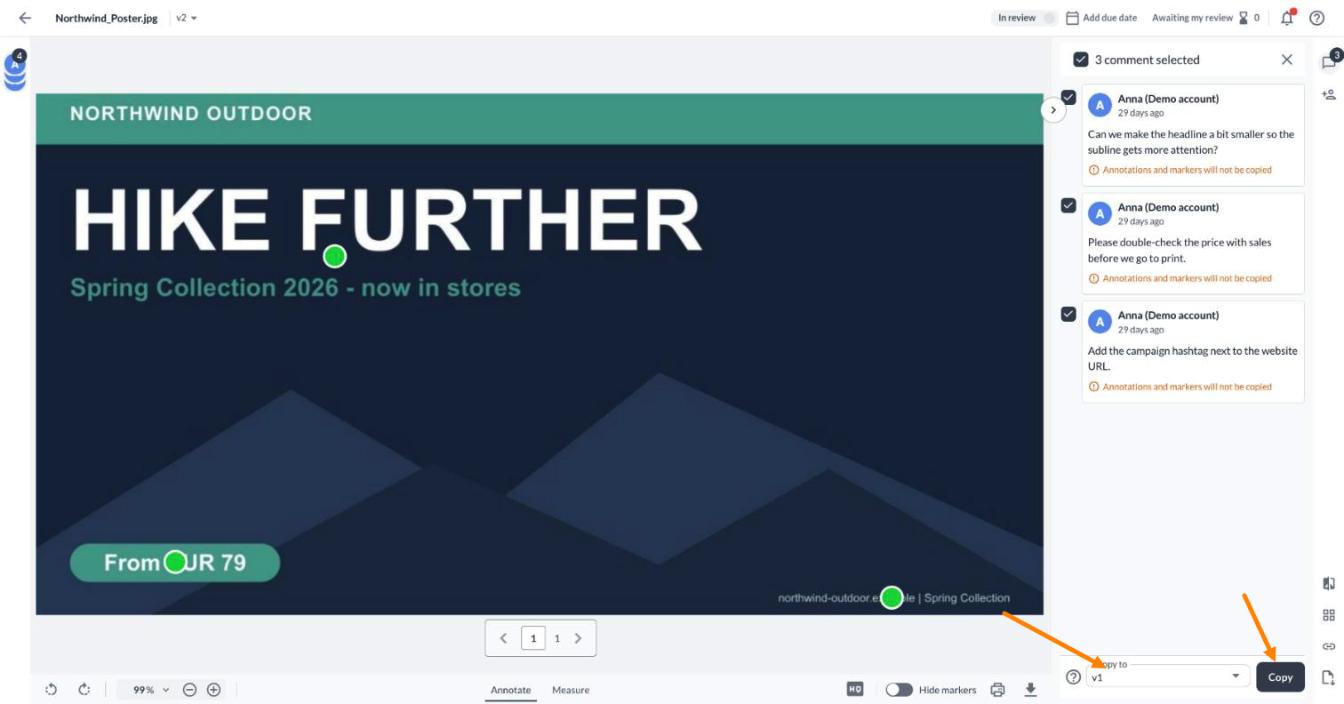
When you copy comments, you become the author in the new reviewer group
To everyone in the new reviewer group, any comments you copy will look like any other new comment. You'll also be able to edit them without affecting the original comments.
The timestamp will be set as the time the comments were copied rather than when the comments were posted in the original reviewer group.
And by default, all copied comments will be displayed as unresolved.
The replies, annotations, and attachments are also copied when you copy comments
Mentions, on the other hand, are removed when comments are copied. This means that the email address is deleted from the comment text, and the mentioned person is not notified when the comment is copied.
💡What’s next? Now that you know how to copy comments, see how to Share links to specific comments.
Let us know if you have any questions by reaching out to us on chat or emailing us at [email protected]. We're always happy to help!


