Need more room for your team's work? This article explains how active project limits work in Filestage, what counts as an active project, and how you can increase your limit.

How can I increase my project limit?
What is an active project?
What happens when I have reached my project limit?
How many active projects do I have available?
How can I upgrade my subscription?
What happens to the billing when I increase my project limit?
The number of active projects available to you and your team depends on your plan. But you can increase the number of active projects by switching to one of our newest subscription plans, as they include unlimited projects. Additional projects cannot be purchased separately.
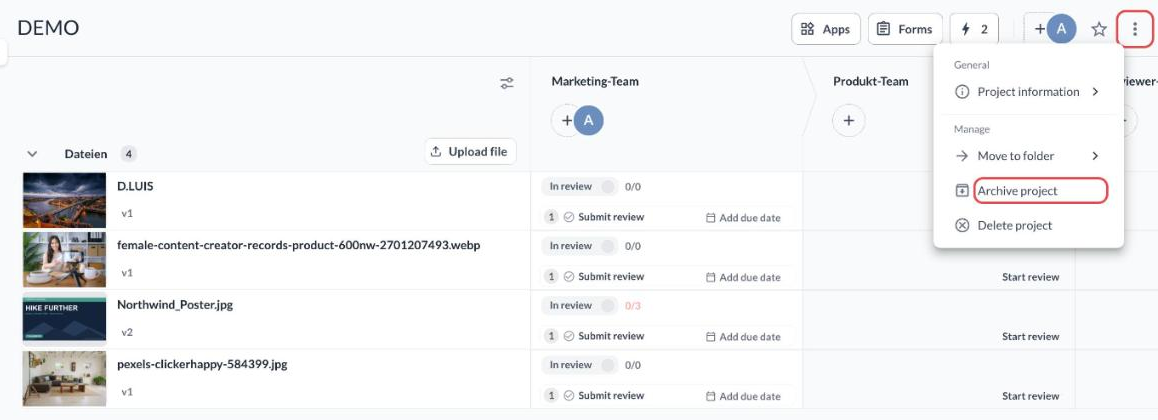
Active projects are projects that are currently available for team members and reviewers to work with. If you don’t want a project to be active, you can archive it by clicking on the three dots in the top right corner of the project and selecting Archive project.

If you reach your project limit, you won’t be able to create new projects until you delete or archive a project, or upgrade your plan.
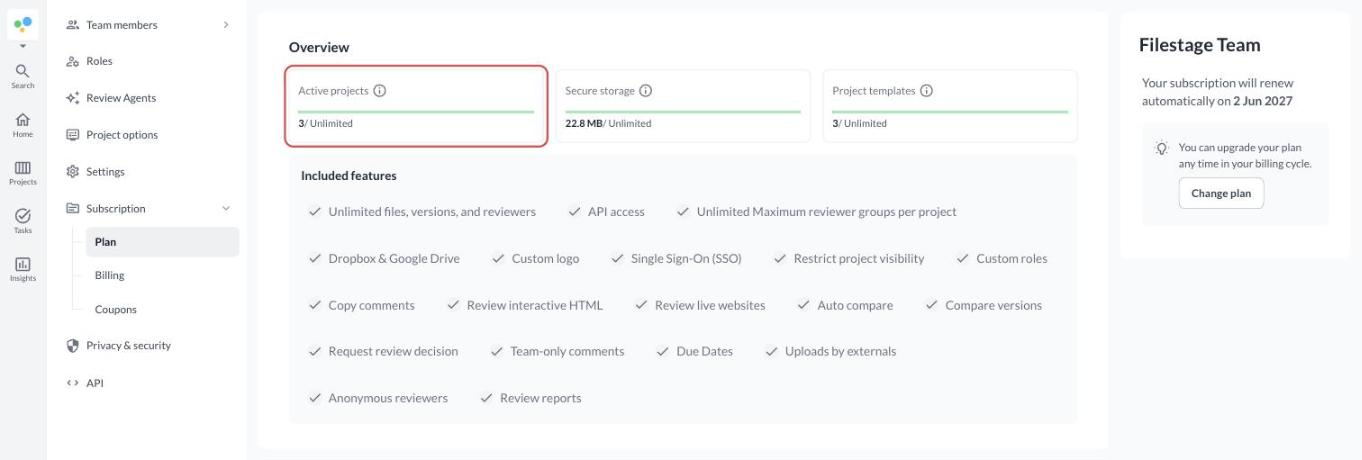
To see how many active projects you currently have, please go to the subscription page of your Team Settings.
To upgrade your subscription plan, please follow the steps listed in the Change your subscription plan article.
If you increase your project limit, you’ll be charged for the remaining portion of the current billing within the upcoming period.
💡What’s next? After learning how to increase your project limit, understand the billing adjustment after you change your subscription.
Let us know if you have any questions by reaching out to us on chat or emailing us at [email protected]. We're always happy to help!
