---
title: "Set up Anonymous reviews for your project"
description: "Learn how to hide reviewer identities from each other while maintaining full visibility for project collaborators."
url: https://help.filestage.io/en/articles/9465080-set-up-anonymous-reviews-for-your-project
collection: "Reviewer Management"
updated: 2026-03-18
language: en
alternates: [es, fr, de]
---

# Set up Anonymous reviews for your project

Learn how to hide reviewer identities from each other while maintaining full visibility for project collaborators.

_The Anonymize reviewers feature hides reviewer identities from each other. Reviewers see anonymized IDs instead of real names, while project collaborators maintain full visibility._

* * *

## When to use Anonymous reviews

Anonymous reviews are particularly useful in these situations:

<table data-id="5014233f-9bf1-4ce4-8339-506ba6f895a6" style="min-width: 25px;"><colgroup><col style="min-width: 25px;"></colgroup><tbody><tr><td colspan="1" rowspan="1"><ul><li><p data-id="768f97a9-0da6-419e-a4ae-8c83bd3cf21a"><strong>Peer reviews</strong> - When colleagues review each other's work, anonymity reduces bias and encourages honest feedback.</p></li><li><p data-id="bf09e1b4-f1b8-47a0-9667-a8168478a9ba"><strong>Crowd reviews</strong> - When gathering feedback from large groups, anonymity ensures each reviewer forms their own independent opinion.</p></li><li><p data-id="c74cc2cb-137e-4c51-9f1e-fd4ac61cf857"><strong>Expert panels</strong> - When multiple experts review content, anonymity prevents groupthink and ensures diverse perspectives.</p></li><li><p data-id="e7e5936e-1b35-4fac-b58d-03a199390aa2"><strong>Sensitive content</strong> - When reviewing materials that might benefit from completely objective feedback without interpersonal dynamics.</p></li></ul></td></tr></tbody></table>

* * *

## Enable Anonymize reviewers

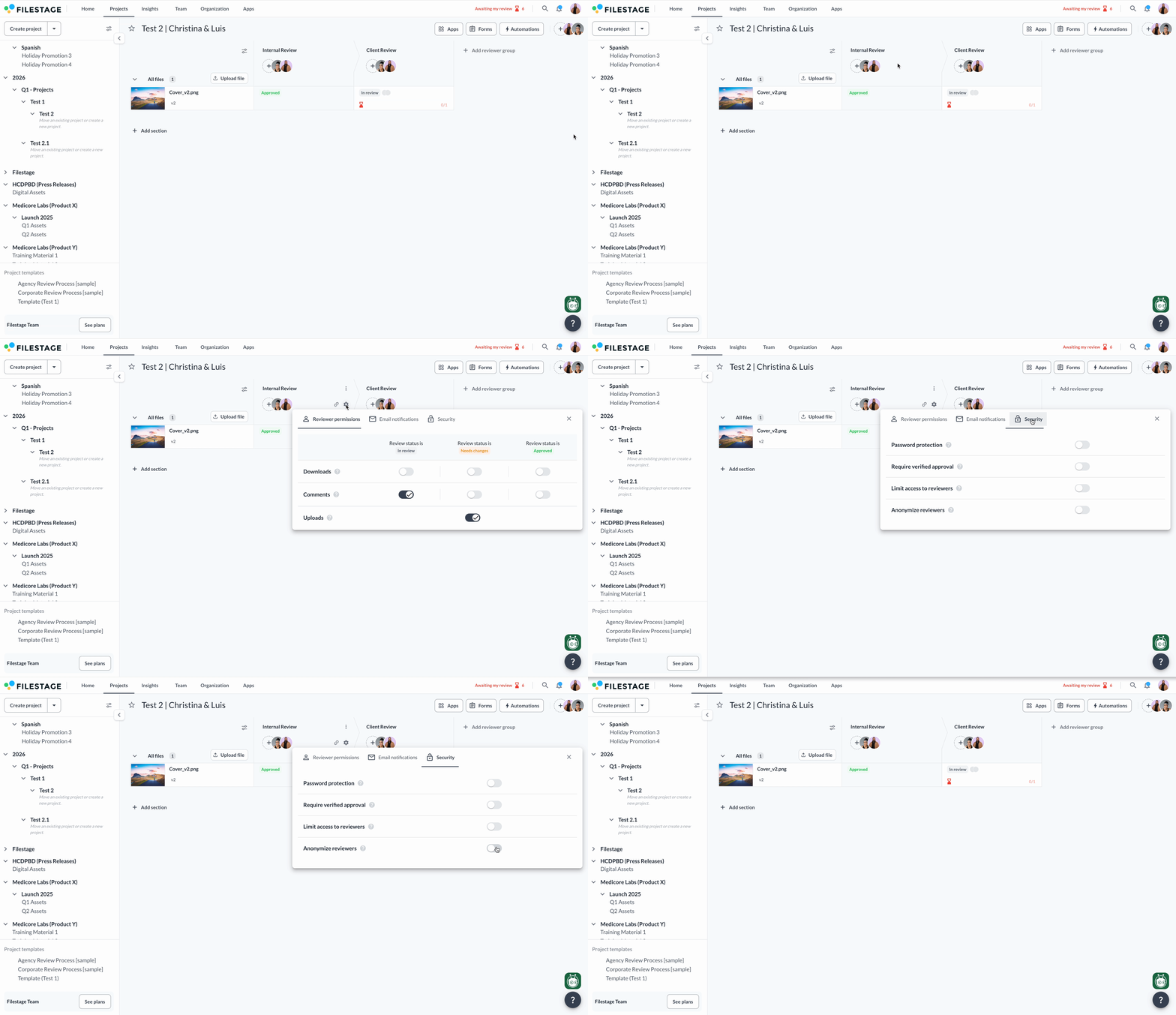
You can activate anonymization in the settings of each reviewer group. This gives you flexibility to anonymize some groups while keeping others standard.

<table data-id="1ea681e8-f5d9-45a8-9a2a-0b0c244ed5f8" style="min-width: 25px;"><colgroup><col style="min-width: 25px;"></colgroup><tbody><tr><td colspan="1" rowspan="1"><ol><li><p data-id="f2f59b43-5b0f-4cf0-a8af-6b48073386e0"><span style="color: rgb(31, 41, 55);">Open your reviewer group’s settings</span></p></li><li><p data-id="694dc08b-b14a-4b42-9726-a6074a6a5613">Select <strong>Security</strong></p></li><li><p data-id="3c820bb6-d334-439c-996d-fa184d9c70f5">Toggle on <strong>Anonymize reviewers</strong></p></li></ol><div style="text-align: left; width: 100%;"><img src="https://staticfiles.gleap.io/gattachments/Kze2TS3h8mvI5AJovLfr7OhKqwwGayfYkQ7hPPsXtNNnKr4RPTJIsV0NLPcrYltpStTPxrg8kcc.gif" data-width="100%" data-align="left" style="width: 100%; border-radius: 10px; margin-top: 10px; margin-bottom: 10px;"></div></td></tr></tbody></table>

> **Info:** Please note: Anonymization is applied per reviewer group. If you use this setting often, consider creating a [project template](https://help.filestage.io/en/articles/3848967-create-and-use-project-templates.md) with anonymization enabled.

* * *

## What reviewers experience

When anonymization is enabled, reviewers see:

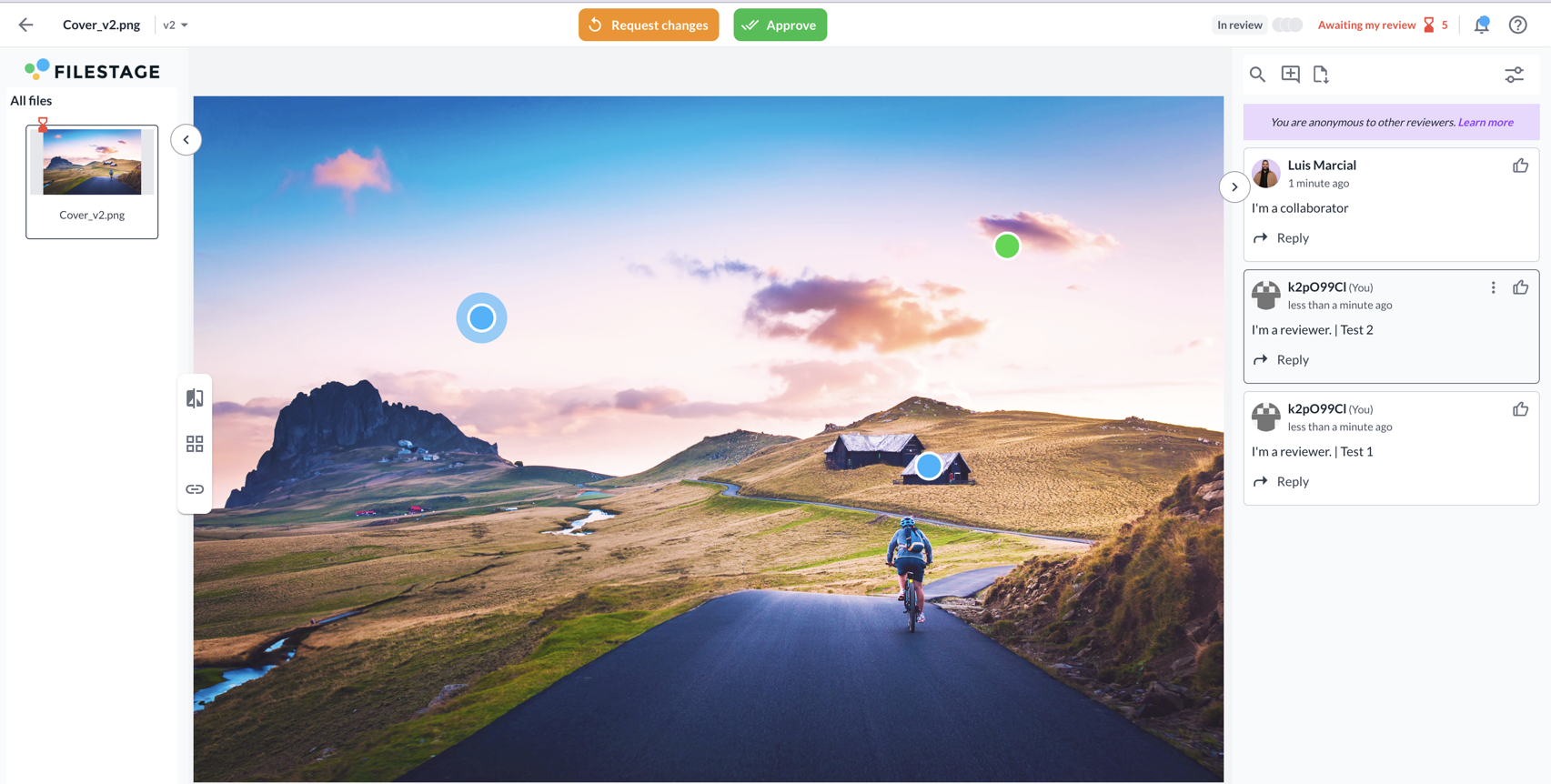
<table data-id="d7a76d16-915c-4f13-a10e-b70b2fd75333" style="min-width: 25px;"><colgroup><col style="min-width: 25px;"></colgroup><tbody><tr><td colspan="1" rowspan="1"><ul><li><p data-id="5c6cf45e-9db7-451f-a66b-92c2af5b5851"><strong>Anonymized identities</strong> - Other reviewers appear as anonymized IDs (e.g., "k2pO95CI") with unique avatars. The same ID stays consistent across all projects where anonymization is active, so you can track feedback patterns without revealing identities.</p></li><li><p data-id="c775faa1-289c-47f4-8e27-b22959fe72b4"><strong>Visible collaborators</strong> - Project collaborators appear with their real names, so reviewers know who is managing the project.</p></li><li><p data-id="82756413-f7cc-4773-ae8e-4f6b197a0b72"><strong>Limited mentions </strong>- Reviewers can mention project collaborators in comments, but cannot mention other anonymous reviewers, as they don't know their identities.</p></li></ul><img src="https://staticfiles.gleap.io/gattachments/o6mqGTvbn8bcw8B49mzqgHEsNLDt6JdEm4laaJDOSfHBya0XMvxEYCajhXAUvHmDC25Xn6jyvik.png" style=""><p data-id="6672e064-82f9-46b2-99c5-8b342389297c"></p></td></tr></tbody></table>

For a detailed explanation of the reviewer experience, see our guide on [**Understanding Anonymous reviews as a reviewer**](https://help.filestage.io/en/articles/9465082-understanding-anonymous-reviews-as-a-reviewer.md)**.**

* * *

## Your experience as a project collaborator

Maintain full control and visibility throughout the review process:

<table data-id="620a6e72-7a8b-4b98-b961-f62c136f7b1f" style="min-width: 25px;"><colgroup><col style="min-width: 25px;"></colgroup><tbody><tr><td colspan="1" rowspan="1"><ul><li><p data-id="30a7c36e-dc25-4abb-8315-bbda87d32d43"><strong>Full visibility</strong> - Project collaborators see the real names of all reviewers, so they can track who has provided feedback and follow up if needed.</p></li><li><p data-id="fad0359e-5475-4ad9-9710-aafc1fd28435"><strong>Unrestricted mentions</strong> - Project collaborators can mention both reviewers and other collaborators in comments.</p></li><li><p data-id="29b1773e-1450-4fa1-83b8-855e20f43f91"><strong>Management control</strong> - Project collaborators retain all normal project management capabilities while reviewers remain anonymous to each other.</p></li></ul></td></tr></tbody></table>

* * *

💡**What’s next?** After learning about anonymizing reviewers, see our top tips for [leaving feedback on files.](https://help.filestage.io/en/articles/9115892-top-tips-for-leaving-feedback-on-files.md)

* * *

_Let us know if you have any questions by reaching out to us on chat or emailing us at_ [_support@filestage.io_](mailto:support@filestage.io)_! We’re always happy to help!_