---
title: "How to get started with Review Agents"
description: "Learn how to use Review Agents in Filestage to make your reviews even more efficient"
url: https://help.filestage.io/en/articles/9465074-how-to-get-started-with-review-agents
collection: "AI reviewers"
updated: 2026-10-07
language: en
alternates: [es, de, fr]
---

# How to get started with Review Agents

Learn how to use Review Agents in Filestage to make your reviews even more efficient

_Review Agents help you speed up your review and approval process by automatically checking your files for issues like missing logos, forbidden terms, spelling mistakes, and more. They’re easy to set up, and they work just like a real reviewer, leaving comments directly on your files._

_This guide will walk you through what Review Agents are, how they work, and how to get started in just a few clicks._

* * *

## What are Review Agents?

**Review Agents are automated tools** you can add to any reviewer group in Filestage. Based on the rules you give them, they **analyze your files and leave feedback**. This helps your team catch mistakes earlier, review content more consistently, and speed up every review round.

You can use them to:

-   Check if your copy matches internal style or tone guidelines
    
-   Flag forbidden or preferred terminology
    
-   Detect grammar and spelling issues
    
-   Scan barcodes and QR codes for correctness
    
-   Verify if required logos or icons are present in your design files
    
-   Create custom checks based on your own prompt and rules
    

They work on documents, images, and PDFs, so you can use them across all kinds of projects.  

> **Info:** _Only account admins can enable or disable Review Agents. Once created, any team member can invite the Review Agent to a project if they are project collaborators._

* * *

### **Set up and manage your Review Agents**

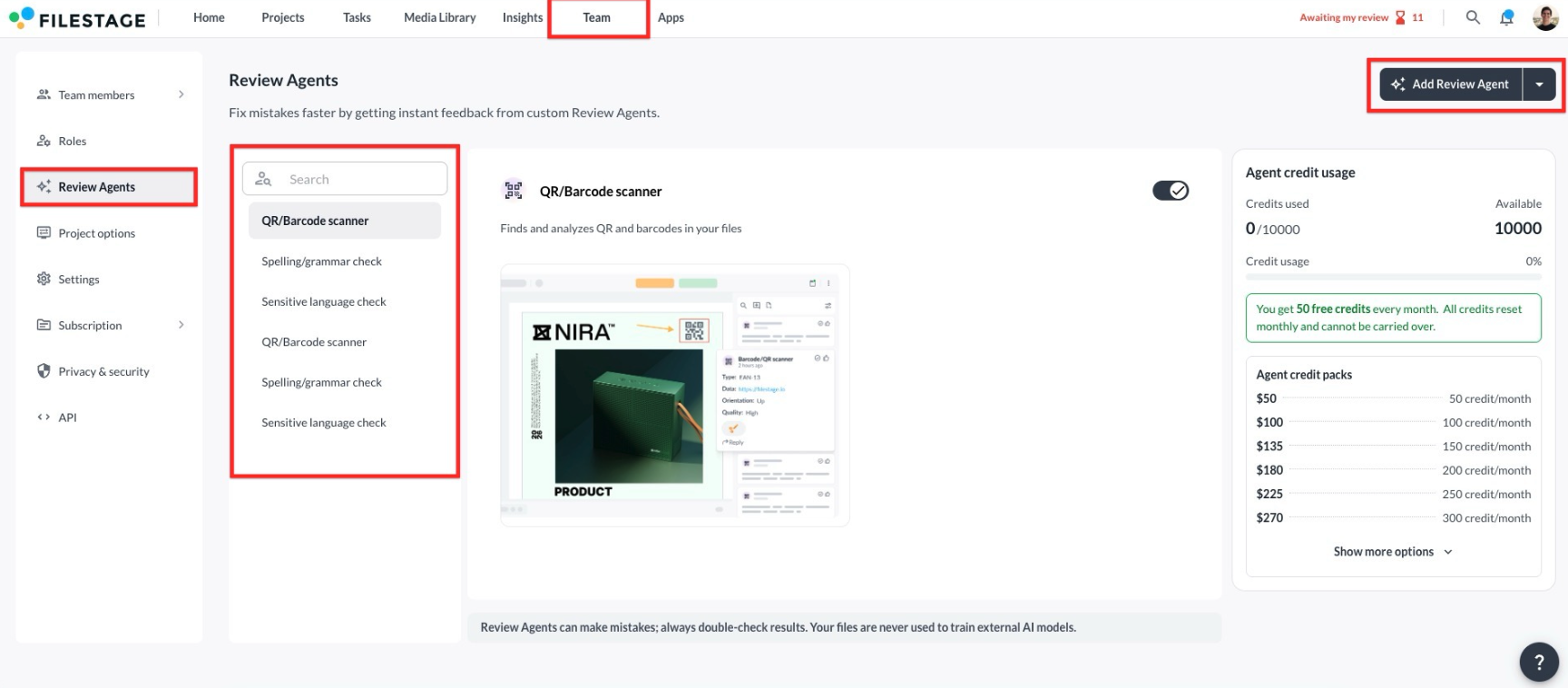
Follow these steps to configure your Review Agents:

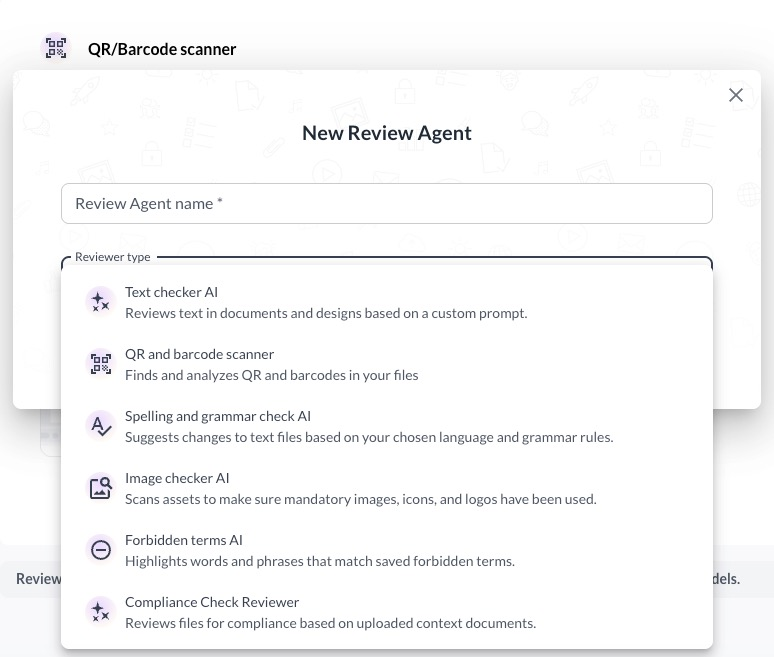
<table data-id="5a87045d-b517-4e8c-adfe-caaf9be90ba5" style="min-width: 25px;"><colgroup><col style="min-width: 25px;"></colgroup><tbody><tr><td colspan="1" rowspan="1"><ol><li><p data-id="f5ac9f69-b035-44e7-afcb-5e871989221d" style="text-align: left;"><span style="color: rgb(0, 0, 0);">Go to <strong>Review Agents</strong> in your <strong>Team </strong>settings<strong> </strong>in the top navigation</span></p></li><li><p data-id="8b9c4270-ad1f-4834-abbd-4d3d03a8b1fb" style="text-align: left;"><span style="color: rgb(0, 0, 0);">Here, you can:</span></p><ul><li><p data-id="c6804380-bf76-48eb-ac99-ea70051a0496" style="text-align: left;"><span style="color: rgb(0, 0, 0);"><strong>Add predefined Review Agents</strong> (e.g. spelling check, barcode scanner)</span></p></li><li><p data-id="9fe5d8fa-c658-4ba1-a6ce-94a6240b091b" style="text-align: left;"><span style="color: rgb(0, 0, 0);"><strong>Create your own Review Agents </strong>with a custom name and prompt</span></p><div style="text-align: center; width: 100%;"><img src="https://staticfiles.gleap.io/gattachments/3Fnb0CEFNeWLKPU2YsURpvCnCH91YA8USY2aPlkmEcmtKX06hNTBVY173urcQgkyETecO5uxIpm.png" data-width="100%" data-align="center" style="width: 100%; border-radius: 10px; margin-top: 10px; margin-bottom: 10px;"></div><p data-id="6f1799ac-32b9-4620-88fd-59d711c769d1" style="text-align: left;"></p></li></ul></li><li><p data-id="e94d85e0-2091-4991-9850-ad0c115aea0e" style="text-align: left;"><span style="color: rgb(0, 0, 0);">There are six types of Review Agents you can choose:</span></p><ul><li><p data-id="479dc671-dddd-434c-b347-727b80ba2f6e" style="text-align: left;"><strong>Barcode &amp; QR Agent: </strong>Finds and analyzes QR codes and barcodes in your files.</p></li><li><p data-id="8d7271a5-fd2f-4c11-9cc1-7b671dce01b0"><strong>Grammar and Spelling Agent: </strong>Suggests changes to text files based on your chosen language and grammar rules.</p></li><li><p data-id="c424b3b5-44eb-4f02-ad61-63c76ca43e86"><strong>Image Agent: </strong>Scans assets to make sure mandatory images, icons, and logos have been used.</p></li><li><p data-id="07cd47dc-00d9-4b72-9ffc-40c25255072f"><strong>Forbidden Terms Agent: </strong>Highlights words and phrases that match saved forbidden terms.</p></li><li><p data-id="a7b73d2e-5e24-4b44-8f1f-b6d3631a43ad"><strong>Compliance Check Reviewer: </strong>Reviews files for compliance based on uploaded context documents.</p></li><li><p data-id="6566d067-f30c-4664-82ba-9545bfb41557"><strong>Smart Text Agent: </strong>Reviews text in documents and designs based on a custom prompt.</p><div style="text-align: left; width: 100%;"><img src="https://staticfiles.gleap.io/gattachments/YWq2LrFS9ita9BUevPuCn2w25QzJCCPUeW5vFKBwNOahGnaLdP4WuuypJ2eJQITzmE8RRMKp5ZR.png" data-width="85%" data-align="left" style="width: 85%; border-radius: 10px; margin-top: 10px; margin-bottom: 10px;"></div><p data-id="56e3a765-c7e5-4f58-9f64-6acbec9b585e" style="text-align: left;"></p></li></ul></li><li><p data-id="494b2de0-61d4-40fe-a63c-ee08813b1dc0" style="text-align: left;"><span style="color: rgb(0, 0, 0);">Once your Review Agent is set up, it’s ready to be invited to a project.</span></p></li></ol></td></tr></tbody></table>

* * *

### **Inviting Review Agents to your project**

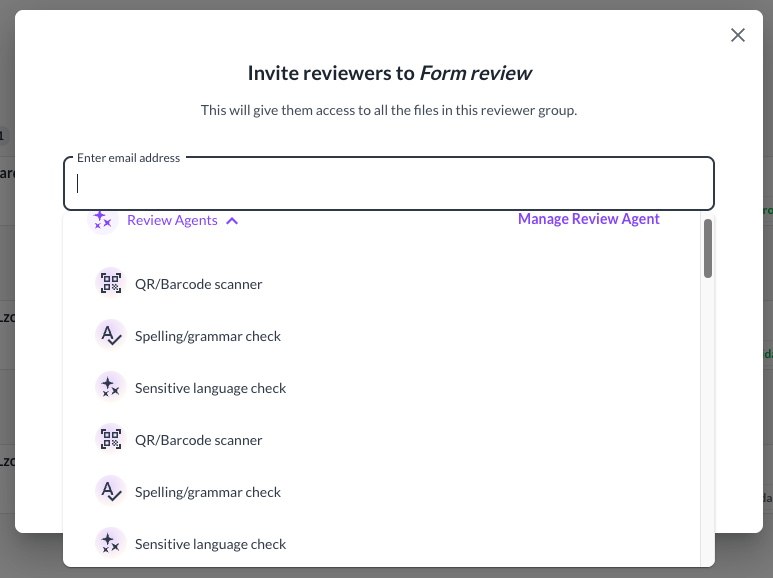
Here’s how to assign a Review Agent to a reviewer group:

<table data-id="a7cef467-2739-4a35-8687-6878b01d7a98" style="min-width: 25px;"><colgroup><col style="min-width: 25px;"></colgroup><tbody><tr><td colspan="1" rowspan="1"><ol><li><p data-id="37df1701-3d0c-4b8b-ae3b-2af1f4cb7085" style="text-align: left;"><span style="color: rgb(0, 0, 0);">Go to your <strong>project </strong>and find the <strong>reviewer group</strong> to which you want to invite them.</span></p></li><li><p data-id="1932748b-c7ff-4fd1-8062-14d3eba82dec" style="text-align: left;"><span style="color: rgb(0, 0, 0);">Click <strong>Invite reviewer</strong>&nbsp; (just like you would for a teammate or client)</span></p></li><li><p data-id="e7573164-43ca-4b8d-a00f-3d62f5df040b" style="text-align: left;"><span style="color: rgb(0, 0, 0);">In the popup, you’ll see an <strong>“Review Agents ” dropdown</strong>.</span></p></li><li><p data-id="36336d61-f0be-4a42-9e51-0c1a988736f1" style="text-align: left;"><span style="color: rgb(0, 0, 0);">Click on it and select any Review Agent from the list.</span><br></p><div style="text-align: left; width: 100%;"><img src="https://staticfiles.gleap.io/gattachments/P0BdolZukKzqc5psDFghdT1zYKzAIBukOrYOIpgMK8npgmiCaIxosmQNjZZIqzTdDet3BpSm5D5.png" data-width="85%" data-align="left" style="width: 85%; border-radius: 10px; margin-top: 10px; margin-bottom: 10px;"></div><p data-id="cbac2582-a592-406a-902d-e1082ebf3517" style="text-align: left;"></p></li><li><p data-id="affc70e4-8260-441e-8048-31df6de7ae7d" style="text-align: left;"><span style="color: rgb(0, 0, 0);">Once added, they’ll automatically review every new file available for this reviewer group.</span></p></li></ol></td></tr></tbody></table>

* * *

### **What happens when you upload a file?**

Once enabled, Review Agents will automatically analyze any newly uploaded file in a reviewer group to which they’ve been added.

The Review Agent will scan the file and leave comments automatically in the viewer:

![](https://staticfiles.gleap.io/gattachments/8vSO9tYQ0WFU3XkP3zWskqg0jV7URujgVIkqdZ2Bggo5BCdu7UHp6EOcfoH6hvRgwsyYVJSzXED.png)

You can:

-   Click comments to jump to the exact spot in the file
    
-   Reply, resolve, or delete comments as usual
    
-   Review Agent comments appear in the same thread-based format you're already used to
    

* * *

### **Which file types are supported?**

Review Agents currently support the most popular document and image formats, including .pdf, .docx, .jpg, and .png. They're still in beta, so more file types will be supported soon.

* * *

### **Privacy and data use**

Your files are safe when using Review Agents:

-   AI models are powered by OpenAI (e.g. GPT-4 or GPT-3.5) via secure API
    
-   Your data is never used to train AI models
    
-   All content stays private to your Filestage account
    

* * *

💡**What´s next?** After understanding how to set up our Review Agents, learn more about the [use cases they can cover](https://help.filestage.io/en/articles/9465076-ai-reviewers-use-cases-how-teams-save-time-across-different-file-types.md).

* * *

_If you have any questions or comments, feel free to reach out through chat or email us at_ [_support@filestage.io_](mailto:support@filestage.io)_._

Agent