---
title: "Integrate Filestage with Slack"
description: "Connect Filestage with Slack to get updates about comments, review decisions, and more."
url: https://help.filestage.io/en/articles/6416366-integrate-filestage-with-slack
collection: "Integrations"
updated: 2026-02-18
language: en
alternates: [fr, de, es]
---

# Integrate Filestage with Slack

Connect Filestage with Slack to get updates about comments, review decisions, and more.

> **Success:** If you need further help integrating Filestage with Slack, get in touch with our integration consultants using our support chat or via support@filestage.io.

* * *

## Here's how you can integrate Slack with your projects:

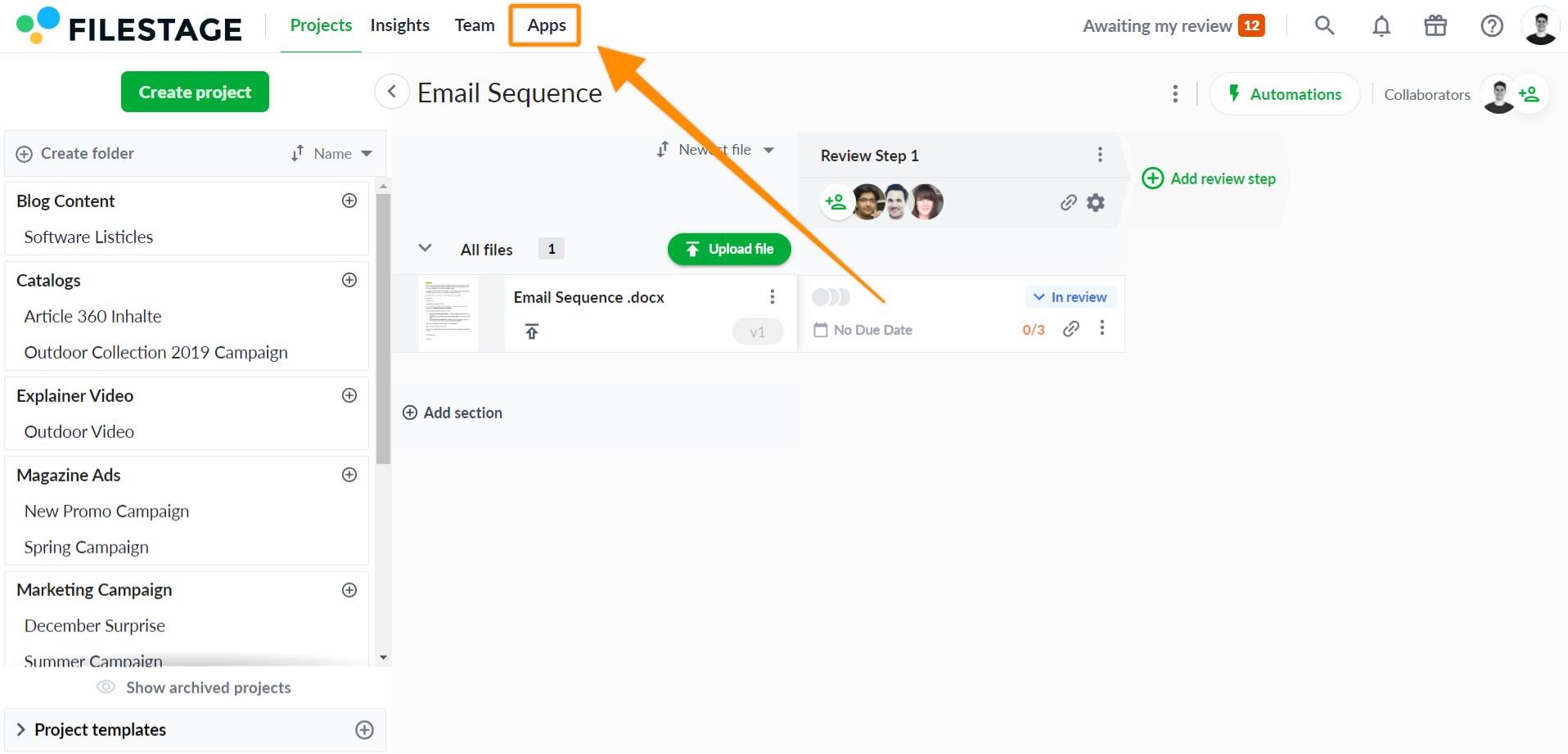
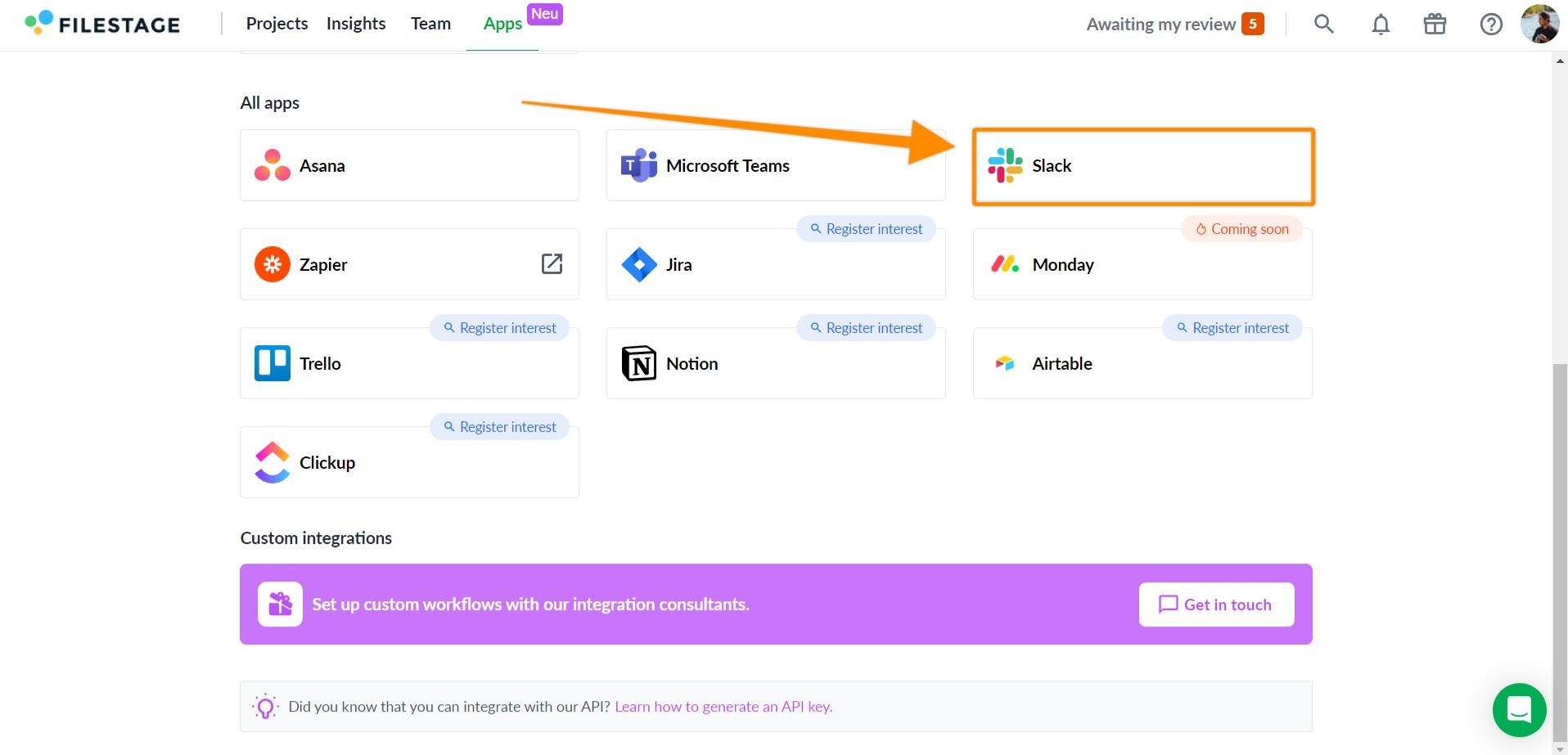
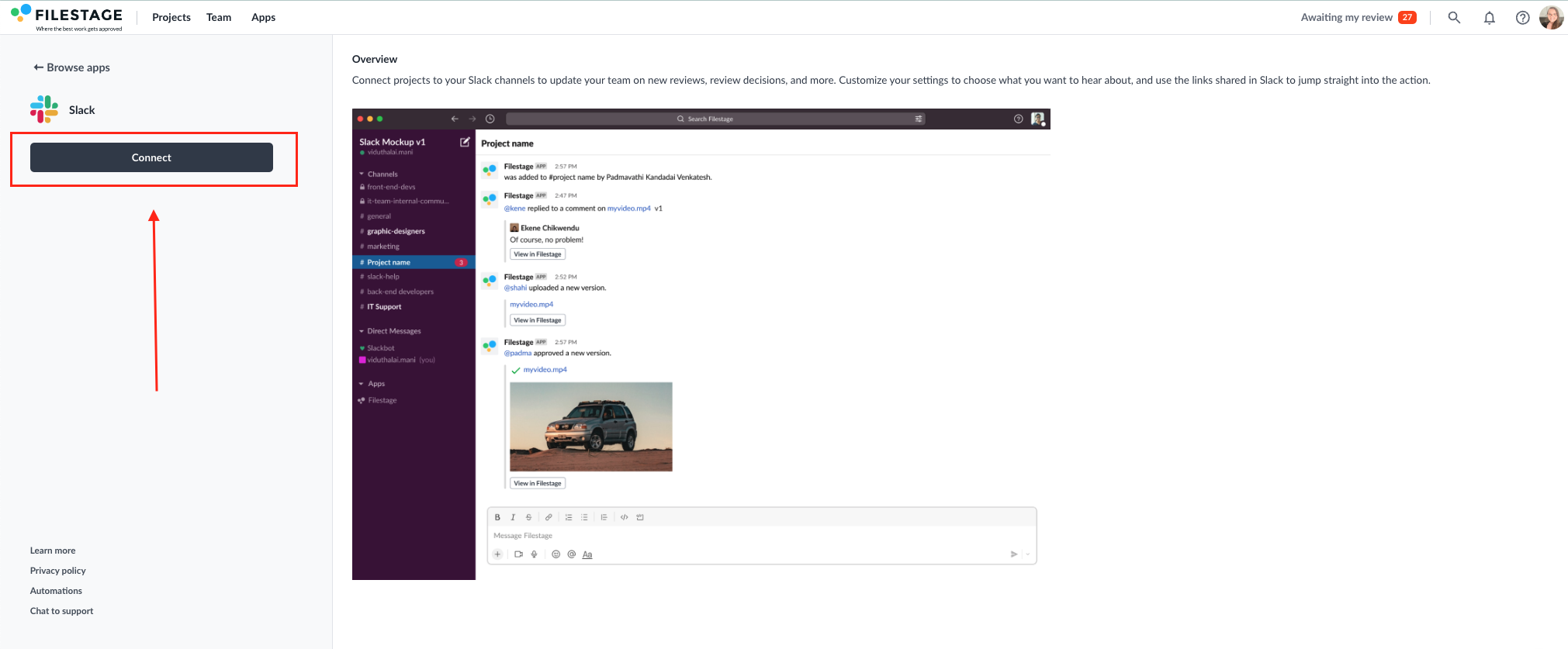
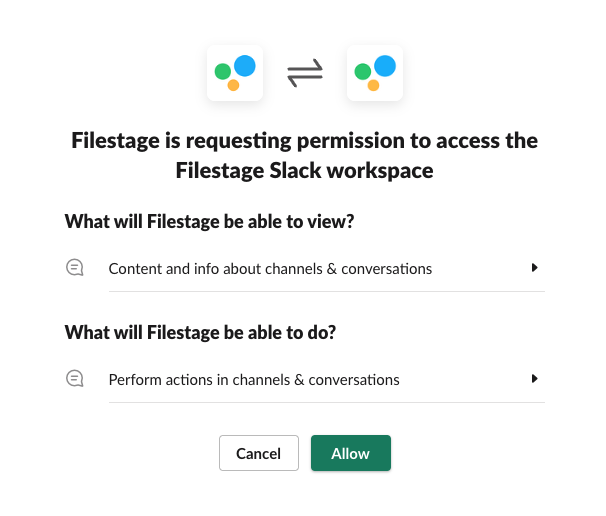
<table data-id="b70159e9-2d88-49df-85dc-ad72b8628ac7" style="min-width: 25px;"><colgroup><col style="min-width: 25px;"></colgroup><tbody><tr><td colspan="1" rowspan="1"><ol><li><p data-id="c48d9dc7-cebd-40c2-bac3-9826ca35a3c6" style="text-align: left;">Click the <strong>Apps</strong> button</p><ul><li><p data-id="233e75ec-01ec-47e7-a1d4-691ccc69c4d4" style="text-align: left;">Open your Filestage project and click the<strong> Apps</strong><em> </em>button in the top right corner.</p></li></ul><img src="https://staticfiles.gleap.io/helpcenter/668fad7b14cdc36cb3fd211c/20240814123623_0782.jpg" style="width: 100%; height: auto; cursor: pointer;"></li><li><p data-id="da8ae188-906a-4a27-9397-ef783bd26efe" style="text-align: left;">Choose <strong>Slack</strong> from the apps menu</p><ul><li><p data-id="82c508a9-c341-4861-9c61-a6cc9d46188a" style="text-align: left;">A menu will appear with all our available apps. Click<strong> </strong>on the Slack app to set up the integration.</p></li></ul><img src="https://staticfiles.gleap.io/helpcenter/668fad7b14cdc36cb3fd211c/20240814123623_2540.jpg" style="width: 100%; height: auto; cursor: pointer;"></li><li><p data-id="a0317cff-e330-4745-b50d-ff779104517a" style="text-align: left;">Connect your Slack workspace</p><ul><li><p data-id="9c08bcff-7f01-47ca-bee5-a4e58c414f96" style="text-align: left;">Select <strong>Connect</strong> on the Slack page</p></li></ul><img src="https://staticfiles.gleap.io/helpcenter/668fad7b14cdc36cb3fd211c/20240814123623_3254.png" style="width: 100%; height: auto; cursor: pointer;"></li><li><p data-id="1baa6b52-8999-41e8-9c84-438a6a8d05d1" style="text-align: left;">Give Filestage permission to access your Slack workspace by selecting <strong>Allow</strong></p><img src="https://staticfiles.gleap.io/helpcenter/668fad7b14cdc36cb3fd211c/20240814123623_4015.png" style="width: 468px; height: auto; cursor: pointer;"></li></ol></td></tr></tbody></table>

* * *

## Connect your Filestage project to a Slack channel

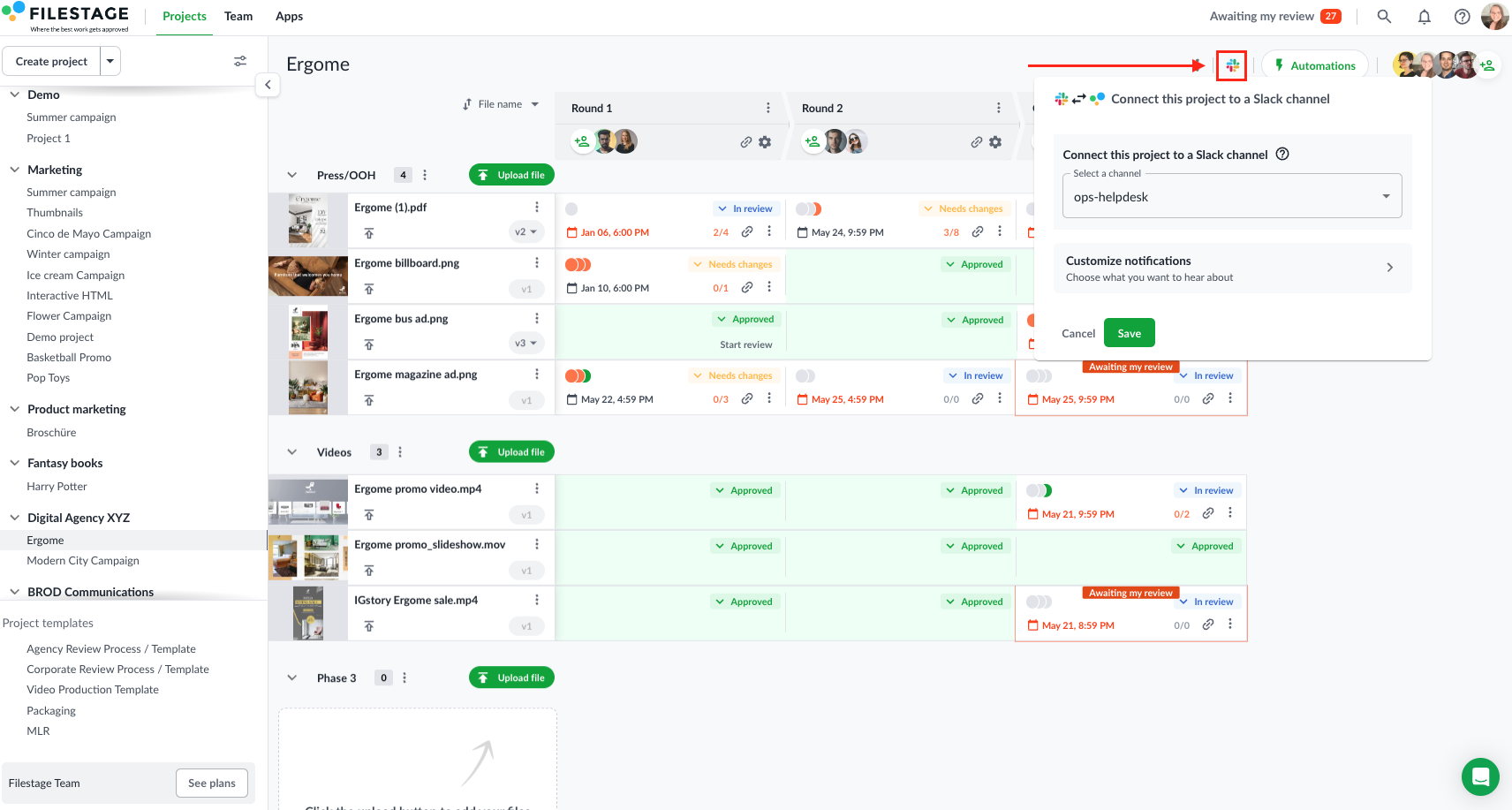
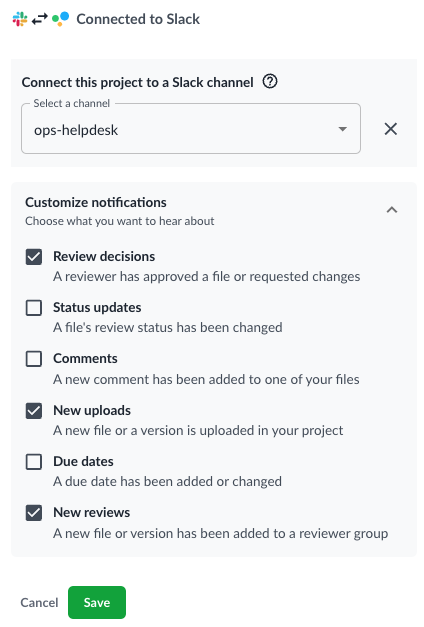
<table data-id="b53b5272-58b3-4ee3-ab3f-f4f19e1479ac" style="min-width: 25px;"><colgroup><col style="min-width: 25px;"></colgroup><tbody><tr><td colspan="1" rowspan="1"><ol><li><p data-id="9932eb2f-6f9e-46bf-aba5-7e965fd73f36" style="text-align: left;">Navigate to the project you want to connect to a Slack channel and click the Slack icon on the top right-hand corner</p><ul><li><p data-id="ac2d1a5b-0f45-4e0e-a9b4-9a488d14c674" style="text-align: left;">Use the dropdown menus to select which Slack channel you want to connect. Then click <strong>Finish.</strong></p></li></ul><img src="https://staticfiles.gleap.io/helpcenter/668fad7b14cdc36cb3fd211c/20240814123623_3878.png" style="width: 100%; height: auto; cursor: pointer;"></li><li><p data-id="923fffd2-90e3-4ba5-8060-82ff4cb71ade" style="text-align: left;">Use the <strong>Customize notifications dropdown </strong>to decide which notifications you would like to appear in your desired Slack channel.<br></p><img src="https://staticfiles.gleap.io/helpcenter/668fad7b14cdc36cb3fd211c/20240814123623_8618.png" style="width: 353px; height: auto; cursor: pointer;"></li></ol><p data-id="6074049f-eb12-403b-ba21-2151208b831c" style="text-align: left;"><strong>As soon as Slack is successfully connected, the logo will appear in the top right-hand corner of your dashboard.</strong></p></td></tr></tbody></table>

* * *

_If you have any questions or comments, please feel free to reach us through chat or email at_ [_support@filestage.io_](mailto:support@filestage.io)_._