---
title: "Manage reviewer permissions and how to request review decisions"
description: "You can manage what a reviewer is able to do, password protect files, and disable email notification for reviewers in reviewer settings"
url: https://help.filestage.io/en/articles/2787865-manage-reviewer-permissions-and-how-to-request-review-decisions
collection: "Reviewer Management"
updated: 2026-07-08
language: en
alternates: [fr, de, es]
---

# Manage reviewer permissions and how to request review decisions

You can manage what a reviewer is able to do, password protect files, and disable email notification for reviewers in reviewer settings

**_As a project collaborator_**_, you can set which_ **_permissions your reviewers_** _have. You can set these permissions for each reviewer group separately. All reviewers of a reviewer group have the same permissions._

* * *

To **open the reviewer permissions menu**, hover over the tile of the corresponding reviewer group and then click on the **settings button**. After that, feel free to customize the reviewer permissions in that step.

![](https://staticfiles.gleap.io/ghelparticle/xd7LxbXWAq2odjhXDRPaIVcUCmQwtADDk8ukAvL402tvnAe4QqrPIuOnUAPmarsoE81MJsEeWIp.gif)

* * *

## The Permissions You Can Give Reviewers

### **Download files**

Please note that you can set this permission separately for files **in review,** that **need changes** and are **approved.**

This is useful if you want to allow the download only for approved files, for example.

![](https://staticfiles.gleap.io/helpcenter/668fad7b14cdc36cb3fd211c/20240814123623_6529.jpg)

* * *

### **Commenting**

Control if your reviewers are allowed to comment on your files. If the reviewer group setting **Commenting** is disabled, reviewers can only access in **read-only** mode. The entire comment list remains visible to reviewers. However, the reviewers cannot create, edit, or delete any comments.

This means that reviewers still have access to the entire documentation of the comments but can no longer make changes. This is especially useful for approved files, or when the feedback stage is over.

Please note that you can set this permission separately for files **in review**, that **need changes** and are **approved.**

![](https://staticfiles.gleap.io/helpcenter/668fad7b14cdc36cb3fd211c/20240814123623_0402.png)

* * *

### **Email Notifications for project activities**

You can turn email notifications for project activities on or off to control whether your reviewers receive file updates. _(Only for reviewers without an account)_ This e-mail will inform reviewers:

-   For [new comments and replies](https://help.filestage.io/en/articles/7002949-commenting-on-files.md)
    
-   For [new files](https://help.filestage.io/en/articles/3188612-manage-your-project-files.md) and [new versions](https://help.filestage.io/en/articles/2211321-manage-different-versions-of-a-file.md)
    
-   For [submitted reviews](https://help.filestage.io/en/articles/2562896-submit-your-review-decision.md)
    
-   For [changes of the file status](https://help.filestage.io/en/articles/3342576-keep-track-of-the-review-status-in-the-review-summary.md)
    

> **Warning:** **_Please note:_** _Even if email notifications are disabled for reviewers, mentions (when users are tagged in a comment) are always sent._

![](https://staticfiles.gleap.io/helpcenter/668fad7b14cdc36cb3fd211c/20240814123623_2949.png)

* * *

### **Email Notifications when a review is started**

Additionally to notifications for project activities, you can now enable or disable notifications for the start of a new review!  
This will help you to meet your deadlines and streamline the review process!

![](https://staticfiles.gleap.io/helpcenter/668fad7b14cdc36cb3fd211c/20240814123623_6009.png)

> **Warning:** **_Please note:_** _These notifications will only be sent to reviewers who are invited to leave a review decision._

* * *

### **Permission to upload files**

You can activate a feature for your team that allows your external contributors (such as agencies or freelancers) to upload files directly to your reviewer group without making them full project collaborators.

![](https://staticfiles.gleap.io/helpcenter/668fad7b14cdc36cb3fd211c/20240814123623_2887.png)

Once this is activated, you can choose whether the reviewers can upload files by simply enabling the button below. If you disable this function, the external collaborator won't have the option to upload files. Your external collaborators only need to create a free account, without paying for a subscription, to be able to upload files.

> **Warning:** This feature is designed specifically for external collaborators. To give your own colleagues upload access, simply invite them as Team Members.

* * *

### **Anonymize reviewers**

You can use anonymize your reviewers and hide their identity from each other with the _anonymize reviewers_ feature. With this feature, your reviewers will be anonymous to each other, but project collaborators will know their identity.

For additional details on anonymizing your reviewers please check [this article](https://help.filestage.io/en/articles/4055926-anonymize-your-reviewers-for-crowd-reviews.md).

![](https://staticfiles.gleap.io/helpcenter/668fad7b14cdc36cb3fd211c/20240814123623_9035.png)

* * *

### **Password Protection**

Your files are secure on our SSL-encrypted servers, and the review links cannot be found by third parties due to their encryption.

If you still want your reviewers to enter an additional password when opening the review links, you can use this feature to set a password.

-   **Reviewers without an account** will need to enter this password before viewing your content.
    
-   **Reviewers with an account** are added to the reviewer group can access the files in the step without the necessity to enter the password.
    

Important: You must share the password with your reviewers yourself - there is no automatic notification of any kind.

![](https://staticfiles.gleap.io/helpcenter/668fad7b14cdc36cb3fd211c/20240814123623_3452.png)

* * *

### **Limit access to invited reviewers**

This option allows you to restrict access to your review to invited reviewers only.

To access the files to be reviewed, your reviewers must log in or authenticate themselves using their email address:

![](https://staticfiles.gleap.io/helpcenter/668fad7b14cdc36cb3fd211c/20240814123623_1884.png)

Once the customer tries to log in, the following happens:

<table data-id="092f0b2f-a4bc-46cf-9e9c-8d5512bbe4d3" style="min-width: 50px;"><colgroup><col style="min-width: 25px;"><col style="min-width: 25px;"></colgroup><tbody><tr><td colspan="1" rowspan="1"><p data-id="b35714e1-7cc8-4f16-9fbc-c60567f048c8"><strong>Reviewers with Filestage account</strong></p></td><td colspan="1" rowspan="1"><p data-id="be5c653c-129c-41c8-99a6-09b2b2976e7a"><strong>Reviewers without Filestage account</strong></p></td></tr><tr><td colspan="1" rowspan="1"><p data-id="d0874632-1ac9-4b7e-acd4-895d66f88f9b">The reviewers need to authenticate via Login, either via password or SSO (Single-Sign-On)</p></td><td colspan="1" rowspan="1"><p data-id="4bed1193-dda9-4a22-af8d-5e98c00e62bf">The reviewers will be requested to enter a OTP (one-time-password), which will automatically be sent to their email address upon request.</p></td></tr></tbody></table>

If you have forgotten to add a reviewer, the reviewer can request access permission. In this case, you will automatically receive an email notification with the option to confirm the request:

![](https://staticfiles.gleap.io/helpcenter/668fad7b14cdc36cb3fd211c/20240814123623_5229.jpg)

> **Warning:** **_Please note:_** _This feature is only available to users on the Enterprise plan._

* * *

### **Require verified approval**

By enabling this option, you can request digital signatures from reviewers when approving your files. This complies with regulations FDA 21, CFR Part 11, and EU Annex 11.  
​

![](https://staticfiles.gleap.io/helpcenter/668fad7b14cdc36cb3fd211c/20240814123623_2615.png)

  
Learn more about verified approval [here](https://help.filestage.io/en/articles/8264866-securing-the-review-process-with-verified-approvals-at-filestage.md).

* * *

## How to request a review decision

_When collaborating in Filestage, there are some people you need feedback and approval from, like your boss or clients._

_But on many projects, you also have external collaborators like freelancers and video producers. It can be helpful to let these people upload files directly to Filestage, but you probably won't need them to give approval on their own work._

With the **request review decision feature**, you can choose exactly who needs to submit a review decision and who simply needs access to the project.

### How to enable or disable review decisions

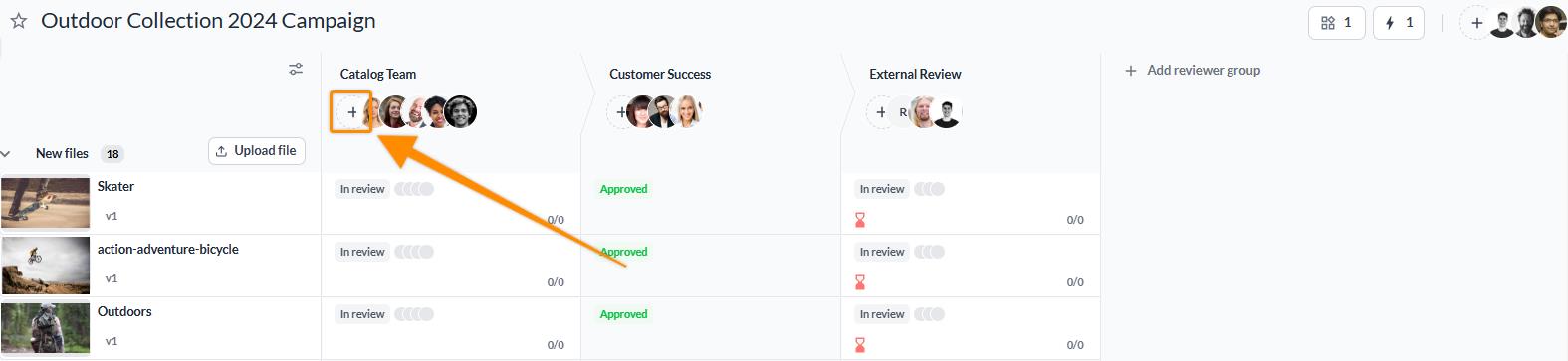
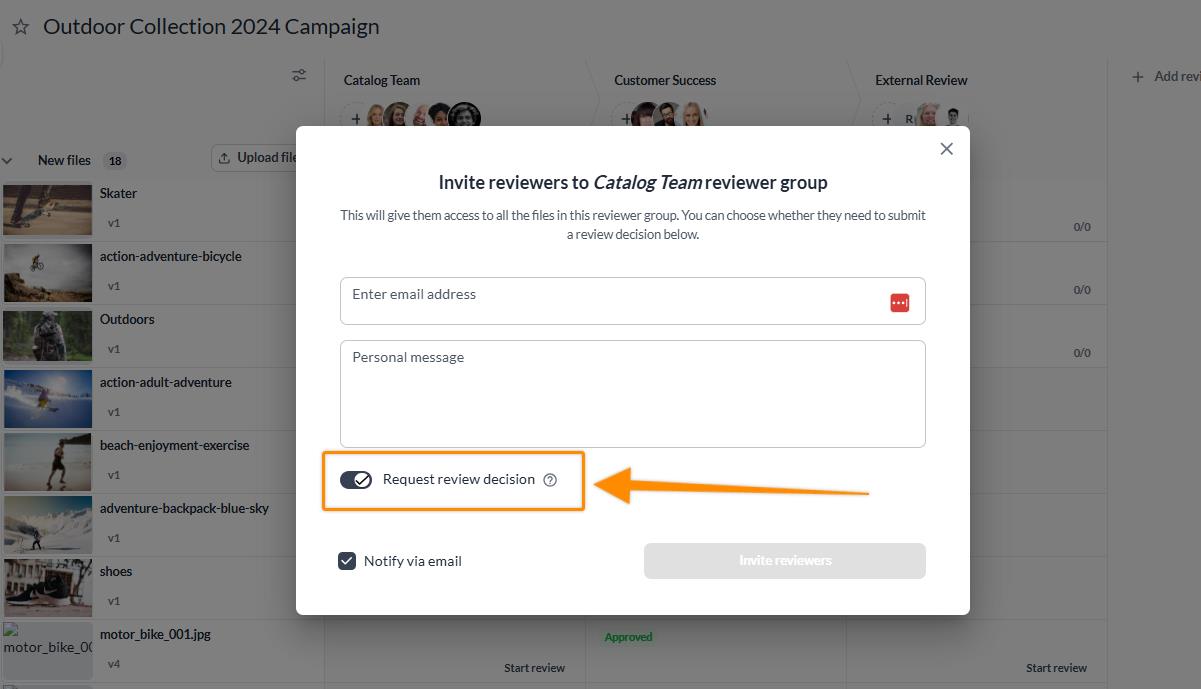
<table data-id="e7922ccd-3cd8-42cb-b60a-3ebf1efcea5b" style="min-width: 25px;"><colgroup><col style="min-width: 25px;"></colgroup><tbody><tr><td colspan="1" rowspan="1"><ol><li><p data-id="ef3ba7da-880c-492f-b556-e88bf9c56955">Click on the <strong>Invite Reviewer button</strong> in your chosen reviewer group.</p><img src="https://staticfiles.gleap.io/ghelparticle/64741grVhnvTbK9ZCHEGLml6f7UxQHNT0NVOcMFhO5B03fdNd6laLYVwXyAGGYSOuYiBgGeTuXg.jpeg" style="width: 100%; height: auto; cursor: pointer;"></li><li><p data-id="b92b7ee8-561d-4209-a8f1-7c52c909f23c"><strong>Enter the email addresses </strong>of the reviewers you want to invite.</p></li><li><p data-id="2ee695b2-1e2c-4fa1-9d16-28767653d47f">By default, the <strong>Request review decision</strong> toggle will be enabled. This means that anyone who opens the review link will be asked for a review decision.</p><img src="https://staticfiles.gleap.io/ghelparticle/1YnClbmktygj66GrumeA89r6vl7H26cYgtkySVzH9mekoigjwi9iOQ8whbyY5NkasxF4LpnAOgh.jpeg" style="width: 100%; height: auto; cursor: pointer;"></li><li><p data-id="8b4ed623-6300-4a59-a6b7-9adbd4c093cd">If you want to disable the toggle, click on it to turn it off.</p></li></ol></td></tr></tbody></table>

* * *

> **Warning:** **_Please note:_** _Remember that unless you turn off the_ **_Request review decision_** _toggle when inviting a reviewer, they will be asked for a review decision._

If you disable the **Request review decision** toggle, your reviewers will be able to share feedback like anyone else. **But they won't:**

-   See the **Request changes** and **Approve** or other review decision buttons
    
-   Have a **review status indicator**
    
-   See the files in the reviewer group in their **Awaiting my review list**
    
-   See the **Awaiting my review badge** on the project dashboard
    
-   Get **due date reminder** emails for the reviewer group
    

* * *

### How to change review decision settings after inviting a reviewer

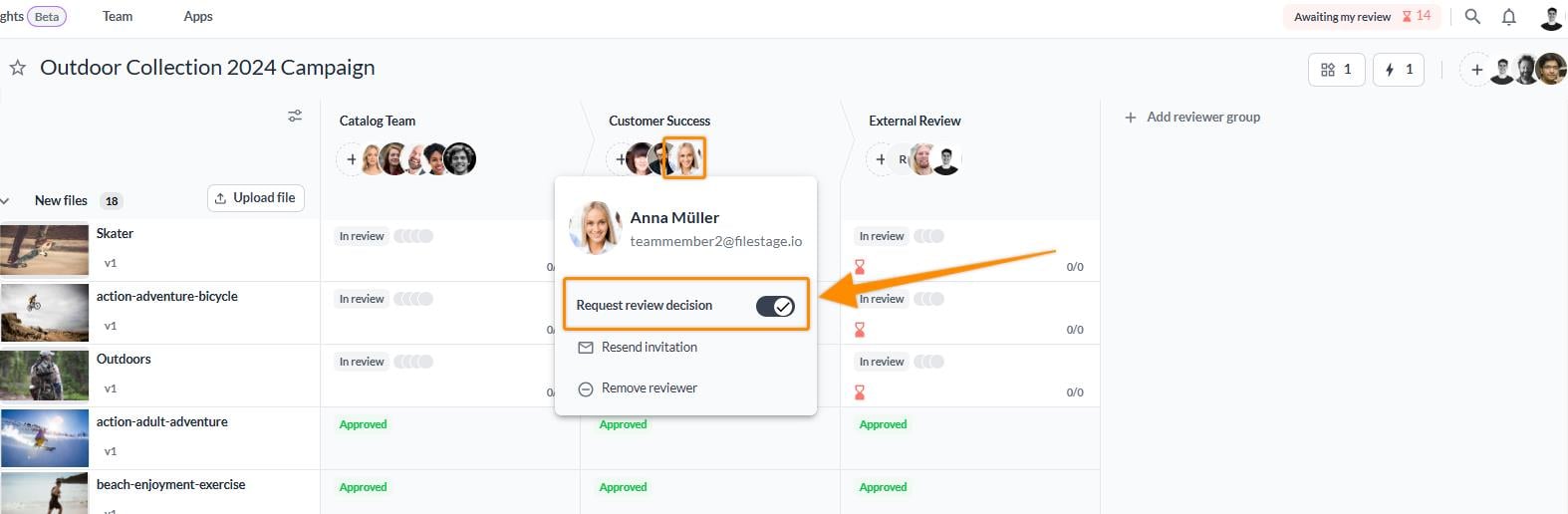
<table data-id="9a268ed4-5129-457f-bd74-033f115143ac" style="min-width: 25px;"><colgroup><col style="min-width: 25px;"></colgroup><tbody><tr><td colspan="1" rowspan="1"><ol><li><p data-id="b2425d06-345f-47f7-9909-d5dd71dcbc04">Go to the <strong>project dashboard.</strong></p></li><li><p data-id="2c6401b9-4559-478d-bf4e-1a8ff09cf1f3"><strong>Click on the avatar of the reviewer </strong>whose review decision you want to change.</p></li><li><p data-id="d00ddf2a-b92b-452b-9984-f917e7efb177">Turn on or off the <strong>Request review decision</strong> slider.</p></li></ol><img src="https://staticfiles.gleap.io/ghelparticle/mLu9nSje9Za1BG66JYgr25xlRK7SG9kfHGde4PHtlYE8ZwBkAAXKE9RzhGXj8p6pem1m8F34D0i.jpeg" style="width: 100%; height: auto; cursor: pointer;"></td></tr></tbody></table>

* * *

> **Warning:** **Please note:** _Changing the_ **_Request review decision_** _setting will only affect the reviewer for the specific reviewer group in which the setting has been changed. If the reviewer is in multiple reviewer groups, the settings must be_ **_changed in all of them._**

* * *

### How to enable the **Request review decision** feature

**Review decisions** are enabled for all our plans, but only our latest Business and Enterprise plans **can use the option to disable it**. To upgrade your subscription plan, please follow the steps listed in the [Change your subscription plan](https://help.filestage.io/en/articles/1482294-change-your-subscription-plan.md) article.

* * *

💡 **What's next?** Once you understand how to set reviewer permissions, [understand the difference between project collaborators and reviewers](https://help.filestage.io/en/articles/1459674-understand-the-difference-between-project-collaborators-and-reviewers.md).

* * *

_Let us know if you have any questions by reaching out to us on chat or emailing us at_ [_support@filestage.io_](mailto:support@filestage.io)_! We're always happy to help!_