---
title: "Delete your account and your team in a GDPR-compliant way"
description: "Learn how you can permanently remove all data related to your account and your team."
url: https://help.filestage.io/en/articles/2517953-delete-your-account-and-your-team-in-a-gdpr-compliant-way
collection: "Personal settings"
updated: 2026-05-02
language: en
alternates: [fr, de, es]
---

# Delete your account and your team in a GDPR-compliant way

Learn how you can permanently remove all data related to your account and your team.

* * *

# What's the difference between deleting your user account and deleting your team?

-   **By deleting your user account** you will delete all personal data which belongs to your personal user account (eg. user name, user password, user settings, etc.). This is not including the profile of other teammates or your team account.
    
-   **By deleting your team** you will remove all projects and contact data of your team (eg. team projects, team billing email, team settings). This does not include personal user profiles of your teammates.
    

* * *

# Delete all data in a GDPR-compliant way

If you want to delete all data belonging to your team and the personal user accounts, you need to **delete your team first, then delete all user accounts individually.**

* * *

# How to delete my team?

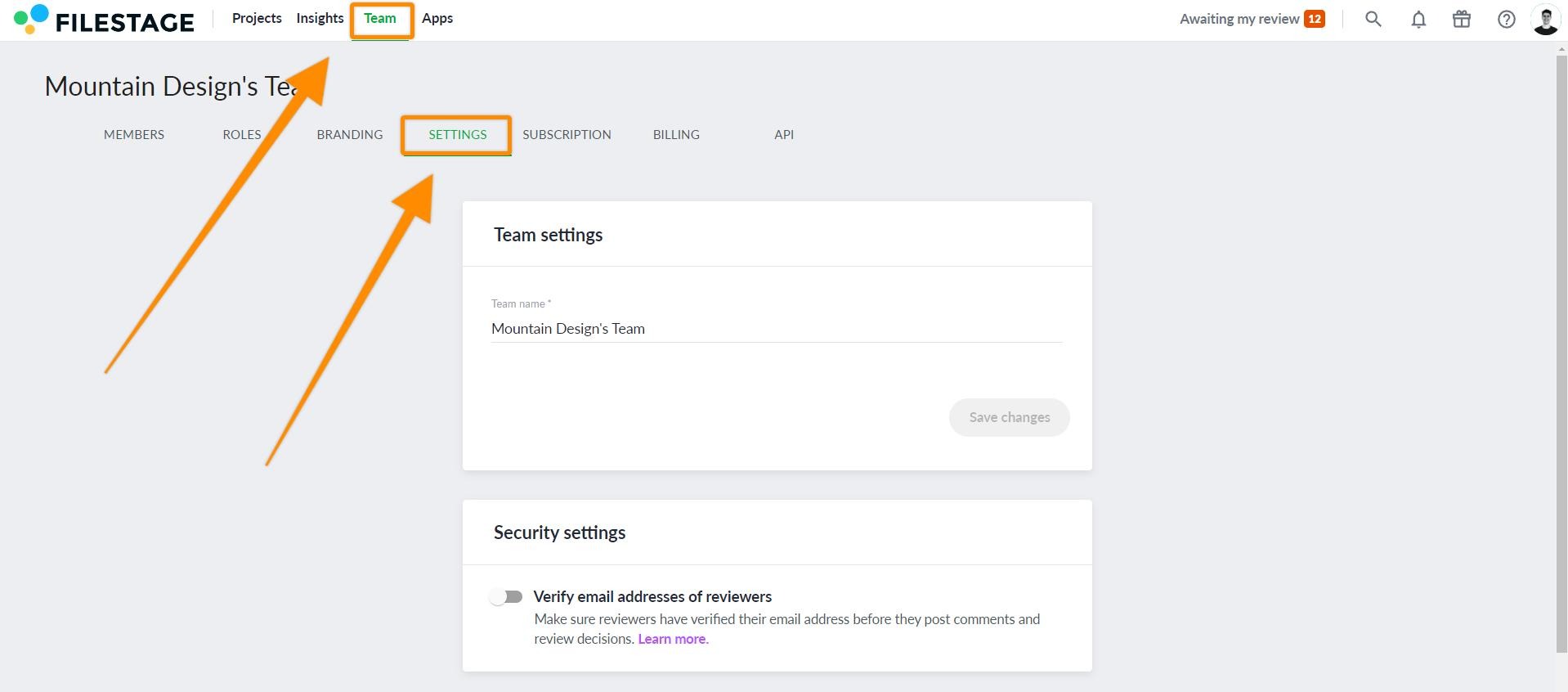
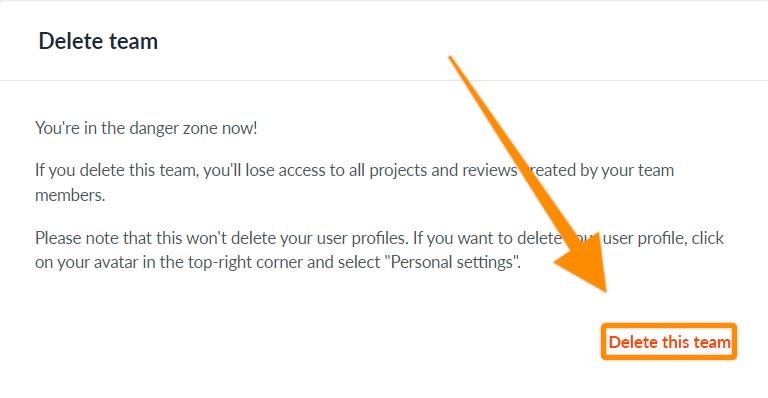
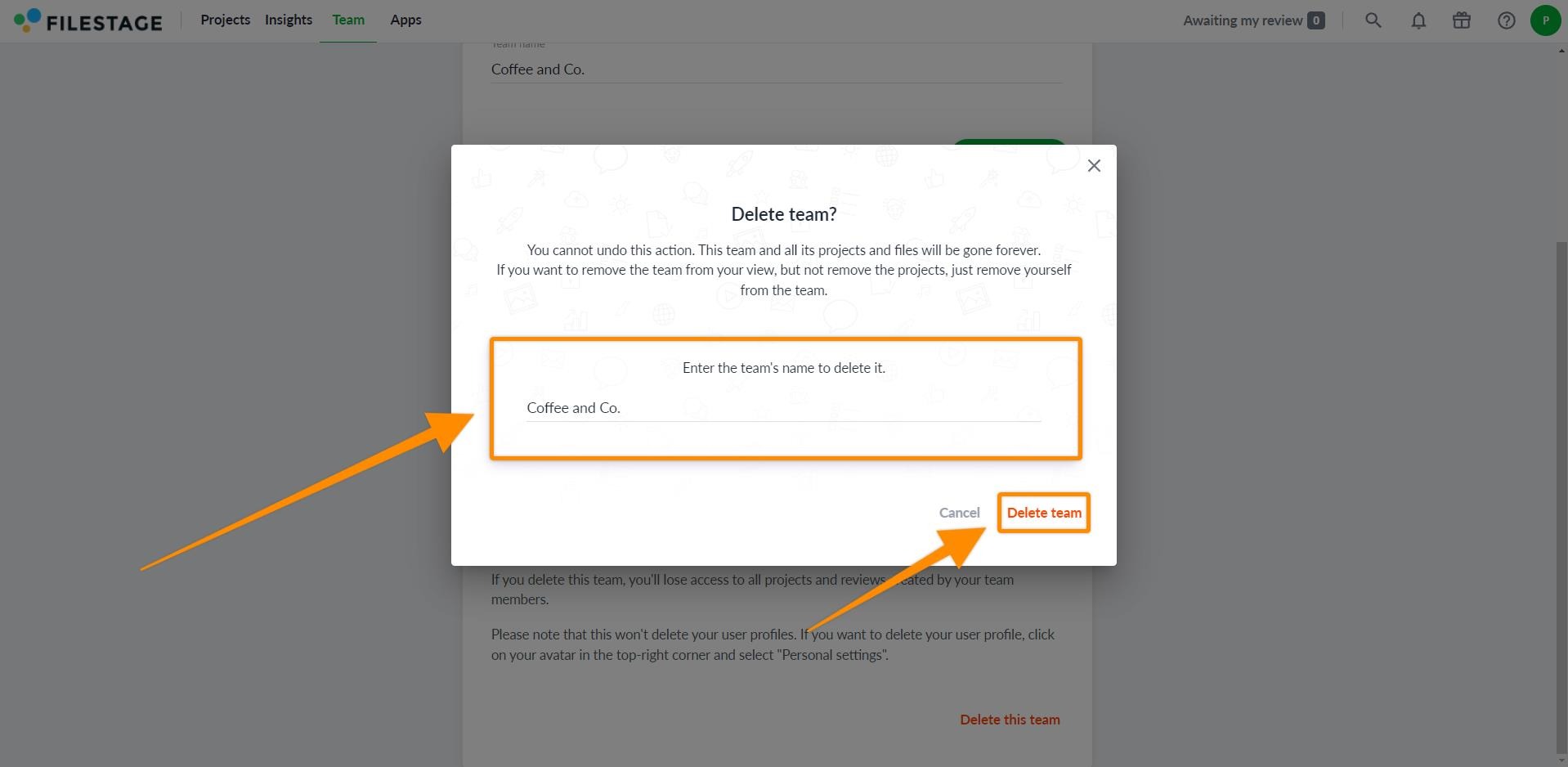
<table data-id="636ba0de-f32a-4f8f-bdde-70fbff82686e" style="min-width: 25px;"><colgroup><col style="min-width: 25px;"></colgroup><tbody><tr><td colspan="1" rowspan="1"><p data-id="f5afd1cd-d764-4267-be53-76839cddcbc3" style="text-align: left;"><strong>As <em>Admin</em>, you can easily follow these steps to proceed:</strong></p><ol><li><p data-id="ef33a56d-3b28-4b8b-b440-af5764992c5d" style="text-align: left;">Log into your account and open the <strong>Team</strong> tab</p></li><li><p data-id="06fd1069-0ac0-4ab1-8b14-e315dbb38ec3" style="text-align: left;">Go to <a target="_blank" rel="noopener noreferrer nofollow" class="linktype-link intercom-content-link link" data-linktype="link" href="https://app.filestage.io/teams/settings"><strong>Settings</strong></a></p><img src="https://staticfiles.gleap.io/helpcenter/668fad7b14cdc36cb3fd211c/20240814123623_3945.jpg"></li><li><p data-id="a8ee58a8-aa21-4a09-a882-7dd17bd74ae1" style="text-align: left;">Click on <strong>Delete this team</strong></p><img src="https://staticfiles.gleap.io/helpcenter/668fad7b14cdc36cb3fd211c/20240814123623_3317.jpg"></li><li><p data-id="07e5b0f8-e73e-43b2-8b83-357759411600" style="text-align: left;">Enter the Team name to confirm the permanent deletion.</p></li><li><p data-id="c9416a27-1105-4392-8548-e7489c2ce43d" style="text-align: left;">Click <strong>Delete team</strong></p><img src="https://staticfiles.gleap.io/helpcenter/668fad7b14cdc36cb3fd211c/20240814123623_7501.jpg"></li></ol></td></tr></tbody></table>

> **Warning:** **_Please note:_** _Deleting your team will permanently delete your team's data. This can not be undone!_

* * *

# How to delete my account?

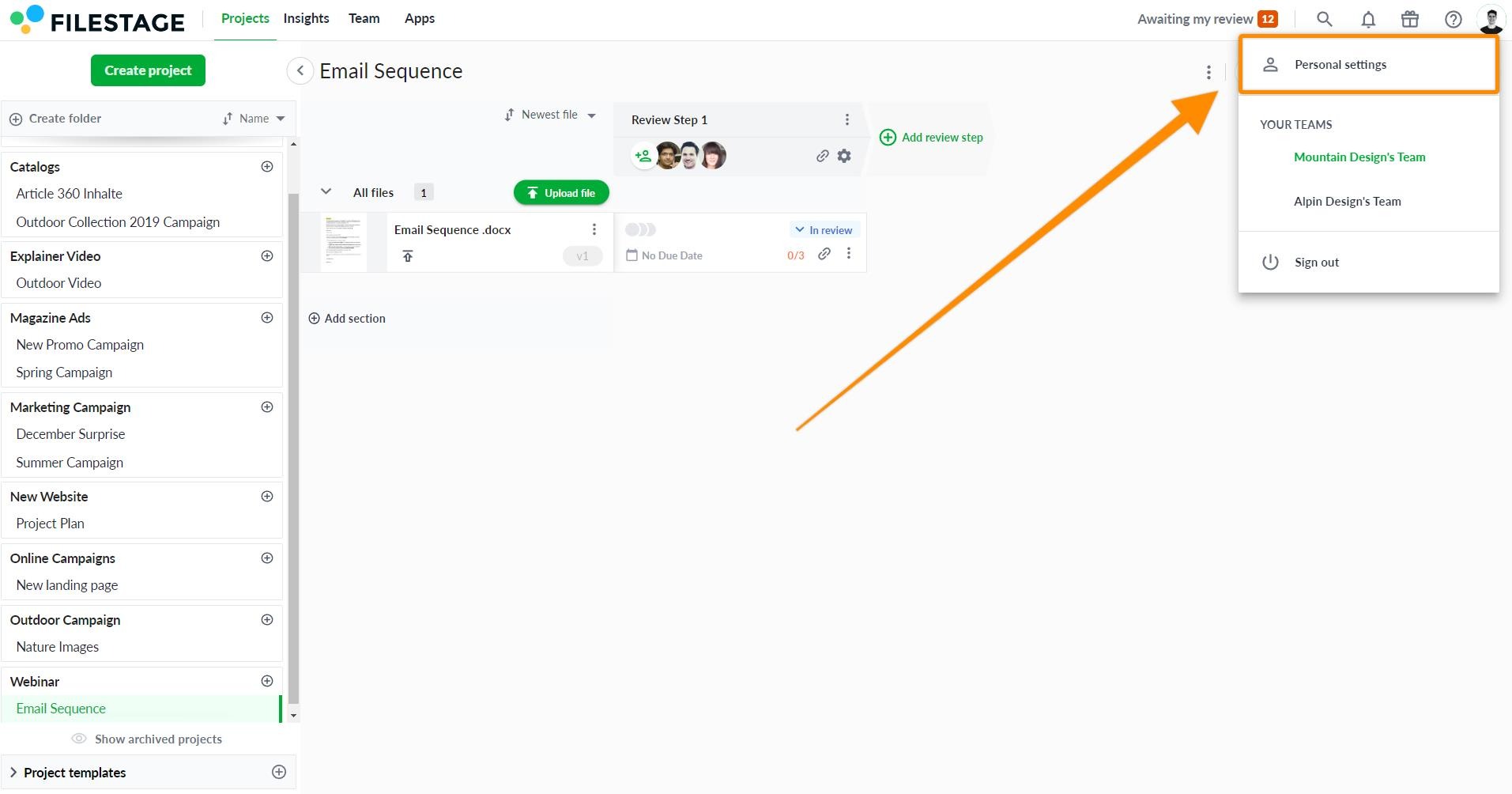
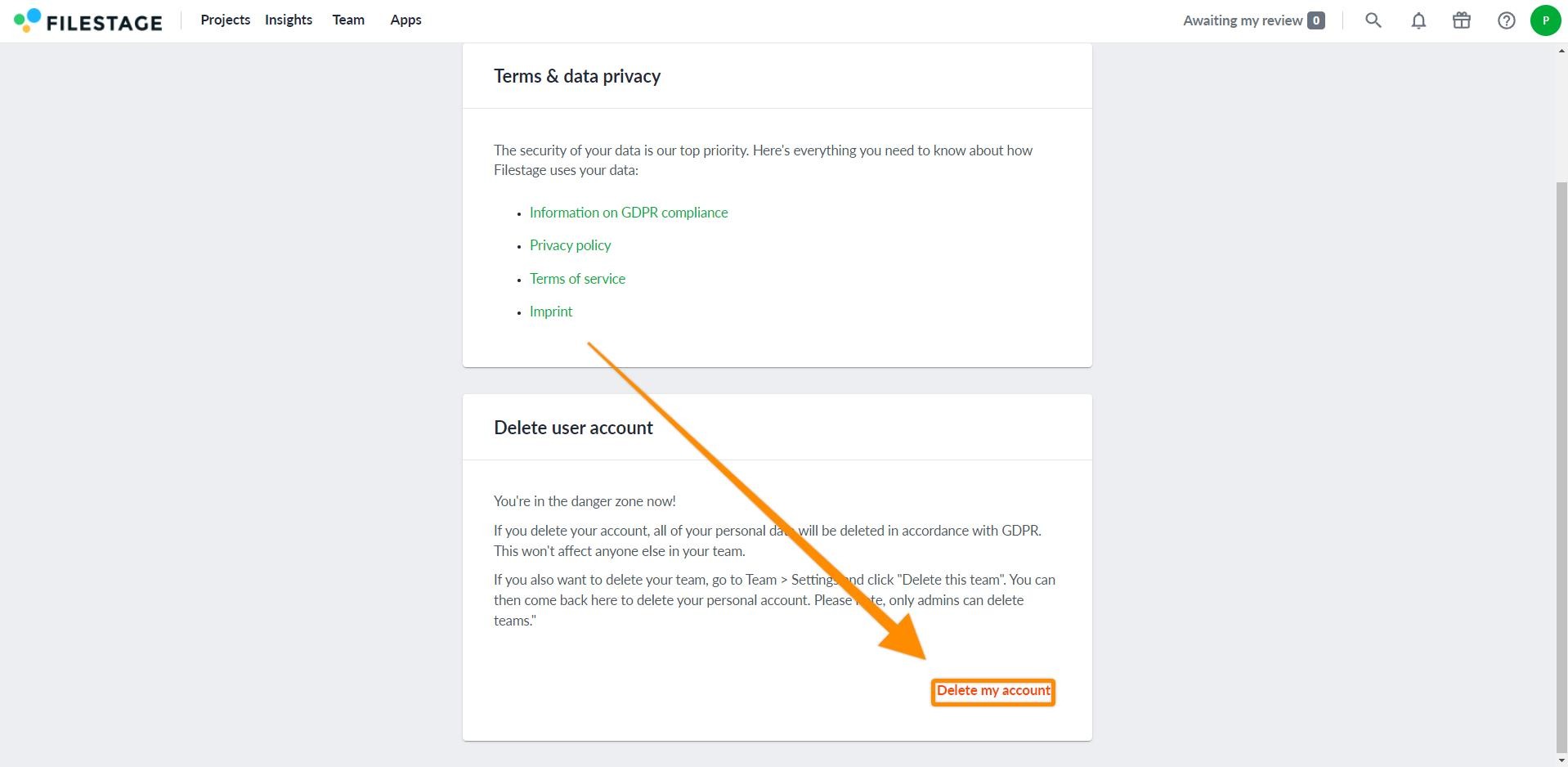
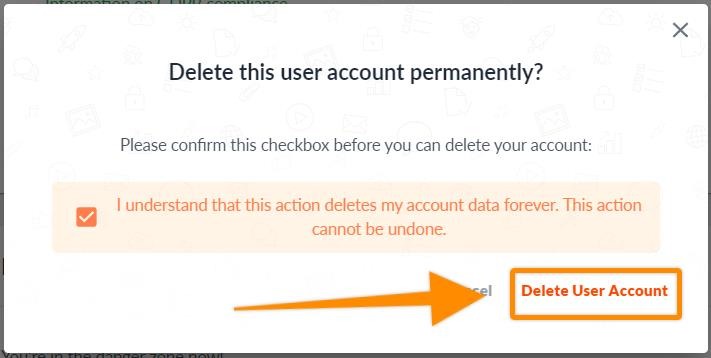
<table data-id="3640fa73-46bc-4228-a8b7-0f5b5f17d1e8" style="min-width: 25px;"><colgroup><col style="min-width: 25px;"></colgroup><tbody><tr><td colspan="1" rowspan="1"><p data-id="c99d8fc2-59dc-49d8-9109-e510af0dda7c" style="text-align: left;"><strong>You can easily delete your account by following these steps:</strong></p><ol><li><p data-id="7c982184-ac0a-43be-96c9-2a4407e14634" style="text-align: left;">Click on your avatar and select <a target="_blank" rel="noopener noreferrer nofollow" class="linktype-link intercom-content-link link" data-linktype="link" href="https://app.filestage.io/profile/"><strong>personal settings</strong></a></p><img src="https://staticfiles.gleap.io/helpcenter/668fad7b14cdc36cb3fd211c/20240814123623_0879.jpg"></li><li><p data-id="03e52c3a-e42b-4ba1-83d4-dd07eb55850a" style="text-align: left;">Go to <a target="_blank" rel="noopener noreferrer nofollow" class="linktype-link intercom-content-link link" data-linktype="link" href="https://app.filestage.io/profile/account"><strong>Account</strong></a></p></li><li><p data-id="82e98c0c-9080-402c-883c-e3e71c586ffe" style="text-align: left;">Press <strong>Delete my account</strong></p><img src="https://staticfiles.gleap.io/helpcenter/668fad7b14cdc36cb3fd211c/20240814123623_9489.jpg"></li><li><p data-id="c227a813-4dd8-4e43-9ba8-2f13859f8f8c" style="text-align: left;">Tick the box to confirm you understand to delete your account permanently.</p></li><li><p data-id="326c5960-2a69-4e98-9478-96dbc6bade11" style="text-align: left;">Click <strong>Delete my account</strong></p><img src="https://staticfiles.gleap.io/helpcenter/668fad7b14cdc36cb3fd211c/20240814123623_7776.jpg"></li></ol></td></tr></tbody></table>

> **Warning:** **_Please note:_** _Deleting your account will permanently delete your team's data. This can not be undone!_

* * *

# Can I recover the deleted data?

When you delete your account or your team, all data will be permanently removed from our system in accordance with **GDPR.**

This action can not be undone, as all data is forever deleted.

* * *

# Is it GDPR compliant?

**Yes, the process of deleting your account is GDPR compliant.** With Filestage you meet all requirements of the General Data Protection Regulation (GDPR). Our processes are regularly checked by external auditors.

* * *

💡 **What's next?** Once you're done with this article, [learn how Filestage complies with GDPR.](https://help.filestage.io/en/articles/1982120-learn-how-filestage-complies-with-gdpr.md)

* * *

_Let us know if you have any questions by reaching out to us on chat or emailing us at_ [_support@filestage.io_](mailto:support@filestage.io) _We're always happy to help!_