---
title: "Archive projects to keep them for documentation"
description: "By archiving a project you can clear up the clutter from your project dashboard!"
url: https://help.filestage.io/en/articles/2484421-archive-projects-to-keep-them-for-documentation
collection: "Project Setup and Organization"
updated: 2026-10-07
language: en
alternates: [fr, de, es]
---

# Archive projects to keep them for documentation

By archiving a project you can clear up the clutter from your project dashboard!

_Keep your project list organized and clear by_ **_archiving past projects._**_This way, these projects do not interfere with the current work of you and your team, while you still have access when you need them.  
By archiving, you also_ **_ensure accurate documentation_** _of the projects, as they can only be accessed in_ **_read-only mode_**_, which prevents any later changes._

* * *

## How to archive your project

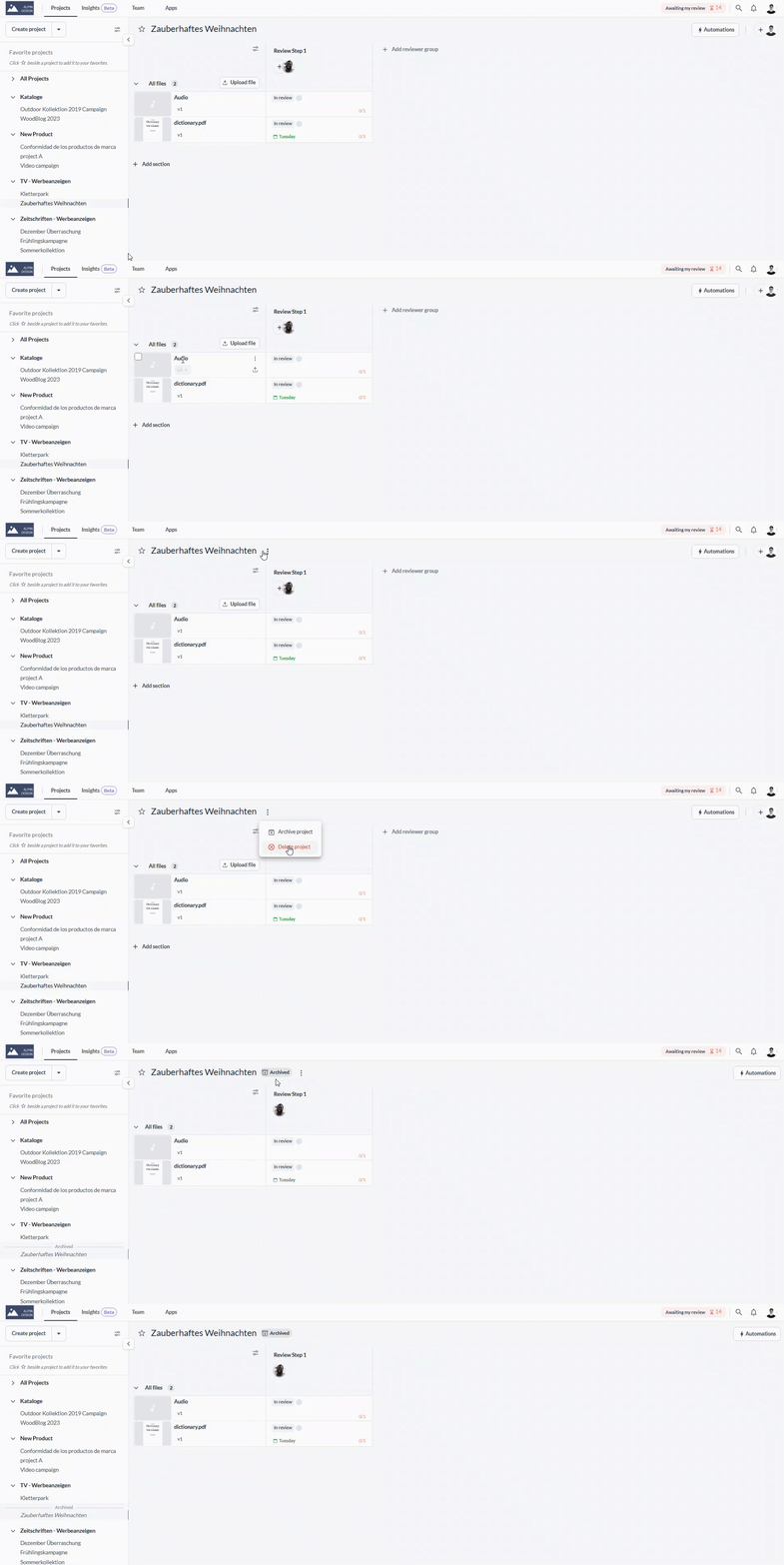
To archive your project, follow these steps:

<table data-id="7b2617ad-d407-4411-9850-aa004fa88255" style="min-width: 25px;"><colgroup><col style="min-width: 25px;"></colgroup><tbody><tr><td colspan="1" rowspan="1"><ol><li><p data-id="60ae05ed-d037-4c52-8535-3c9b7b72b6d7" style="text-align: left;">Open the project you would like to archive.</p></li><li><p data-id="d5049cbb-5cae-41b8-8942-431ac984599e" style="text-align: left;">Hover with the cursor over the project name</p></li><li><p data-id="c29b7aab-9e5c-4e1d-8bbc-0bc007f61098" style="text-align: left;">Click on the <strong>three dots that will appear next to the project name</strong></p></li><li><p data-id="9da33746-f328-4e62-9fb7-8eb167662827" style="text-align: left;">Select<strong> Archive Project</strong> from the dropdown</p></li><li><p data-id="1482c85e-9475-4c60-a3f0-dde4063848f2" style="text-align: left;">The archived project will now be hidden on the project list.</p></li></ol><img src="https://staticfiles.gleap.io/ghelparticle/NojhlHoplBYKtUD5AiXXNJG2RZAP7AnUwZnJDEs93SyEcHv9GsXyAh1mQv5H5nCckYwB2Svs1qo.gif" alt="" style="width: 612px;"></td></tr></tbody></table>

* * *

## Folders & archiving

Under certain circumstances, folders can also be archived. The following conditions must be met to archive a folder:

**If a folder contains at least one active project inside it or any of its subfolders, then it will be visible, together with all of its subfolders.**

In other words:

**If a folder and all of its subfolders do not contain any active projects, it is archived together with the last active project.** This applies only to main folders (the first-level folders), while subfolders are only archived together with the main folders

* * *

## How to view archived projects

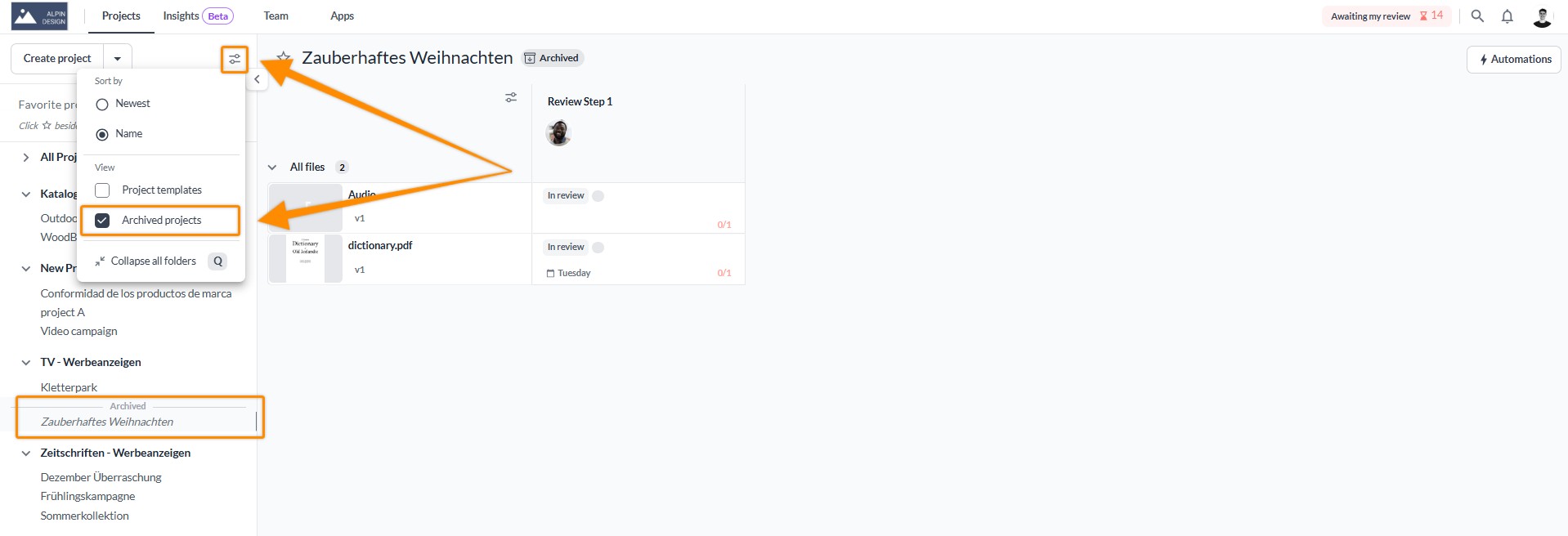
Once archived, your projects disappear from the standard project list. To view them again, do the following:

<table data-id="f2da8b56-e026-49bc-b9f1-fcfb182d3dae" style="min-width: 25px;"><colgroup><col style="min-width: 25px;"></colgroup><tbody><tr><td colspan="1" rowspan="1"><ol><li><p data-id="46e1451a-843c-451c-b0b9-6e6dd8f7277a" style="text-align: left;">Click on the <strong>sort and filter </strong>symbol in the project menu</p></li><li><p data-id="8ffbc92f-e927-4aa0-8bb5-d6d97503997c" style="text-align: left;">Select the checkbox<strong> Archived Projects</strong></p></li><li><p data-id="47af5758-5561-4ee3-b396-597c90ee3004" style="text-align: left;">Select the project you'd like to view</p></li></ol><img src="https://staticfiles.gleap.io/ghelparticle/6K2rfHHbCptVDcMsJQNsQc8ANLj1uFwoFiC2aWj7oRng94UcHnmmMbsDT822h1RM53NMMah2Izz.jpeg" alt="" style="width: 565px;"></td></tr></tbody></table>

* * *

## How to un-archive a project

There might be situations when a project needs to be reactivated. This is easily possible - simply unarchive the project and it returns to the previous state as an active project.

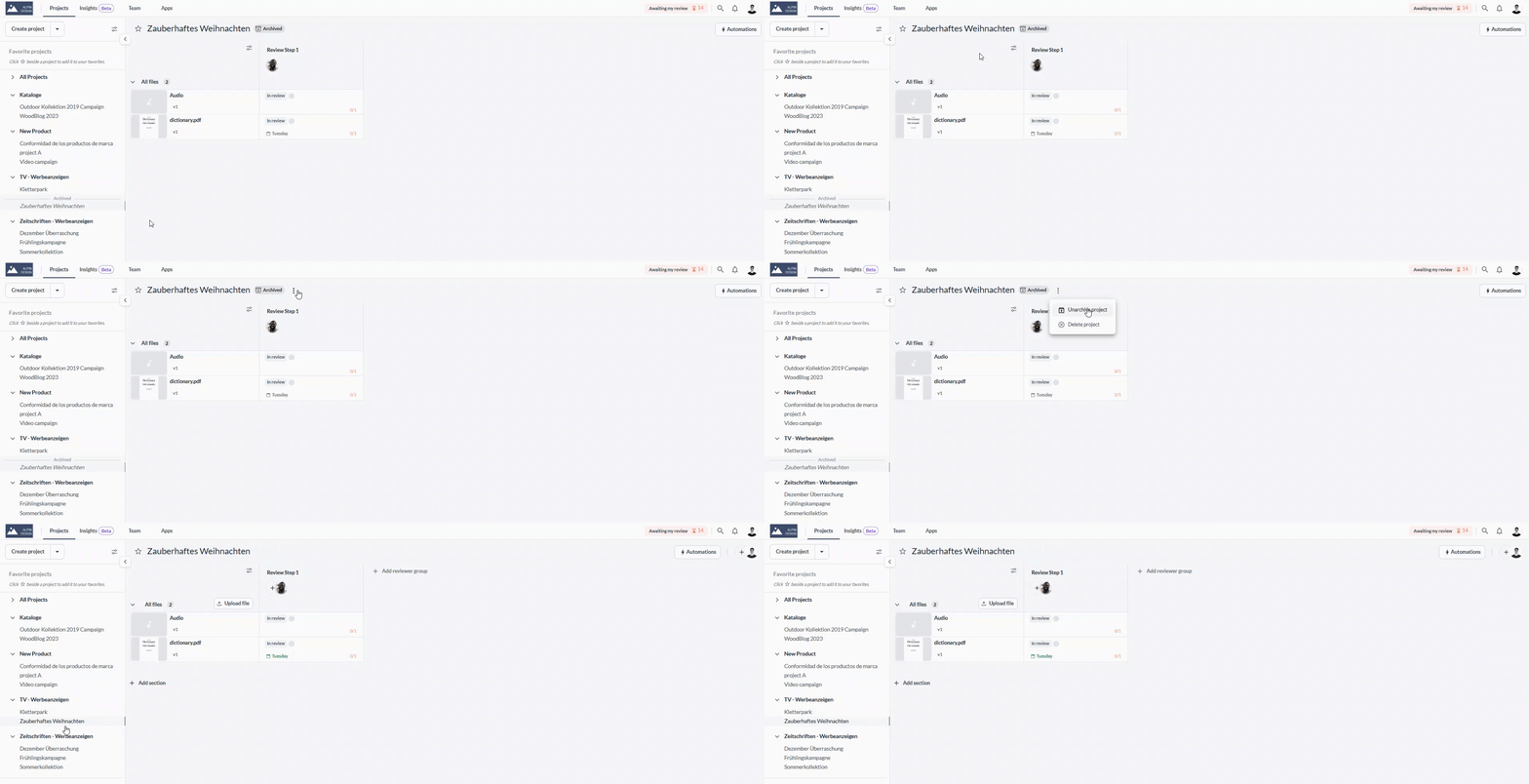
To unarchive projects, follow these steps:

<table data-id="fa1d954c-d116-4da4-8794-d8ceae883741" style="min-width: 25px;"><colgroup><col style="min-width: 25px;"></colgroup><tbody><tr><td colspan="1" rowspan="1"><ol><li><p data-id="0c4bd83a-bdcc-42db-9fe8-1a86368bc483" style="text-align: left;">Select the archived project from the<strong> project list</strong></p></li><li><p data-id="84ef4cb2-75ed-47b6-ad77-3ddd5c55535f" style="text-align: left;">Hover with the cursor over the project name</p></li><li><p data-id="50ae6075-29a4-4395-a65c-30c142fa6afc" style="text-align: left;">Click on the <strong>three dots that will appear next to the project name</strong> and the<strong> Archived sign</strong></p></li><li><p data-id="9375f96d-1446-41e2-9470-03dc7d55d9a7" style="text-align: left;">Select<strong> Unarchive Project</strong> from the dropdown</p></li><li><p data-id="d147318c-f4ea-49b2-9adc-c3a4adec34d2" style="text-align: left;">The project is now <strong>active </strong>again and you can find it in the <strong>project list</strong>.</p></li></ol><img src="https://staticfiles.gleap.io/ghelparticle/BSKUJMB9ZiCCYlLrQ0azhjQRa6iN7bN77e0ztw9ydh95MNV0XIbSTkNokG4lvFfbf2aMFtAaQC8.gif" alt="" style="width: 569px;"></td></tr></tbody></table>

* * *

## Do archived projects count towards my plan limits?

-   Archived projects do not count against your **project limit**. This means that you can store an unlimited number of archived projects.
    
-   Archived projects count against your **storage limit**.
    

> **Warning:** **_Please note:_** _Some of our older plans include a_ **_file limit_**_. Files in archived projects count against your_ **_file limit_**_. Please reach out to us if you are not sure if your plan has a file limit. We will be happy to clarify this for you._

* * *

💡**What´s next?** After understanding how to archive projects to keep them for documentation, see how to [set up your project.](https://help.filestage.io/en/articles/1567557-set-up-your-project.md)

* * *

_If you have any questions or comments, please contact us through chat or email at_ [_support@filestage.io_](mailto:support@filestage.io)_._