---
title: "Invite or remove reviewers"
description: "Learn how to invite reviewers and how to remove them."
url: https://help.filestage.io/en/articles/1459680-invite-or-remove-reviewers
collection: "Reviewer Management"
updated: 2026-06-19
language: en
alternates: [fr, de, es]
---

# Invite or remove reviewers

Learn how to invite reviewers and how to remove them.

* * *

_As a_ **_project collaborator_**_, you can add reviewers to your project, get their feedback, and remove them when necessary._

* * *

## How to invite reviewers to a reviewer group

To ask people for feedback, you need to invite them to Filestage as reviewers. You can either invite reviewers via email invitation or a review link. **Follow these steps to invite reviewers:**

### Invite reviewers via their email address

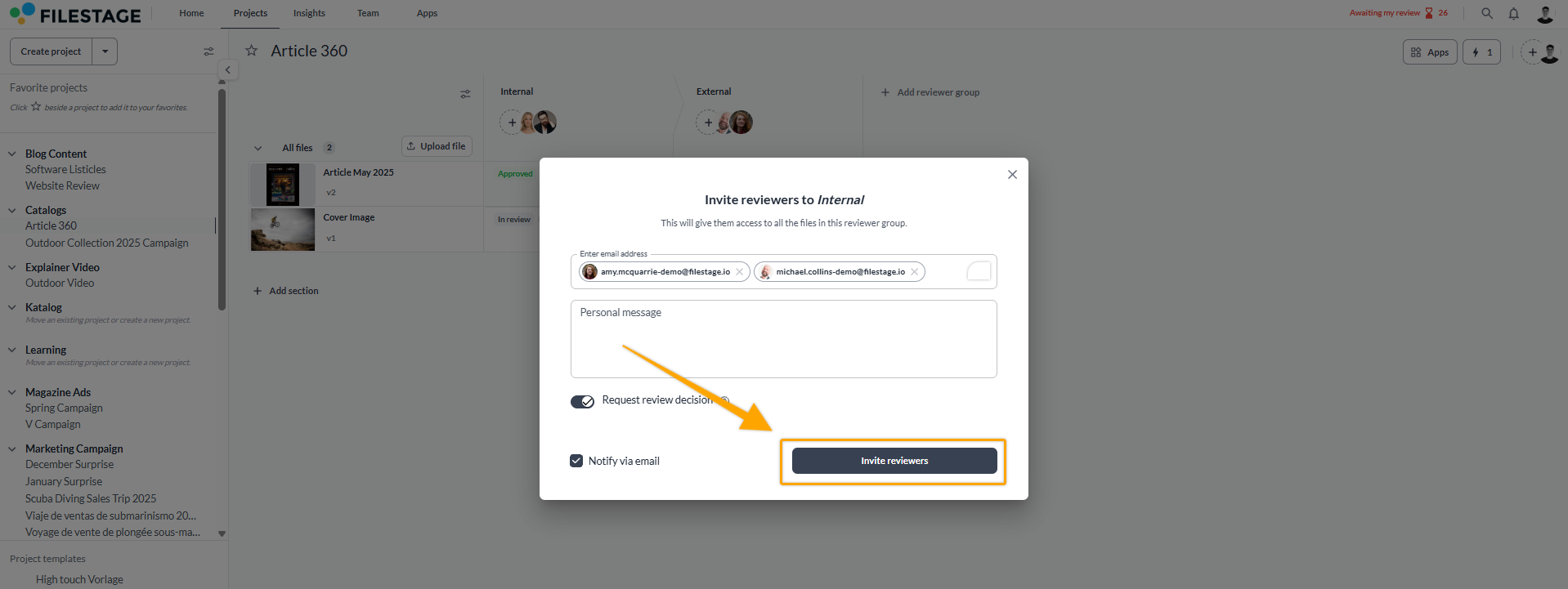
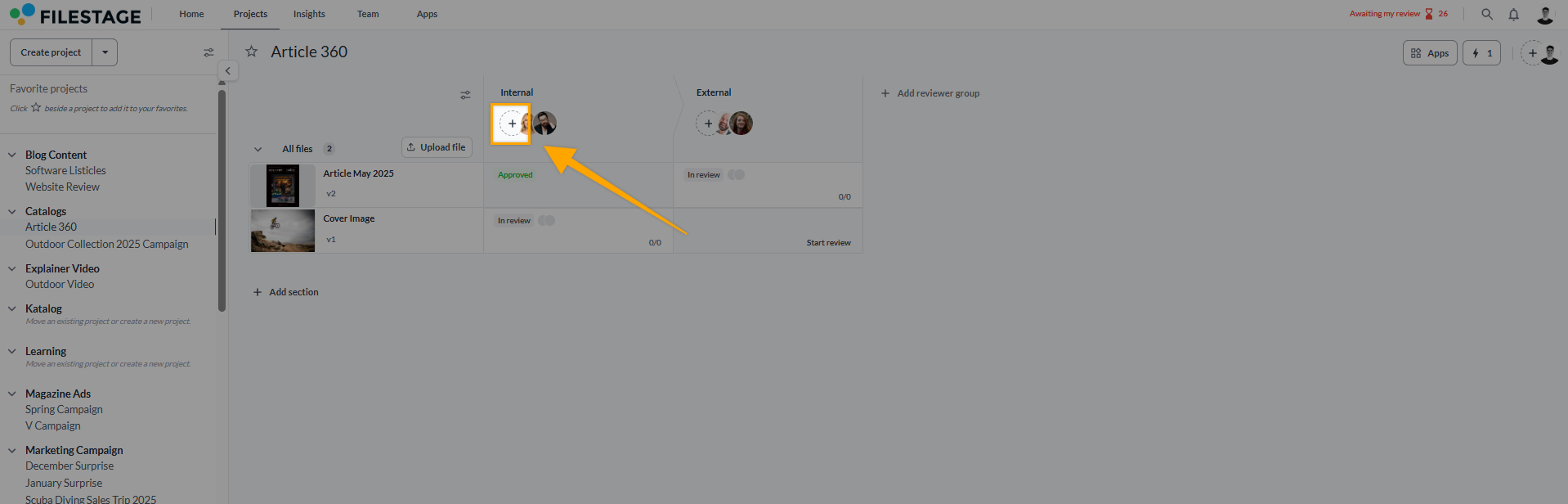
<table data-id="7df11015-736a-42ef-b8c4-47184a7eb574" style="min-width: 25px;"><colgroup><col style="min-width: 25px;"></colgroup><tbody><tr><td colspan="1" rowspan="1"><ol><li><p data-id="83ec98bb-163c-4c92-97d5-96d770ba0bc7" style="text-align: left;">Log in to your Filestage account and<strong> go to the desired project.</strong></p></li><li><p data-id="97004a05-0934-47b0-8621-17ee279ea6ba" style="text-align: left;">In the project, add reviewers to a <strong>reviewer group</strong> by clicking on the<strong> invite reviewers icon</strong>.<br>Filestage will now suggest a list of reviewers, <strong>sorted by the frequency of their participation in other reviews.</strong></p><img src="https://staticfiles.gleap.io/gattachments/jKcqNuoe5zdHde4tZwfCrkHkWXlkJD9msnggOyNN0Z85YoRTcOxUyJiz9ilv2qBDZHCDLOf94i6.png" alt="" style=""></li></ol><ol start="3"><li><p data-id="1042df6c-9ad3-457a-bb23-cf79ef31c46c" style="text-align: left;"><strong>Enter the email addresses</strong> of the desired reviewers. You can copy and paste multiple email addresses of reviewers at once or choose from the available list.</p></li><li><p data-id="7d86ab09-b698-43dc-b0a9-d537ce763f27" style="text-align: left;">Choose whether to<strong> notify your reviewers via email</strong>. You can also add a personal message that will be displayed in the notification.</p></li><li><p data-id="dc48757c-4f59-434b-aef2-f241a7481cd7" style="text-align: left;">Click <strong>Invite Reviewers</strong> to send the invitation via email.</p><img src="https://staticfiles.gleap.io/gattachments/wCjOLeazYl5SM8wyJmC0K4TuZ5stEesc0NjtykFOiQXhEWyeb0N34j8TQmf4wOyFvnH8z8dqP8R.png" alt="" style=""></li></ol></td></tr></tbody></table>
* * *

### Invite reviewers without a review decision

If you use either our Business or Enterprise plans, you have an additional option when inviting reviewers.  
With the option “Request review decision” toggled off, you can invite reviewers to only contribute their feedback, without finally leaving a review decision.

![](https://staticfiles.gleap.io/gattachments/12cPMkBHmZuRo9jcb4scZ1dZoos5gZxbnlOH2kSTg4t4yIZqqRl9fkUUnRE5T1XxEvduJ9svk8Q.png)

This allows for a cleaner review workflow and extends your options for reviewer management.

> **Info:** For users working on Free or Starter plans, the review decision is always enabled.

* * *

### Invite reviewers via review link

Alternatively, you can invite reviewers via review link. **Follow these steps:**

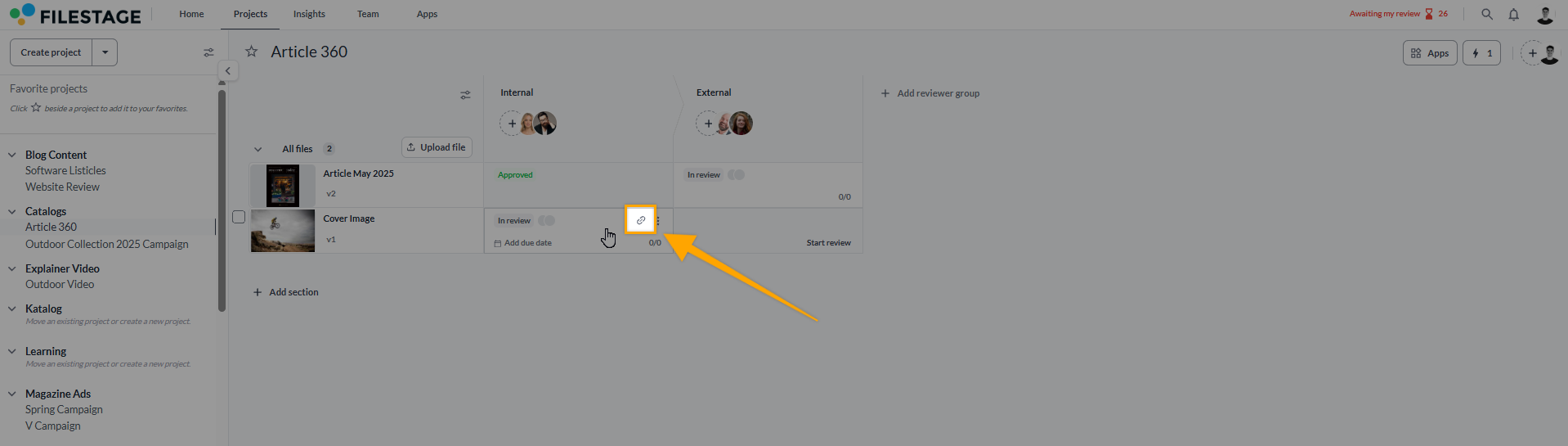
<table data-id="2c90bcd7-2855-4c55-87ad-1824ef21af6a" style="min-width: 25px;"><colgroup><col style="min-width: 25px;"></colgroup><tbody><tr><td colspan="1" rowspan="1"><ol><li><p data-id="3b97e812-a3c1-4a6c-b2bc-e91ada1ee0e9" style="text-align: left;">In your desired reviewer group, select the <strong>copy review link icon</strong>.</p></li><li><p data-id="05f6532e-7bbf-4cee-b513-e0774a6587ba" style="text-align: left;">​The share link will be automatically copied.</p></li><li><p data-id="b1ff39d5-f36c-4cae-b540-de28b77341d7" style="text-align: left;"><strong>Share the link with your reviewers</strong> via email or tools like Trello, Basecamp or Slack.</p><div style="text-align: left; width: 100%;"><img src="https://staticfiles.gleap.io/gattachments/JKc2N3ptTEist8RJkSMo44hsALRL3x1DAXBqFrL5G3Kkm6RdizDnSvwYb3MnWU2q8LbaaYh2RVF.png" data-width="100%" data-align="left" style="width: 100%; border-radius: 10px; margin-top: 10px; margin-bottom: 10px;"></div></li></ol></td></tr></tbody></table>

> **Warning:** **_Please note: Reviewers can forward their review links_**
> _Reviewers can forward their review links internally to other people to show them the file and include it in the feedback loop. This works regardless of whether you invited them by e-mail invitation or by review link._

* * *

## How to remove reviewers from a reviewer group

Sometimes you may need to remove a reviewer from a project. **Follow these steps to delete a reviewer:**

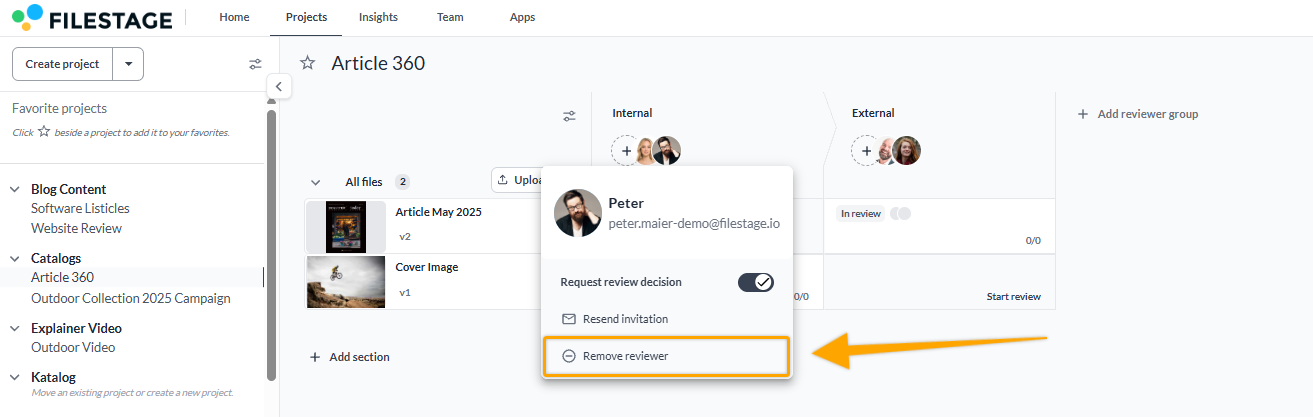
<table data-id="5e8db6cb-9827-43b3-b67c-54e1a7b865f8" style="min-width: 25px;"><colgroup><col style="min-width: 25px;"></colgroup><tbody><tr><td colspan="1" rowspan="1"><ol><li><p data-id="e185bb52-59a3-4ff5-9d46-7da5d1cb1c57" style="text-align: left;"><strong>Select the reviewer avatar</strong> you wish to remove</p></li><li><p data-id="786c6608-d26d-4848-b013-1ae22cafaca3" style="text-align: left;">Click <strong>Remove Reviewer</strong></p></li><li><p data-id="8b6d4b4c-6f22-4a88-9a55-8e062da91e9c" style="text-align: left;">Confirm the action</p><img src="https://staticfiles.gleap.io/gattachments/ROWy1Uykdh95qWraacN8nGvvgHKxbBmtmzh9QxI13Xkql6yVty4DKb3J3QZg8HUoEhM5nQV0XAR.png" alt="" style=""></li></ol></td></tr></tbody></table>

* * *

> **Warning:** **_Please note:_** _Deleting a reviewer does not prevent them from accessing the file. Review links are shareable once they are created. To add extra security to a review link, you can password-protect your files by using reviewer permissions._

* * *

## What reviewers can and can’t do: 

### Reviewers can always:

-   View files in the reviewer group they’re invited to see
    
-   Share their review link with others
    

### Depending on the permissions that you give your reviewers, they may also be able to:

-   Comment on a file
    
-   Attach files to their comments (logos, documents, sounds, or design drafts)
    
-   Download a file
    
-   Upload or delete a file (only in the **Business** plan)
    

### A reviewer can never:

-   See files, comments, or versions in a different reviewer group they are not invited to
    
-   Upload or delete a version
    
-   Invite or remove team members
    

You can [**manage reviewer permissions**](https://help.filestage.io/en/articles/2787865-manage-reviewer-permissions.md) by clicking on the settings gear above the reviewer group.

* * *

💡 **What's next?** Once you understand how to invite or remove reviewers, see how to [**Manage reviewer permissions**](https://help.filestage.io/en/articles/2787865-manage-reviewer-permissions.md).

* * *

_Let us know if you have any questions by reaching out to us on chat or emailing us at_ [_support@filestage.io_](mailto:support@filestage.io)_! We're always happy to help!_

  
​