---
title: "Understand and Manage Team Members"
description: "Learn about inviting and removing team members, understand admin, manager and member roles, and how to switch roles."
url: https://help.filestage.io/de/articles/9465096-understand-and-manage-team-members
collection: "Verwalten von Projekten, Dateien und Kommentaren"
updated: 2026-06-25
language: de
alternates: [en]
---

# Understand and Manage Team Members

Learn about inviting and removing team members, understand admin, manager and member roles, and how to switch roles.

Working on Filestage is more effective and fun with your team! Learn how you can add new team members to your Filestage team and how you can manage them using our Team settings.

* * *

## Invite a team member

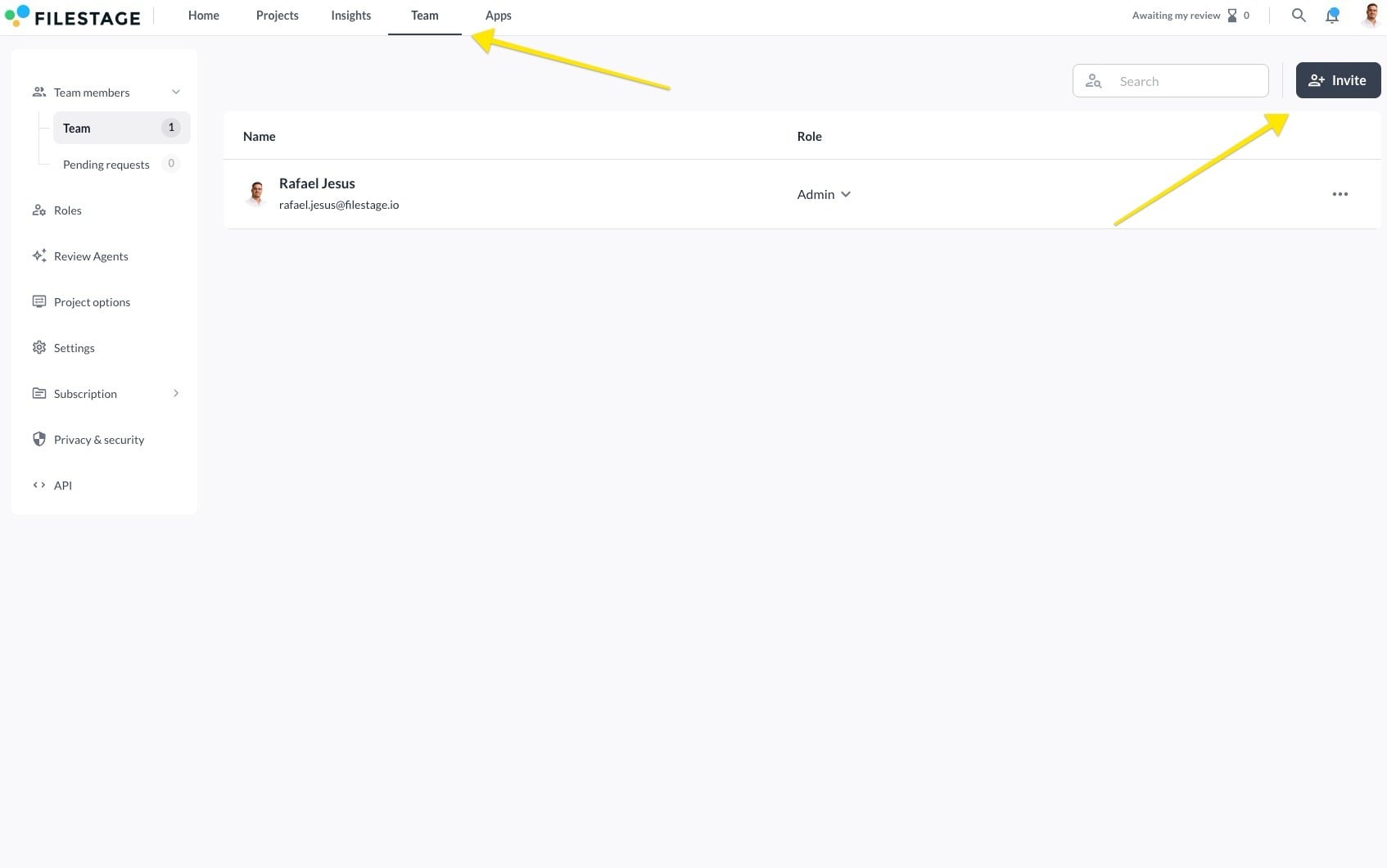
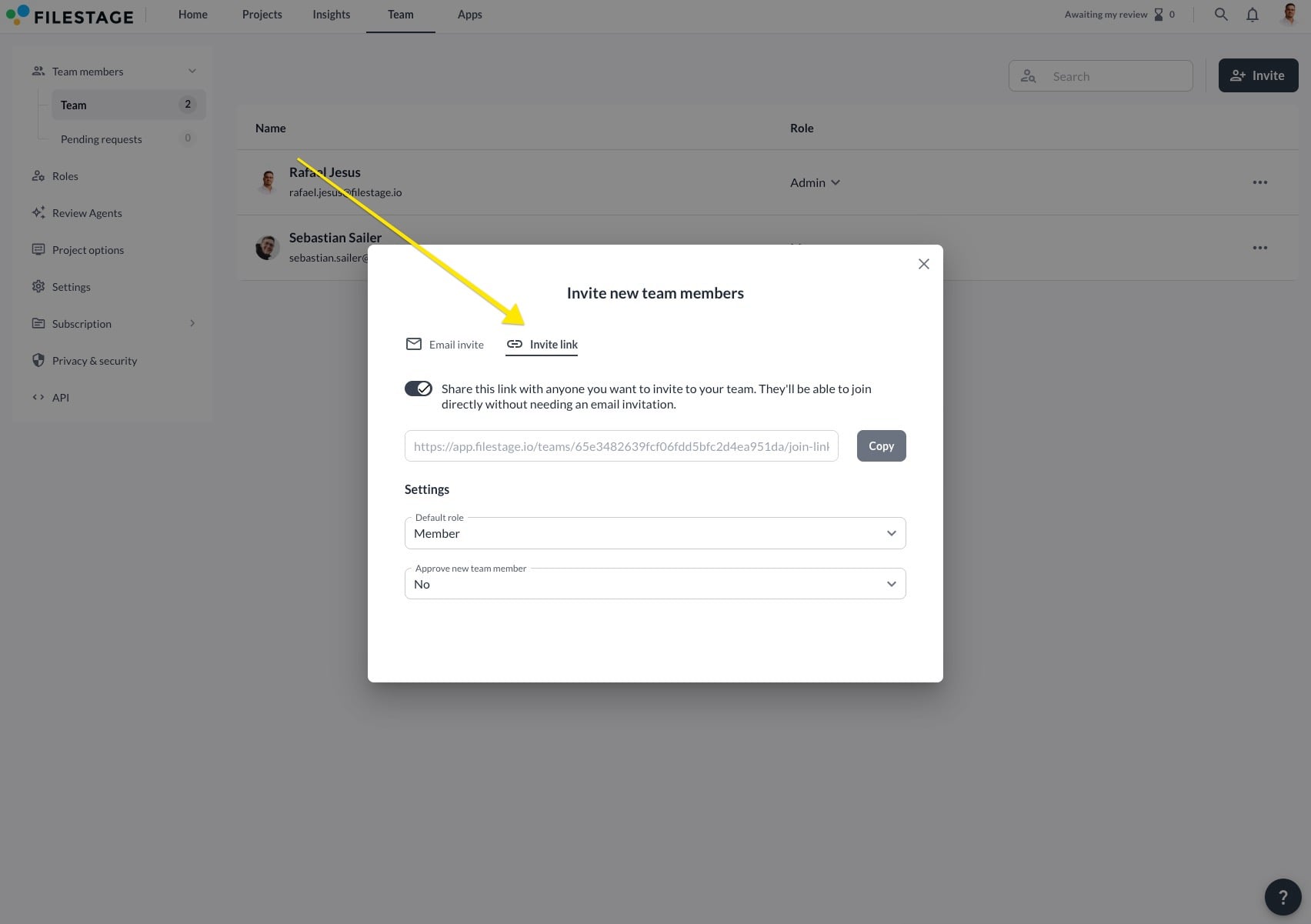
You can invite new team members through the team members’ tab, share a direct invite link, or enable automatic team joins for users with a specified domain.

To invite a team member, **follow these steps**:

### Invite over the team members tab

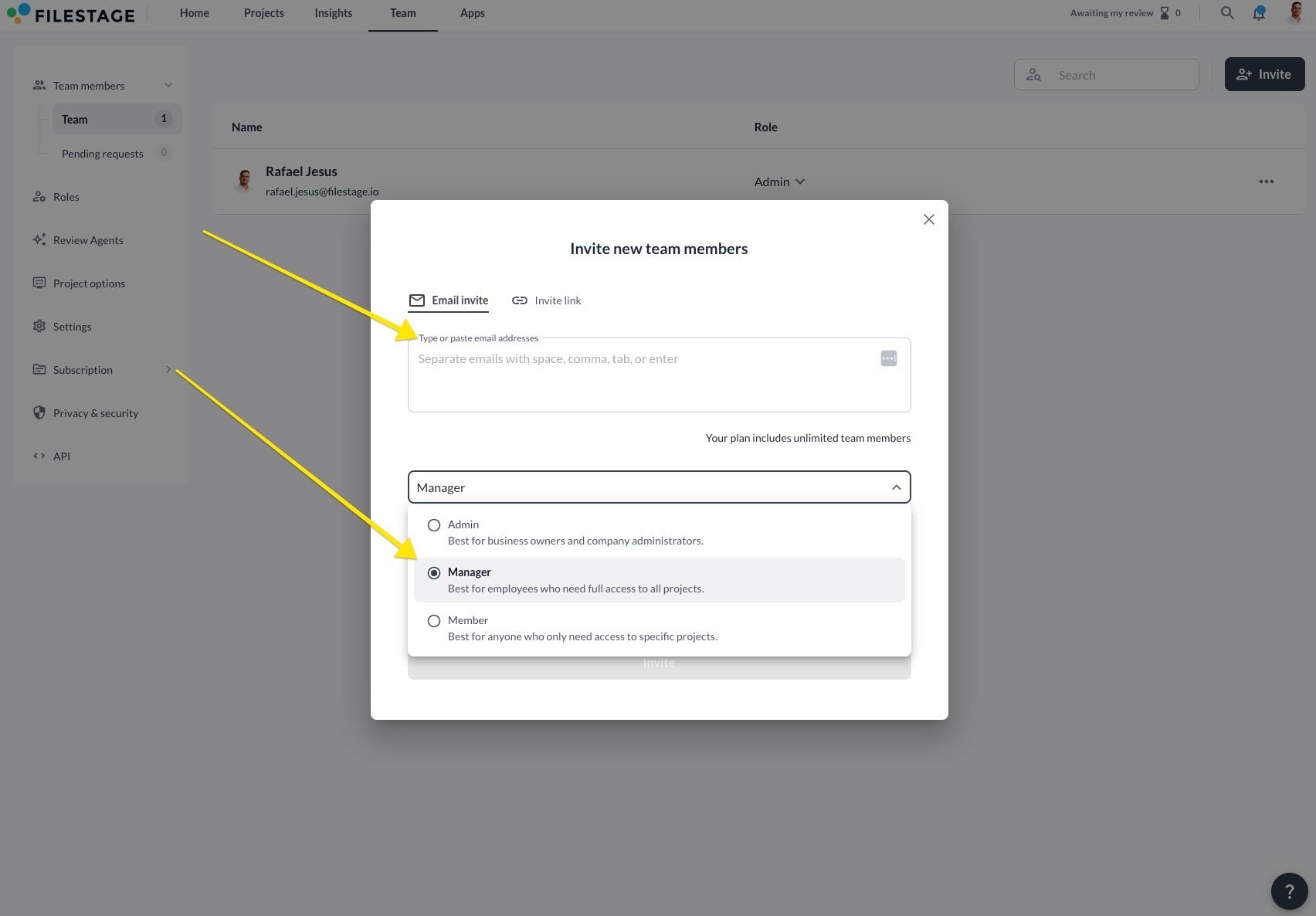
<table data-id="8165e516-16a0-4458-bf32-38f37255735b" style="min-width: 25px;"><colgroup><col style="min-width: 25px;"></colgroup><tbody><tr><td colspan="1" rowspan="1"><ol><li><p data-id="723bdbc2-7360-4be9-94a2-edae9af766e2">Open your <strong>Team</strong> tab</p></li><li><p data-id="98104200-dfef-433f-902d-a75404533e6a">Click on <strong>Invite team members</strong></p><div style="text-align: center; width: 100%;"><img src="https://staticfiles.gleap.io/gattachments/jnnhzw2A6ndRE2umT4Ay6sM7mtpvoGUDHANJ1ABZIZRsWolpUekjDEofskPctUdpZdxXIqrWdv9.png" data-width="100%" data-align="center" style="width: 100%; border-radius: 10px; margin-top: 10px; margin-bottom: 10px;"></div></li><li><p data-id="946a46c3-50bd-438b-9486-30a4ce150f9f">Enter the <strong>desired email address</strong> and <strong>choose their role</strong></p><div style="text-align: center; width: 100%;"><img src="https://staticfiles.gleap.io/gattachments/eWgWCyl4Z2k59VsKRC3xp2FQuEQadE6GfFVVEBDHBx6PIAjhuMGQshUERQqLdmcqGR7AbBR4dZB.png" data-width="100%" data-align="center" style="width: 100%; border-radius: 10px; margin-top: 10px; margin-bottom: 10px;"></div><p data-id="6a379b54-b28a-468b-b4e7-b69a67228db0"><span data-name="mailbox_with_mail" data-type="emoji">📬</span> <strong>What happens next?</strong> The invited team member will receive an email with instructions on how to join your team. Once they accept the invitation, they can access your projects and begin collaborating.</p></li></ol></td></tr></tbody></table>

* * *

### Invite via invitation link

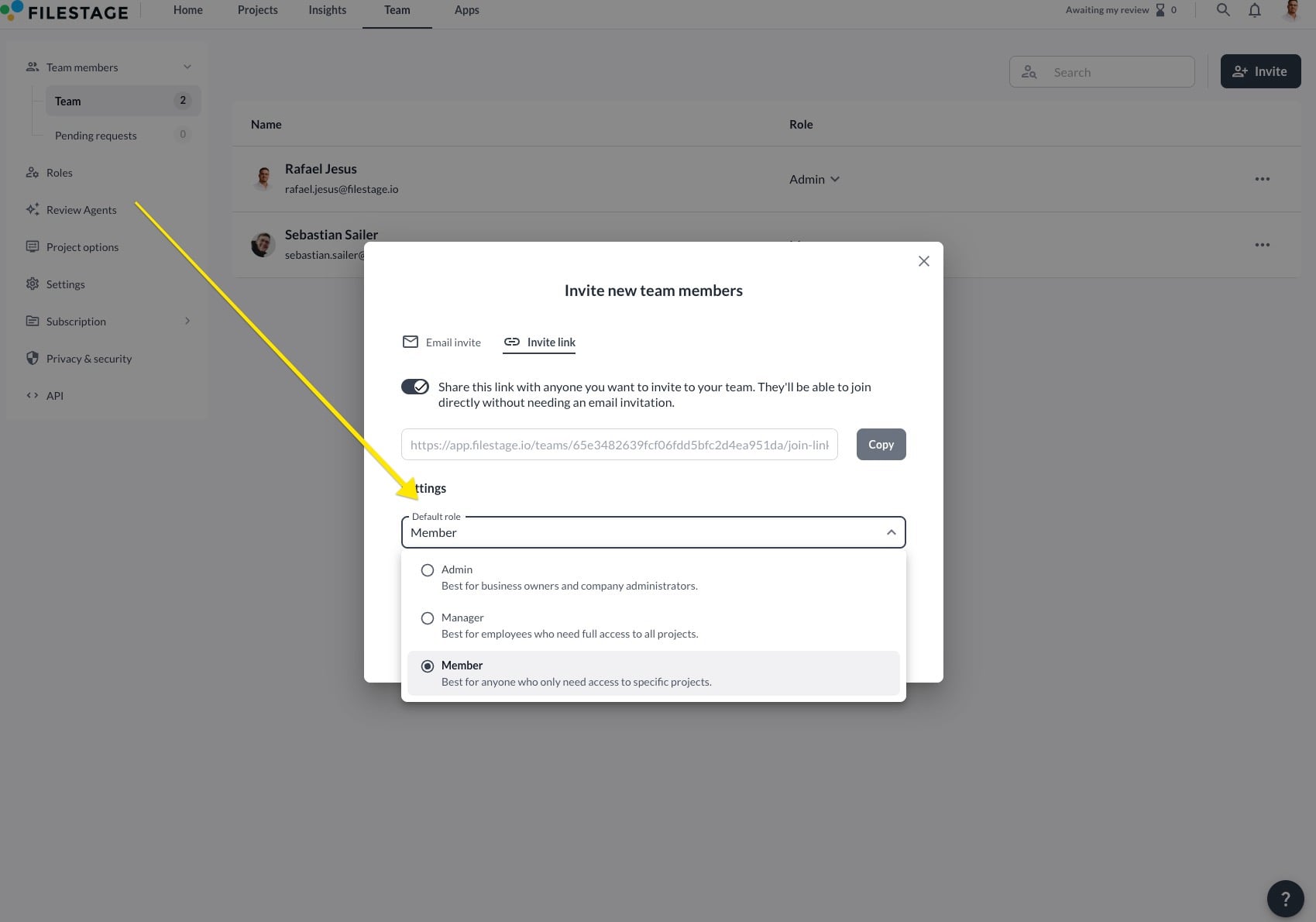
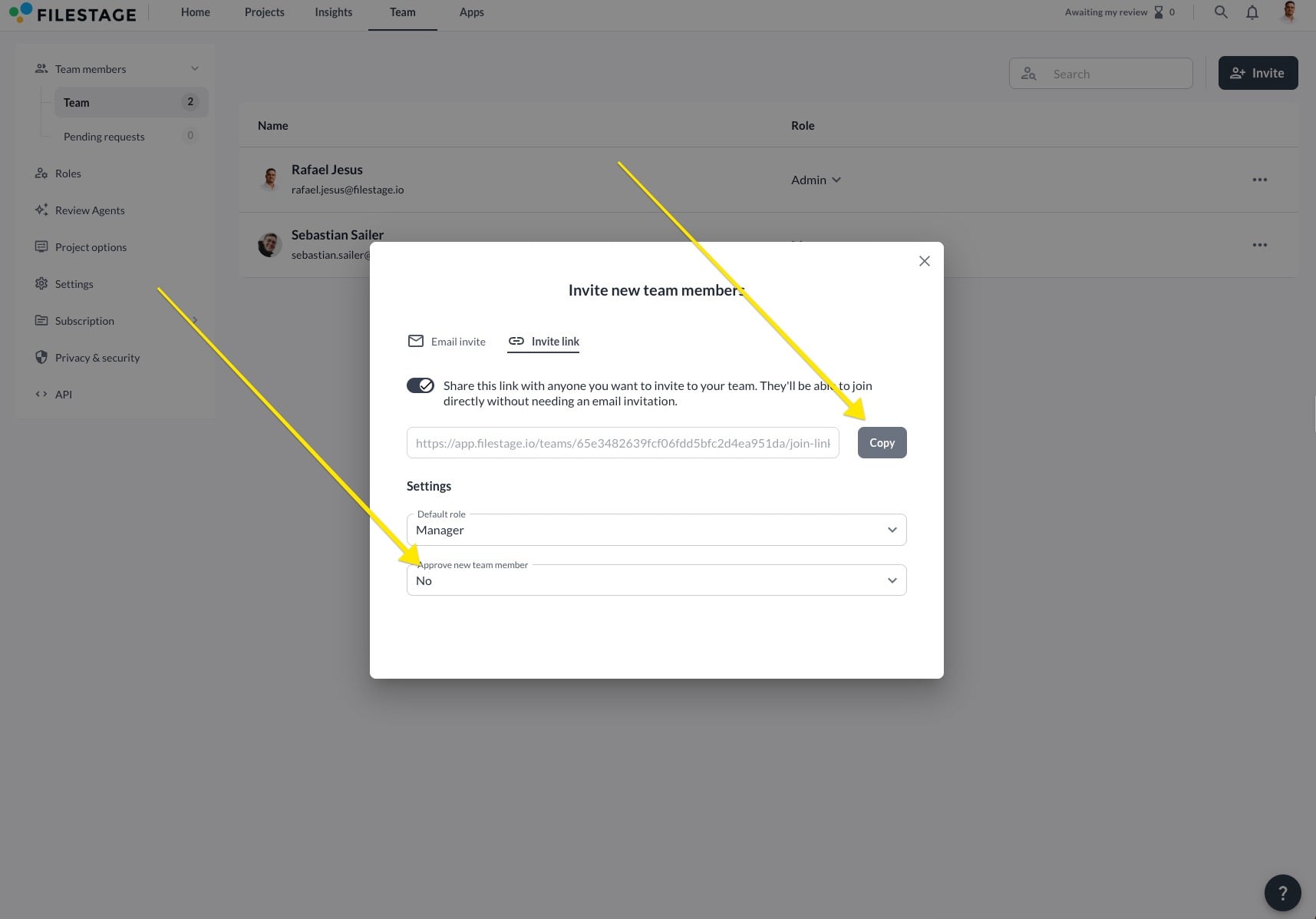
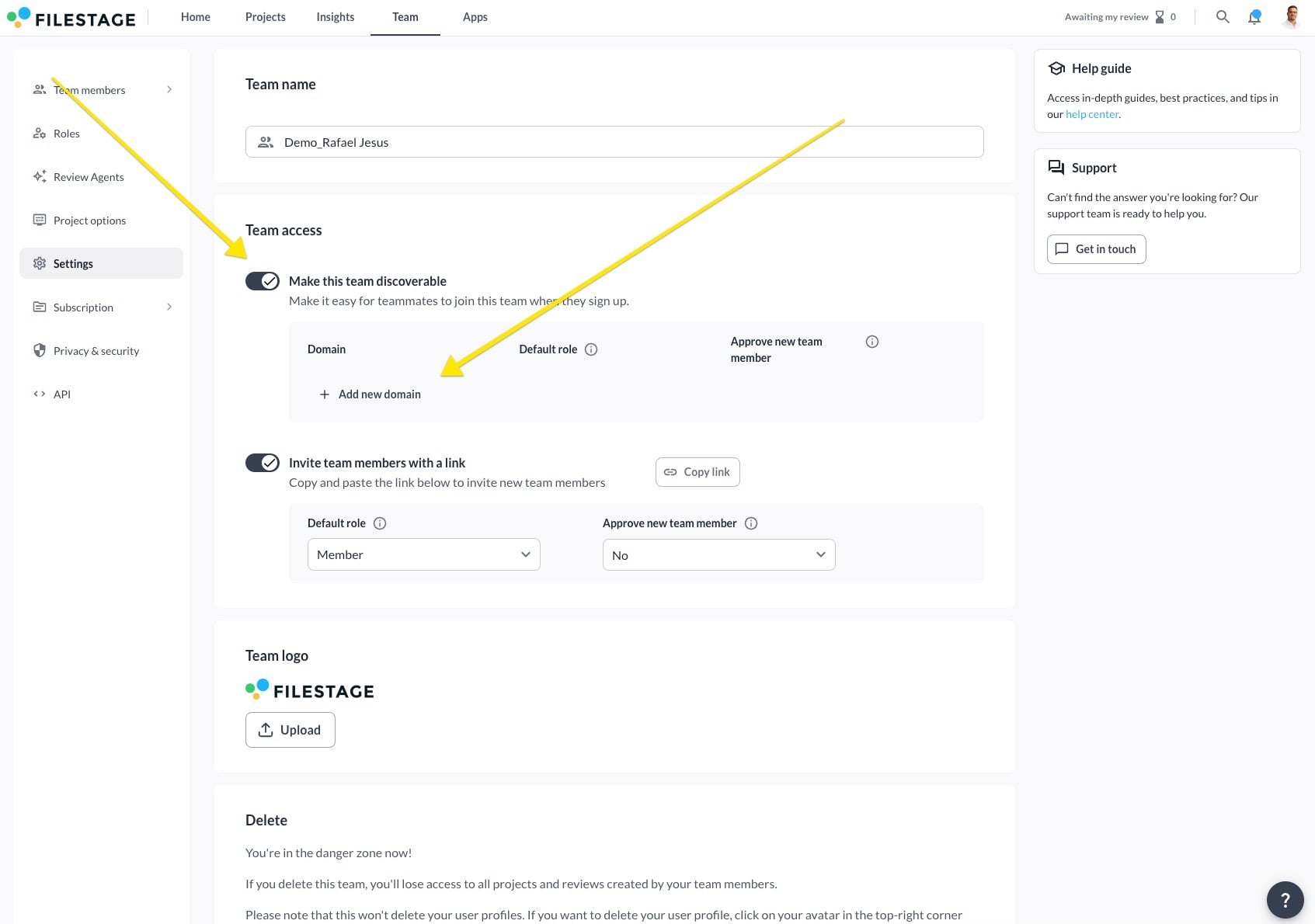
<table data-id="62e9498e-5977-41e3-9caa-9fc9ae05758b" style="min-width: 25px;"><colgroup><col style="min-width: 25px;"></colgroup><tbody><tr><td colspan="1" rowspan="1"><ol><li><p data-id="68ff4f62-8ec4-4e5f-8543-e2ffc67efc68">Go to your Team settings tab</p></li><li><p data-id="cd5fe0e0-b9ea-49ad-83c6-6543b900ef42">Click on the <strong>Invite team members with a link</strong> slider</p><div style="text-align: left; width: 100%;"><img src="https://staticfiles.gleap.io/gattachments/mmlNBUBO0ELraON6ty4qf3gtxXYNeaWjWCIjd4WjKPvSoFARclycLNEfFlho2HwWk2cpgACcCXy.jpg" data-width="100%" data-align="left" style="width: 100%; border-radius: 10px; margin-top: 10px; margin-bottom: 10px;"></div><p data-id="f0ee0978-3c45-4251-8f68-c9af001b8817"></p></li><li><p data-id="f52411b3-0ee7-4952-9065-ef543f1dfc8f">Choose a <strong>default role</strong> from the dropdown menu</p><div style="text-align: left; width: 100%;"><img src="https://staticfiles.gleap.io/gattachments/FQunkBYkbrdJe7SXYjv3m1wIxcbCqVtwSYVOPJDqzXjnxE7Etg2nWgkCeKh2qmR3MYh9Jy9A4Fe.jpg" data-width="100%" data-align="left" style="width: 100%; border-radius: 10px; margin-top: 10px; margin-bottom: 10px;"></div><p data-id="1a4d8066-a361-482d-8356-01bc361a8e19"></p></li><li><p data-id="747d5370-7155-42b0-950b-b1f30166069d">Decide if new members <strong>require approval</strong> from a manager<br>If you activate this option, any registration requests will appear in the team members tab. The member can only join the team upon the manager’s approval of their request.</p></li><li><p data-id="03955db6-beae-433a-b271-745e8193e17f">Click n <strong>Save changes</strong> and then <strong>Copy link</strong> to share the invitation link with your new team members. The invited team member will be added to your team after successfully registering an account.</p><div style="text-align: left; width: 100%;"><img src="https://staticfiles.gleap.io/gattachments/znI9lgltIFGro7colDmt1SGnrV8kZnF4sWesOGaGaiItq6uVs3gAozZ3IoYT202Hhf0Wbh9GRZZ.jpg" data-width="100%" data-align="left" style="width: 100%; border-radius: 10px; margin-top: 10px; margin-bottom: 10px;"></div><p data-id="e5b540bf-d324-43f0-abc5-4287995fac94"><br></p></li></ol></td></tr></tbody></table>

* * *

### Invite via domain access

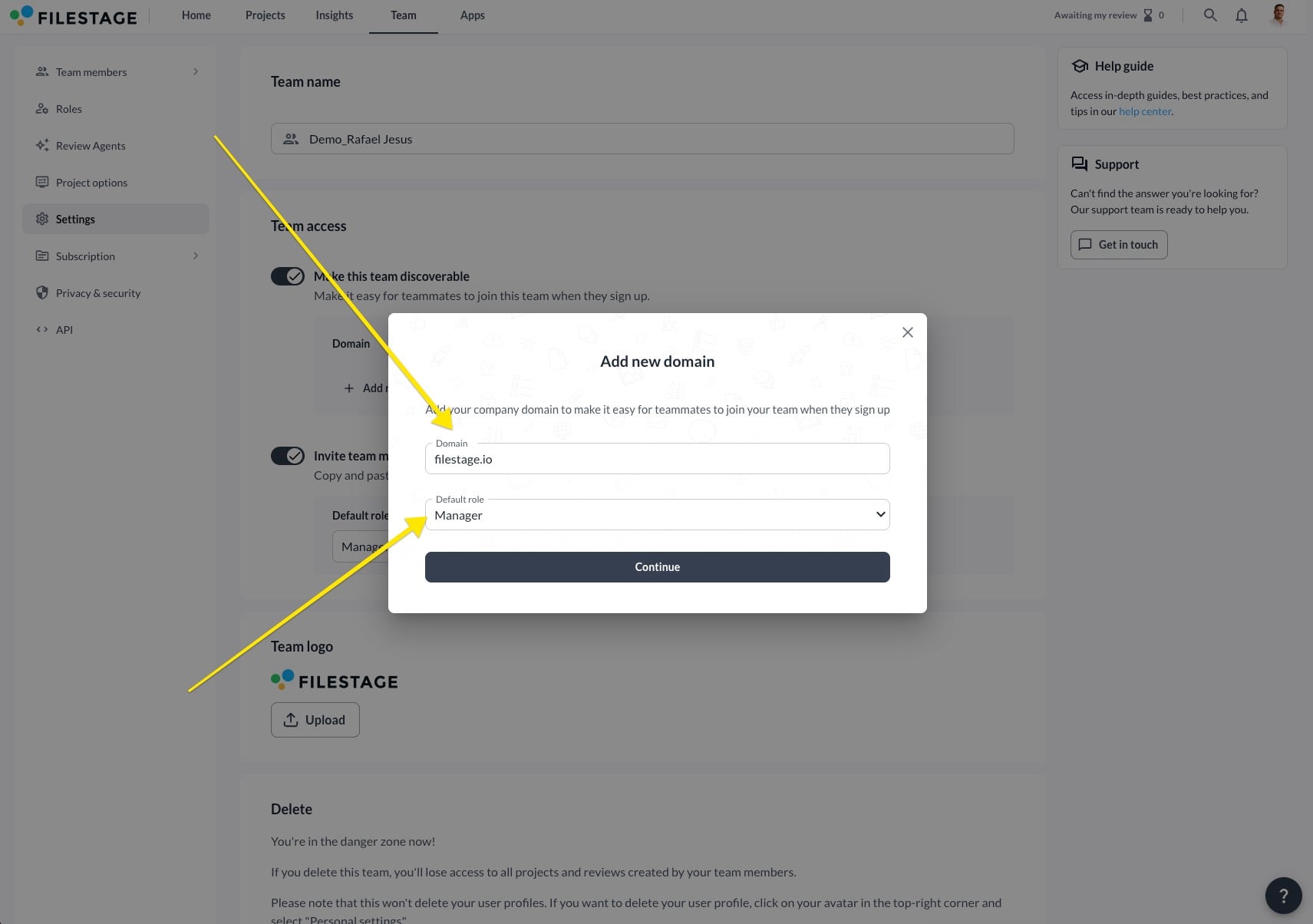
<table data-id="293ad05d-513f-4cee-b725-47f1497a2f0b" style="min-width: 25px;"><colgroup><col style="min-width: 25px;"></colgroup><tbody><tr><td colspan="1" rowspan="1"><ol><li><p data-id="d6a8571b-4ca4-4804-a869-45e35fd8f615">Go to your Team settings tab</p></li><li><p data-id="15b1c838-8474-45c5-a991-3de647c6694b">Click on the <strong>Make this team discoverable</strong> slider</p></li><li><p data-id="1d7d9540-132e-4ff6-a199-3a1efa8f745c">Click <strong>+Add new domain</strong></p><div style="text-align: center; width: 100%;"><img src="https://staticfiles.gleap.io/gattachments/DIrbZO0Uc0tH08Y6KLSEK2KfAiQVVlak4ygEFTRJ2Mr7Q0g05J3GOy8KB5oHMPYooXgWppMNJRM.png" data-width="100%" data-align="center" style="width: 100%; border-radius: 10px; margin-top: 10px; margin-bottom: 10px;"></div></li><li><p data-id="19cac6fd-1df8-4105-aa2b-62c231044ad0">Insert the <strong>domain name</strong>, assign <strong>roles</strong> for new users, and click Continue</p></li><li><p data-id="bd30cd16-9db2-4158-8d48-ba1a020c3bf9">Decide if new members <strong>require approval</strong> from a manager<br>If you activate this option, any registration requests will appear in the team members tab. The member can only join the team upon the manager’s approval of their request.</p><div style="text-align: left; width: 100%;"><img src="https://staticfiles.gleap.io/gattachments/2eZKxiNEZfXQXbJsk2MpIewSmTmUHbnQNAW6BCIIZYtNc5EfOJKK5LT6bh8pCmj70JkSMG4saoy.jpg" data-width="100%" data-align="left" style="width: 100%; border-radius: 10px; margin-top: 10px; margin-bottom: 10px;"></div><p data-id="38bdd9d9-b214-412e-a34f-f463abb30a17"></p></li><li><p data-id="448fc037-43d2-4a84-b4a3-5c161a9b2dcc">After selecting <strong>Save changes</strong>, any new account registered with the specified domain will receive a prompt to join your team during setup.</p></li></ol></td></tr></tbody></table>

* * *

### Understand roles for team members

When inviting a team member to Filestage, you can assign them specific roles - Admin, Manager, or Member - based on their responsibilities and access requirements. These roles can also be switched later on, giving you the flexibility to adapt as your team evolves.

### What are the roles for team members in Filestage?

-   **Admin:** Best for business owners and company administrators.
    
-   **Manager:** Best for employees who need full access to all projects.
    
-   **Member:** Best for anyone who only needs access to specific projects.
    

> **Success:** The Member role is available in our Business and Enterprise plans.

## **Which permissions do the different roles provide?**

Click on the “►” symbol in the table to access more detailed information of each function and permission.

<table data-id="037ce5d5-e5aa-4fa9-8435-8be061778eed" style="min-width: 224px;"><colgroup><col style="min-width: 25px;"><col style="width: 100px;"><col style="width: 25px;"><col style="width: 74px;"></colgroup><tbody><tr><td colspan="1" rowspan="1" style="box-sizing: border-box; font-family: proxima-nova, &quot;Helvetica Neue&quot;, system-ui, &quot;Segoe UI&quot;, Roboto, Helvetica, Arial, sans-serif, &quot;Apple Color Emoji&quot;, &quot;Segoe UI Emoji&quot;, &quot;Segoe UI Symbol&quot;; line-height: 1; border: 1px solid rgba(0, 0, 0, 0.1); text-align: left; vertical-align: top; min-width: 100px; padding: 0.5rem; position: relative; margin-top: 0px;"><p data-id="0480e3cf-aafc-4be8-aa2b-1abd32eeb4dd" style="text-align: left;"><strong>Permission</strong></p></td><td colspan="1" rowspan="1" style="box-sizing: border-box; font-family: proxima-nova, &quot;Helvetica Neue&quot;, system-ui, &quot;Segoe UI&quot;, Roboto, Helvetica, Arial, sans-serif, &quot;Apple Color Emoji&quot;, &quot;Segoe UI Emoji&quot;, &quot;Segoe UI Symbol&quot;; line-height: 1; border: 1px solid rgba(0, 0, 0, 0.1); text-align: left; vertical-align: top; min-width: 100px; padding: 0.5rem; position: relative;"><p data-id="fcc99c50-1ed8-4403-a5be-8c0a12a8e8d0" style="text-align: left;"><strong>Admin</strong></p></td><td colspan="1" rowspan="1" style="box-sizing: border-box; font-family: proxima-nova, &quot;Helvetica Neue&quot;, system-ui, &quot;Segoe UI&quot;, Roboto, Helvetica, Arial, sans-serif, &quot;Apple Color Emoji&quot;, &quot;Segoe UI Emoji&quot;, &quot;Segoe UI Symbol&quot;; line-height: 1; border: 1px solid rgba(0, 0, 0, 0.1); text-align: left; vertical-align: top; min-width: 100px; padding: 0.5rem; position: relative;"><p data-id="24dad299-e080-4d84-82f1-bc8f1616a0c4" style="text-align: left;"><strong>Manager</strong></p></td><td colspan="1" rowspan="1" style="box-sizing: border-box; font-family: proxima-nova, &quot;Helvetica Neue&quot;, system-ui, &quot;Segoe UI&quot;, Roboto, Helvetica, Arial, sans-serif, &quot;Apple Color Emoji&quot;, &quot;Segoe UI Emoji&quot;, &quot;Segoe UI Symbol&quot;; line-height: 1; border: 1px solid rgba(0, 0, 0, 0.1); text-align: left; vertical-align: top; min-width: 100px; padding: 0.5rem; position: relative;"><p data-id="b546a134-2b67-4be0-b759-9493ef750871" style="text-align: left;"><strong>Member</strong></p></td></tr><tr><td colspan="1" rowspan="1" style="box-sizing: border-box; font-family: proxima-nova, &quot;Helvetica Neue&quot;, system-ui, &quot;Segoe UI&quot;, Roboto, Helvetica, Arial, sans-serif, &quot;Apple Color Emoji&quot;, &quot;Segoe UI Emoji&quot;, &quot;Segoe UI Symbol&quot;; line-height: 1; border: 1px solid rgba(0, 0, 0, 0.1); text-align: left; vertical-align: top; min-width: 100px; padding: 0.5rem; position: relative; margin-top: 0px;"><details class="details"><summary><strong>Access to all projects</strong></summary><div data-type="detailsContent"><ul><li><p data-id="9d77859c-4ab9-4565-99f7-3ccaa82d7186" style="text-align: left;">This permission determines whether a team member can access all of the team’s projects or only those to which he or she has been invited</p></li></ul></div></details><p data-id="111c9a73-30da-404e-831b-825b0434391a" style="text-align: left;"></p></td><td colspan="1" rowspan="1" style="box-sizing: border-box; font-family: proxima-nova, &quot;Helvetica Neue&quot;, system-ui, &quot;Segoe UI&quot;, Roboto, Helvetica, Arial, sans-serif, &quot;Apple Color Emoji&quot;, &quot;Segoe UI Emoji&quot;, &quot;Segoe UI Symbol&quot;; line-height: 1; border: 1px solid rgba(0, 0, 0, 0.1); text-align: left; vertical-align: top; min-width: 100px; padding: 0.5rem; position: relative;"><p data-id="338e8ac0-ea88-423d-a39f-e677a92d15ac" style="text-align: center;"><span style="color: inherit;"><span data-name="check_mark_button" data-type="emoji">✅</span></span></p></td><td colspan="1" rowspan="1" style="box-sizing: border-box; font-family: proxima-nova, &quot;Helvetica Neue&quot;, system-ui, &quot;Segoe UI&quot;, Roboto, Helvetica, Arial, sans-serif, &quot;Apple Color Emoji&quot;, &quot;Segoe UI Emoji&quot;, &quot;Segoe UI Symbol&quot;; line-height: 1; border: 1px solid rgba(0, 0, 0, 0.1); text-align: left; vertical-align: top; min-width: 100px; padding: 0.5rem; position: relative;"><p data-id="191f9937-31aa-4f24-b99b-71a1871b5600" style="text-align: center;"><span style="color: inherit;"><span data-name="check_mark_button" data-type="emoji">✅</span></span></p></td><td colspan="1" rowspan="1" style="box-sizing: border-box; font-family: proxima-nova, &quot;Helvetica Neue&quot;, system-ui, &quot;Segoe UI&quot;, Roboto, Helvetica, Arial, sans-serif, &quot;Apple Color Emoji&quot;, &quot;Segoe UI Emoji&quot;, &quot;Segoe UI Symbol&quot;; line-height: 1; border: 1px solid rgba(0, 0, 0, 0.1); text-align: left; vertical-align: top; min-width: 100px; padding: 0.5rem; position: relative;"><p data-id="613bc33a-ef5a-434f-b15f-f5c497cb49a1" style="text-align: left;"><span style="color: inherit;"><span data-name="info" data-type="emoji">ℹ</span></span>&nbsp;Can only see the projects to which he or she has been invited</p></td></tr><tr><td colspan="1" rowspan="1" style="box-sizing: border-box; font-family: proxima-nova, &quot;Helvetica Neue&quot;, system-ui, &quot;Segoe UI&quot;, Roboto, Helvetica, Arial, sans-serif, &quot;Apple Color Emoji&quot;, &quot;Segoe UI Emoji&quot;, &quot;Segoe UI Symbol&quot;; line-height: 1; border: 1px solid rgba(0, 0, 0, 0.1); text-align: left; vertical-align: top; min-width: 100px; padding: 0.5rem; position: relative; margin-top: 0px;"><details class="details"><summary><strong>Manage projects</strong></summary><div data-type="detailsContent"><ul><li><p data-id="ed957f04-450f-4e78-bcec-b7433207a554" style="text-align: left;">Create, rename and delete projects</p></li><li><p data-id="d0d4ce1a-fc65-4aa4-a7b6-510ec826e45f" style="text-align: left;">Create projects using project templates</p></li><li><p data-id="c1c5fe8a-6a2f-46c7-8b99-fd48400c531d" style="text-align: left;">Create, rename and delete reviewer groups</p></li><li><p data-id="2097457c-8dbb-40be-9ead-6799cc3db657" style="text-align: left;">Add and remove project reviewers</p></li><li><p data-id="1ee45f0f-9137-440d-88e2-4623f20452b2" style="text-align: left;">Change reviewer settings of reviewer groups</p></li></ul></div></details></td><td colspan="1" rowspan="1" style="box-sizing: border-box; font-family: proxima-nova, &quot;Helvetica Neue&quot;, system-ui, &quot;Segoe UI&quot;, Roboto, Helvetica, Arial, sans-serif, &quot;Apple Color Emoji&quot;, &quot;Segoe UI Emoji&quot;, &quot;Segoe UI Symbol&quot;; line-height: 1; border: 1px solid rgba(0, 0, 0, 0.1); text-align: left; vertical-align: top; min-width: 100px; padding: 0.5rem; position: relative;"><p data-id="001ad528-25b2-4b25-8778-29ccd4166610" style="text-align: center;"><span style="color: inherit;"><span data-name="check_mark_button" data-type="emoji">✅</span></span></p></td><td colspan="1" rowspan="1" style="box-sizing: border-box; font-family: proxima-nova, &quot;Helvetica Neue&quot;, system-ui, &quot;Segoe UI&quot;, Roboto, Helvetica, Arial, sans-serif, &quot;Apple Color Emoji&quot;, &quot;Segoe UI Emoji&quot;, &quot;Segoe UI Symbol&quot;; line-height: 1; border: 1px solid rgba(0, 0, 0, 0.1); text-align: left; vertical-align: top; min-width: 100px; padding: 0.5rem; position: relative;"><p data-id="fe771a29-9962-4de3-8350-76d750ef5e6d" style="text-align: center;"><span style="color: inherit;"><span data-name="check_mark_button" data-type="emoji">✅</span></span></p></td><td colspan="1" rowspan="1" style="box-sizing: border-box; font-family: proxima-nova, &quot;Helvetica Neue&quot;, system-ui, &quot;Segoe UI&quot;, Roboto, Helvetica, Arial, sans-serif, &quot;Apple Color Emoji&quot;, &quot;Segoe UI Emoji&quot;, &quot;Segoe UI Symbol&quot;; line-height: 1; border: 1px solid rgba(0, 0, 0, 0.1); text-align: left; vertical-align: top; min-width: 100px; padding: 0.5rem; position: relative;"><p data-id="5b6ade3f-3097-4c21-97b1-b26b4c3999c5" style="text-align: center;"><span style="color: inherit;"><span data-name="check_mark_button" data-type="emoji">✅</span></span></p></td></tr><tr><td colspan="1" rowspan="1" style="box-sizing: border-box; font-family: proxima-nova, &quot;Helvetica Neue&quot;, system-ui, &quot;Segoe UI&quot;, Roboto, Helvetica, Arial, sans-serif, &quot;Apple Color Emoji&quot;, &quot;Segoe UI Emoji&quot;, &quot;Segoe UI Symbol&quot;; line-height: 1; border: 1px solid rgba(0, 0, 0, 0.1); text-align: left; vertical-align: top; min-width: 100px; padding: 0.5rem; position: relative; margin-top: 0px;"><details class="details"><summary><strong>Upload new files</strong></summary><div data-type="detailsContent"><ul><li><p data-id="b16b1fd6-72ab-4231-bba1-1b17eda1e220" style="text-align: left;">Upload new files to projects</p></li></ul></div></details><p data-id="51b7371a-b856-4fff-9f6c-5ff6f786251b" style="text-align: left;"></p></td><td colspan="1" rowspan="1" style="box-sizing: border-box; font-family: proxima-nova, &quot;Helvetica Neue&quot;, system-ui, &quot;Segoe UI&quot;, Roboto, Helvetica, Arial, sans-serif, &quot;Apple Color Emoji&quot;, &quot;Segoe UI Emoji&quot;, &quot;Segoe UI Symbol&quot;; line-height: 1; border: 1px solid rgba(0, 0, 0, 0.1); text-align: left; vertical-align: top; min-width: 100px; padding: 0.5rem; position: relative;"><p data-id="390c7503-7e6a-4bd0-8847-ee73dc219294" style="text-align: center;"><span style="color: inherit;"><span data-name="check_mark_button" data-type="emoji">✅</span></span></p></td><td colspan="1" rowspan="1" style="box-sizing: border-box; font-family: proxima-nova, &quot;Helvetica Neue&quot;, system-ui, &quot;Segoe UI&quot;, Roboto, Helvetica, Arial, sans-serif, &quot;Apple Color Emoji&quot;, &quot;Segoe UI Emoji&quot;, &quot;Segoe UI Symbol&quot;; line-height: 1; border: 1px solid rgba(0, 0, 0, 0.1); text-align: left; vertical-align: top; min-width: 100px; padding: 0.5rem; position: relative;"><p data-id="22e0666e-315e-4a16-a9be-2380d15bc82c" style="text-align: center;"><span style="color: inherit;"><span data-name="check_mark_button" data-type="emoji">✅</span></span></p></td><td colspan="1" rowspan="1" style="box-sizing: border-box; font-family: proxima-nova, &quot;Helvetica Neue&quot;, system-ui, &quot;Segoe UI&quot;, Roboto, Helvetica, Arial, sans-serif, &quot;Apple Color Emoji&quot;, &quot;Segoe UI Emoji&quot;, &quot;Segoe UI Symbol&quot;; line-height: 1; border: 1px solid rgba(0, 0, 0, 0.1); text-align: left; vertical-align: top; min-width: 100px; padding: 0.5rem; position: relative;"><p data-id="03baab27-4649-4949-97f6-1a49017747a0" style="text-align: center;"><span style="color: inherit;"><span data-name="check_mark_button" data-type="emoji">✅</span></span></p></td></tr><tr><td colspan="1" rowspan="1" style="box-sizing: border-box; font-family: proxima-nova, &quot;Helvetica Neue&quot;, system-ui, &quot;Segoe UI&quot;, Roboto, Helvetica, Arial, sans-serif, &quot;Apple Color Emoji&quot;, &quot;Segoe UI Emoji&quot;, &quot;Segoe UI Symbol&quot;; line-height: 1; border: 1px solid rgba(0, 0, 0, 0.1); text-align: left; vertical-align: top; min-width: 100px; padding: 0.5rem; position: relative; margin-top: 0px;"><details class="details"><summary><strong>Manage the team</strong></summary><div data-type="detailsContent"><ul><li><p data-id="032f74a1-6ed3-4214-8849-832701d64314" style="text-align: left;">Invite and remove team members</p></li><li><p data-id="30663cea-4803-47a2-ac07-ce1ef608132c" style="text-align: left;">Create, edit, and delete roles</p></li><li><p data-id="4e7e5be2-2a48-4a96-8cf0-8a8ca16bd8ce" style="text-align: left;">Edit the team name and delete the team</p></li></ul></div></details></td><td colspan="1" rowspan="1" style="box-sizing: border-box; font-family: proxima-nova, &quot;Helvetica Neue&quot;, system-ui, &quot;Segoe UI&quot;, Roboto, Helvetica, Arial, sans-serif, &quot;Apple Color Emoji&quot;, &quot;Segoe UI Emoji&quot;, &quot;Segoe UI Symbol&quot;; line-height: 1; border: 1px solid rgba(0, 0, 0, 0.1); text-align: left; vertical-align: top; min-width: 100px; padding: 0.5rem; position: relative;"><p data-id="6245e808-57e3-42b7-b5a2-3067cdb59cdc" style="text-align: center;"><span style="color: inherit;"><span data-name="check_mark_button" data-type="emoji">✅</span></span></p></td><td colspan="1" rowspan="1" style="box-sizing: border-box; font-family: proxima-nova, &quot;Helvetica Neue&quot;, system-ui, &quot;Segoe UI&quot;, Roboto, Helvetica, Arial, sans-serif, &quot;Apple Color Emoji&quot;, &quot;Segoe UI Emoji&quot;, &quot;Segoe UI Symbol&quot;; line-height: 1; border: 1px solid rgba(0, 0, 0, 0.1); text-align: left; vertical-align: top; min-width: 100px; padding: 0.5rem; position: relative;"><p data-id="baeb3ebd-d10b-431b-b8dd-e6e5f7e45ed1" style="text-align: center;"><span style="color: inherit;"><span data-name="cross_mark" data-type="emoji">❌</span></span></p></td><td colspan="1" rowspan="1" style="box-sizing: border-box; font-family: proxima-nova, &quot;Helvetica Neue&quot;, system-ui, &quot;Segoe UI&quot;, Roboto, Helvetica, Arial, sans-serif, &quot;Apple Color Emoji&quot;, &quot;Segoe UI Emoji&quot;, &quot;Segoe UI Symbol&quot;; line-height: 1; border: 1px solid rgba(0, 0, 0, 0.1); text-align: left; vertical-align: top; min-width: 100px; padding: 0.5rem; position: relative;"><p data-id="f2390496-0223-40e7-9e23-59f891879f48" style="text-align: center;"><span style="color: inherit;"><span data-name="cross_mark" data-type="emoji">❌</span></span></p></td></tr><tr><td colspan="1" rowspan="1" style="box-sizing: border-box; font-family: proxima-nova, &quot;Helvetica Neue&quot;, system-ui, &quot;Segoe UI&quot;, Roboto, Helvetica, Arial, sans-serif, &quot;Apple Color Emoji&quot;, &quot;Segoe UI Emoji&quot;, &quot;Segoe UI Symbol&quot;; line-height: 1; border: 1px solid rgba(0, 0, 0, 0.1); text-align: left; vertical-align: top; min-width: 100px; padding: 0.5rem; position: relative; margin-top: 0px;"><details class="details"><summary><strong>Manage the subscription</strong></summary><div data-type="detailsContent"><ul><li><p data-id="0c8d656b-406b-4425-94fa-c82b1f1520a7" style="text-align: left;">View subscription details and invoices</p></li><li><p data-id="7f1739e2-f13c-4206-bbb1-720369167c01" style="text-align: left;">Change plan and payment details</p></li></ul></div></details></td><td colspan="1" rowspan="1" style="box-sizing: border-box; font-family: proxima-nova, &quot;Helvetica Neue&quot;, system-ui, &quot;Segoe UI&quot;, Roboto, Helvetica, Arial, sans-serif, &quot;Apple Color Emoji&quot;, &quot;Segoe UI Emoji&quot;, &quot;Segoe UI Symbol&quot;; line-height: 1; border: 1px solid rgba(0, 0, 0, 0.1); text-align: left; vertical-align: top; min-width: 100px; padding: 0.5rem; position: relative;"><p data-id="ec393963-0361-49a5-9a53-384740d19e14" style="text-align: center;"><span style="color: inherit;"><span data-name="check_mark_button" data-type="emoji">✅</span></span></p></td><td colspan="1" rowspan="1" style="box-sizing: border-box; font-family: proxima-nova, &quot;Helvetica Neue&quot;, system-ui, &quot;Segoe UI&quot;, Roboto, Helvetica, Arial, sans-serif, &quot;Apple Color Emoji&quot;, &quot;Segoe UI Emoji&quot;, &quot;Segoe UI Symbol&quot;; line-height: 1; border: 1px solid rgba(0, 0, 0, 0.1); text-align: left; vertical-align: top; min-width: 100px; padding: 0.5rem; position: relative;"><p data-id="1c3697d6-fa0c-4155-be6d-057546c66f53" style="text-align: center;"><span style="color: inherit;"><span data-name="cross_mark" data-type="emoji">❌</span></span></p></td><td colspan="1" rowspan="1" style="box-sizing: border-box; font-family: proxima-nova, &quot;Helvetica Neue&quot;, system-ui, &quot;Segoe UI&quot;, Roboto, Helvetica, Arial, sans-serif, &quot;Apple Color Emoji&quot;, &quot;Segoe UI Emoji&quot;, &quot;Segoe UI Symbol&quot;; line-height: 1; border: 1px solid rgba(0, 0, 0, 0.1); text-align: left; vertical-align: top; min-width: 100px; padding: 0.5rem; position: relative;"><p data-id="eb1dc255-667b-4ec7-8c71-fe63a2ac3ce5" style="text-align: center;"><span style="color: inherit;"><span data-name="cross_mark" data-type="emoji">❌</span></span></p></td></tr><tr><td colspan="1" rowspan="1" style="box-sizing: border-box; font-family: proxima-nova, &quot;Helvetica Neue&quot;, system-ui, &quot;Segoe UI&quot;, Roboto, Helvetica, Arial, sans-serif, &quot;Apple Color Emoji&quot;, &quot;Segoe UI Emoji&quot;, &quot;Segoe UI Symbol&quot;; line-height: 1; border: 1px solid rgba(0, 0, 0, 0.1); text-align: left; vertical-align: top; min-width: 100px; padding: 0.5rem; position: relative; margin-top: 0px;"><details class="details"><summary><strong>Manage the branding</strong></summary><div data-type="detailsContent"><ul><li><p data-id="d7b44288-9438-49c6-aa6a-621193330ce9" style="text-align: left;">Change the team branding</p></li></ul></div></details></td><td colspan="1" rowspan="1" style="box-sizing: border-box; font-family: proxima-nova, &quot;Helvetica Neue&quot;, system-ui, &quot;Segoe UI&quot;, Roboto, Helvetica, Arial, sans-serif, &quot;Apple Color Emoji&quot;, &quot;Segoe UI Emoji&quot;, &quot;Segoe UI Symbol&quot;; line-height: 1; border: 1px solid rgba(0, 0, 0, 0.1); text-align: left; vertical-align: top; min-width: 100px; padding: 0.5rem; position: relative;"><p data-id="72733219-3ad1-4037-b963-fcbe0bd326ee" style="text-align: center;"><span style="color: inherit;"><span data-name="check_mark_button" data-type="emoji">✅</span></span></p></td><td colspan="1" rowspan="1" style="box-sizing: border-box; font-family: proxima-nova, &quot;Helvetica Neue&quot;, system-ui, &quot;Segoe UI&quot;, Roboto, Helvetica, Arial, sans-serif, &quot;Apple Color Emoji&quot;, &quot;Segoe UI Emoji&quot;, &quot;Segoe UI Symbol&quot;; line-height: 1; border: 1px solid rgba(0, 0, 0, 0.1); text-align: left; vertical-align: top; min-width: 100px; padding: 0.5rem; position: relative;"><p data-id="d16a4a44-2d79-4db6-93fe-2b17061d5834" style="text-align: center;"><span style="color: inherit;"><span data-name="cross_mark" data-type="emoji">❌</span></span></p></td><td colspan="1" rowspan="1" style="box-sizing: border-box; font-family: proxima-nova, &quot;Helvetica Neue&quot;, system-ui, &quot;Segoe UI&quot;, Roboto, Helvetica, Arial, sans-serif, &quot;Apple Color Emoji&quot;, &quot;Segoe UI Emoji&quot;, &quot;Segoe UI Symbol&quot;; line-height: 1; border: 1px solid rgba(0, 0, 0, 0.1); text-align: left; vertical-align: top; min-width: 100px; padding: 0.5rem; position: relative;"><p data-id="e22e9ae1-5db7-4b25-8963-74094612e9e8" style="text-align: center;"><span style="color: inherit;"><span data-name="cross_mark" data-type="emoji">❌</span></span></p></td></tr><tr><td colspan="1" rowspan="1" style="box-sizing: border-box; font-family: proxima-nova, &quot;Helvetica Neue&quot;, system-ui, &quot;Segoe UI&quot;, Roboto, Helvetica, Arial, sans-serif, &quot;Apple Color Emoji&quot;, &quot;Segoe UI Emoji&quot;, &quot;Segoe UI Symbol&quot;; line-height: 1; border: 1px solid rgba(0, 0, 0, 0.1); text-align: left; vertical-align: top; min-width: 100px; padding: 0.5rem; position: relative; margin-top: 0px;"><details class="details"><summary><strong>Manage project templates</strong></summary><div data-type="detailsContent"><ul><li><p data-id="32577b87-948d-4ddf-9184-be2887b51b3a" style="text-align: left;">Create, rename, and delete projects</p></li><li><p data-id="44025386-d030-467d-ac82-f3e77500ee38" style="text-align: left;">Create, rename, and delete reviewer groups in project templates</p></li><li><p data-id="456b4b90-96a5-4238-b340-acf28ab01309" style="text-align: left;">Change reviewer group settings in project templates</p></li></ul></div></details></td><td colspan="1" rowspan="1" style="box-sizing: border-box; font-family: proxima-nova, &quot;Helvetica Neue&quot;, system-ui, &quot;Segoe UI&quot;, Roboto, Helvetica, Arial, sans-serif, &quot;Apple Color Emoji&quot;, &quot;Segoe UI Emoji&quot;, &quot;Segoe UI Symbol&quot;; line-height: 1; border: 1px solid rgba(0, 0, 0, 0.1); text-align: left; vertical-align: top; min-width: 100px; padding: 0.5rem; position: relative;"><p data-id="7e252a94-a546-4f22-9e28-432b7dc56796" style="text-align: center;"><span style="color: inherit;"><span data-name="check_mark_button" data-type="emoji">✅</span></span></p></td><td colspan="1" rowspan="1" style="box-sizing: border-box; font-family: proxima-nova, &quot;Helvetica Neue&quot;, system-ui, &quot;Segoe UI&quot;, Roboto, Helvetica, Arial, sans-serif, &quot;Apple Color Emoji&quot;, &quot;Segoe UI Emoji&quot;, &quot;Segoe UI Symbol&quot;; line-height: 1; border: 1px solid rgba(0, 0, 0, 0.1); text-align: left; vertical-align: top; min-width: 100px; padding: 0.5rem; position: relative;"><p data-id="22734ef9-270b-4a84-a854-a7559e116d69" style="text-align: center;"><span style="color: inherit;"><span data-name="check_mark_button" data-type="emoji">✅</span></span></p></td><td colspan="1" rowspan="1" style="box-sizing: border-box; font-family: proxima-nova, &quot;Helvetica Neue&quot;, system-ui, &quot;Segoe UI&quot;, Roboto, Helvetica, Arial, sans-serif, &quot;Apple Color Emoji&quot;, &quot;Segoe UI Emoji&quot;, &quot;Segoe UI Symbol&quot;; line-height: 1; border: 1px solid rgba(0, 0, 0, 0.1); text-align: left; vertical-align: top; min-width: 100px; padding: 0.5rem; position: relative;"><p data-id="5b54f6ef-67c9-4cf2-95b6-6c46713895ab" style="text-align: center;"><span style="color: inherit;"><span data-name="cross_mark" data-type="emoji">❌</span></span></p></td></tr><tr><td colspan="1" rowspan="1" style="box-sizing: border-box; font-family: proxima-nova, &quot;Helvetica Neue&quot;, system-ui, &quot;Segoe UI&quot;, Roboto, Helvetica, Arial, sans-serif, &quot;Apple Color Emoji&quot;, &quot;Segoe UI Emoji&quot;, &quot;Segoe UI Symbol&quot;; line-height: 1; border: 1px solid rgba(0, 0, 0, 0.1); text-align: left; vertical-align: top; min-width: 100px; padding: 0.5rem; position: relative; margin-top: 0px;"><details class="details"><summary><strong>Manage Apps</strong></summary><div data-type="detailsContent"><ul><li><p data-id="fb1568b9-5103-4a0b-9fe3-756214a2069f" style="text-align: left;">Add and remove apps from projects</p></li><li><p data-id="cf81e0bf-6a33-449c-bfe1-a514701779ea" style="text-align: left;">Manage notifications sent to app projects and channels</p></li><li><p data-id="d18bed11-1eaa-47ca-a86a-a8ba3dfc59db" style="text-align: left;">Change settings for existing apps</p></li></ul></div></details></td><td colspan="1" rowspan="1" style="box-sizing: border-box; font-family: proxima-nova, &quot;Helvetica Neue&quot;, system-ui, &quot;Segoe UI&quot;, Roboto, Helvetica, Arial, sans-serif, &quot;Apple Color Emoji&quot;, &quot;Segoe UI Emoji&quot;, &quot;Segoe UI Symbol&quot;; line-height: 1; border: 1px solid rgba(0, 0, 0, 0.1); text-align: left; vertical-align: top; min-width: 100px; padding: 0.5rem; position: relative;"><p data-id="8fc9849b-31ae-4fd6-bcda-5593e454ceb6" style="text-align: center;"><span style="color: inherit;"><span data-name="check_mark_button" data-type="emoji">✅</span></span></p></td><td colspan="1" rowspan="1" style="box-sizing: border-box; font-family: proxima-nova, &quot;Helvetica Neue&quot;, system-ui, &quot;Segoe UI&quot;, Roboto, Helvetica, Arial, sans-serif, &quot;Apple Color Emoji&quot;, &quot;Segoe UI Emoji&quot;, &quot;Segoe UI Symbol&quot;; line-height: 1; border: 1px solid rgba(0, 0, 0, 0.1); text-align: left; vertical-align: top; min-width: 100px; padding: 0.5rem; position: relative;"><p data-id="e4814380-056d-4b82-ada3-eb26192a4c9f" style="text-align: center;"><span style="color: inherit;"><span data-name="check_mark_button" data-type="emoji">✅</span></span></p></td><td colspan="1" rowspan="1" style="box-sizing: border-box; font-family: proxima-nova, &quot;Helvetica Neue&quot;, system-ui, &quot;Segoe UI&quot;, Roboto, Helvetica, Arial, sans-serif, &quot;Apple Color Emoji&quot;, &quot;Segoe UI Emoji&quot;, &quot;Segoe UI Symbol&quot;; line-height: 1; border: 1px solid rgba(0, 0, 0, 0.1); text-align: left; vertical-align: top; min-width: 100px; padding: 0.5rem; position: relative;"><p data-id="ce51c9e1-6727-4e88-9630-6f384aa6c54a" style="text-align: center;"><span style="color: inherit;"><span data-name="check_mark_button" data-type="emoji">✅</span></span></p></td></tr><tr><td colspan="1" rowspan="1" style="box-sizing: border-box; font-family: proxima-nova, &quot;Helvetica Neue&quot;, system-ui, &quot;Segoe UI&quot;, Roboto, Helvetica, Arial, sans-serif, &quot;Apple Color Emoji&quot;, &quot;Segoe UI Emoji&quot;, &quot;Segoe UI Symbol&quot;; line-height: 1; border: 1px solid rgba(0, 0, 0, 0.1); text-align: left; vertical-align: top; min-width: 100px; padding: 0.5rem; position: relative; margin-top: 0px;"><details class="details"><summary><strong>Manage automations</strong></summary><div data-type="detailsContent"><ul><li><p data-id="21feb83c-8710-48f5-be58-f15ddcf27db5" style="text-align: left;">Create and delete automations</p></li><li><p data-id="f9497777-e937-4e20-b4d3-8de591a4dc80" style="text-align: left;">Activate or pause existing automations</p></li></ul></div></details></td><td colspan="1" rowspan="1" style="box-sizing: border-box; font-family: proxima-nova, &quot;Helvetica Neue&quot;, system-ui, &quot;Segoe UI&quot;, Roboto, Helvetica, Arial, sans-serif, &quot;Apple Color Emoji&quot;, &quot;Segoe UI Emoji&quot;, &quot;Segoe UI Symbol&quot;; line-height: 1; border: 1px solid rgba(0, 0, 0, 0.1); text-align: left; vertical-align: top; min-width: 100px; padding: 0.5rem; position: relative;"><p data-id="03e59e75-802a-43da-a37b-2b6d7b143543" style="text-align: center;"><span style="color: inherit;"><span data-name="check_mark_button" data-type="emoji">✅</span></span></p></td><td colspan="1" rowspan="1" style="box-sizing: border-box; font-family: proxima-nova, &quot;Helvetica Neue&quot;, system-ui, &quot;Segoe UI&quot;, Roboto, Helvetica, Arial, sans-serif, &quot;Apple Color Emoji&quot;, &quot;Segoe UI Emoji&quot;, &quot;Segoe UI Symbol&quot;; line-height: 1; border: 1px solid rgba(0, 0, 0, 0.1); text-align: left; vertical-align: top; min-width: 100px; padding: 0.5rem; position: relative;"><p data-id="8c265d5d-3db8-46a2-9b1c-580d2f7f3c22" style="text-align: center;"><span style="color: inherit;"><span data-name="check_mark_button" data-type="emoji">✅</span></span></p></td><td colspan="1" rowspan="1" style="box-sizing: border-box; font-family: proxima-nova, &quot;Helvetica Neue&quot;, system-ui, &quot;Segoe UI&quot;, Roboto, Helvetica, Arial, sans-serif, &quot;Apple Color Emoji&quot;, &quot;Segoe UI Emoji&quot;, &quot;Segoe UI Symbol&quot;; line-height: 1; border: 1px solid rgba(0, 0, 0, 0.1); text-align: left; vertical-align: top; min-width: 100px; padding: 0.5rem; position: relative;"><p data-id="c3381369-6508-4ed9-9a5a-0a9b29ad3d0a" style="text-align: center;"><span style="color: inherit;"><span data-name="check_mark_button" data-type="emoji">✅</span></span></p></td></tr><tr><td colspan="1" rowspan="1" style="box-sizing: border-box; font-family: proxima-nova, &quot;Helvetica Neue&quot;, system-ui, &quot;Segoe UI&quot;, Roboto, Helvetica, Arial, sans-serif, &quot;Apple Color Emoji&quot;, &quot;Segoe UI Emoji&quot;, &quot;Segoe UI Symbol&quot;; line-height: 1; border: 1px solid rgba(0, 0, 0, 0.1); text-align: left; vertical-align: top; min-width: 100px; padding: 0.5rem; position: relative; margin-top: 0px;"><details class="details"><summary><strong>View Insights</strong></summary><div data-type="detailsContent"><ul><li><p data-id="c47ff413-670f-4c7a-8ec1-ae9645e71d88" style="text-align: left;">View project metrics and data</p></li></ul></div></details></td><td colspan="1" rowspan="1" style="box-sizing: border-box; font-family: proxima-nova, &quot;Helvetica Neue&quot;, system-ui, &quot;Segoe UI&quot;, Roboto, Helvetica, Arial, sans-serif, &quot;Apple Color Emoji&quot;, &quot;Segoe UI Emoji&quot;, &quot;Segoe UI Symbol&quot;; line-height: 1; border: 1px solid rgba(0, 0, 0, 0.1); text-align: left; vertical-align: top; min-width: 100px; padding: 0.5rem; position: relative;"><p data-id="2de8c8e2-9128-426e-972d-2ad1e719022b" style="text-align: center;"><span style="color: inherit;"><span data-name="check_mark_button" data-type="emoji">✅</span></span></p></td><td colspan="1" rowspan="1" style="box-sizing: border-box; font-family: proxima-nova, &quot;Helvetica Neue&quot;, system-ui, &quot;Segoe UI&quot;, Roboto, Helvetica, Arial, sans-serif, &quot;Apple Color Emoji&quot;, &quot;Segoe UI Emoji&quot;, &quot;Segoe UI Symbol&quot;; line-height: 1; border: 1px solid rgba(0, 0, 0, 0.1); text-align: left; vertical-align: top; min-width: 100px; padding: 0.5rem; position: relative;"><p data-id="2eb24865-9e07-4c36-bc5a-359e83947b68" style="text-align: center;"><span style="color: inherit;"><span data-name="cross_mark" data-type="emoji">❌</span></span></p></td><td colspan="1" rowspan="1" style="box-sizing: border-box; font-family: proxima-nova, &quot;Helvetica Neue&quot;, system-ui, &quot;Segoe UI&quot;, Roboto, Helvetica, Arial, sans-serif, &quot;Apple Color Emoji&quot;, &quot;Segoe UI Emoji&quot;, &quot;Segoe UI Symbol&quot;; line-height: 1; border: 1px solid rgba(0, 0, 0, 0.1); text-align: left; vertical-align: top; min-width: 100px; padding: 0.5rem; position: relative;"><p data-id="480419c9-ee4c-4e4e-93a8-ca066bdf4c95" style="text-align: center;"><span style="color: inherit;"><span data-name="cross_mark" data-type="emoji">❌</span></span></p></td></tr></tbody></table>

> **Info:** _The same information can also be found in the_ [_roles page_](https://app.filestage.io/teams/roles) _of your account. Please note that it is accessible only to admins._

_The same information can also be found in the_ [_roles page_](https://app.filestage.io/teams/roles) _of your account. Please note that it is accessible only to admins._

### Are there customizable roles?

In the Enterprise plan, you can create individual roles for your team to manage permissions more accurately. Feel free to reach out to us if you’re interested in custom roles. [**support@filestage.io**](mailto:support@filestage.io)[**.**](mailto:support@filestage.io) 

* * *

## Remove a team member

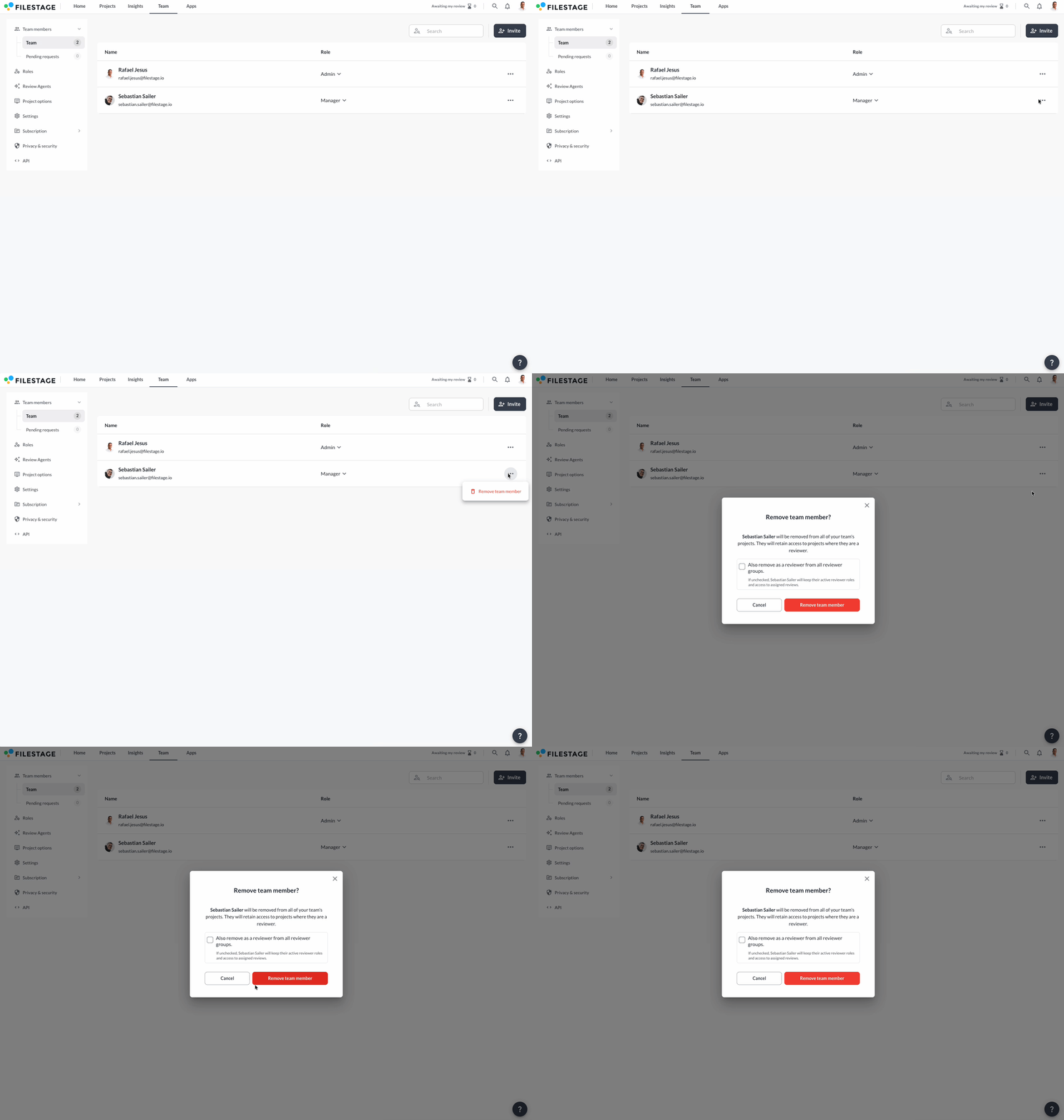
If you need to remove a team member from your team, **follow these steps:**

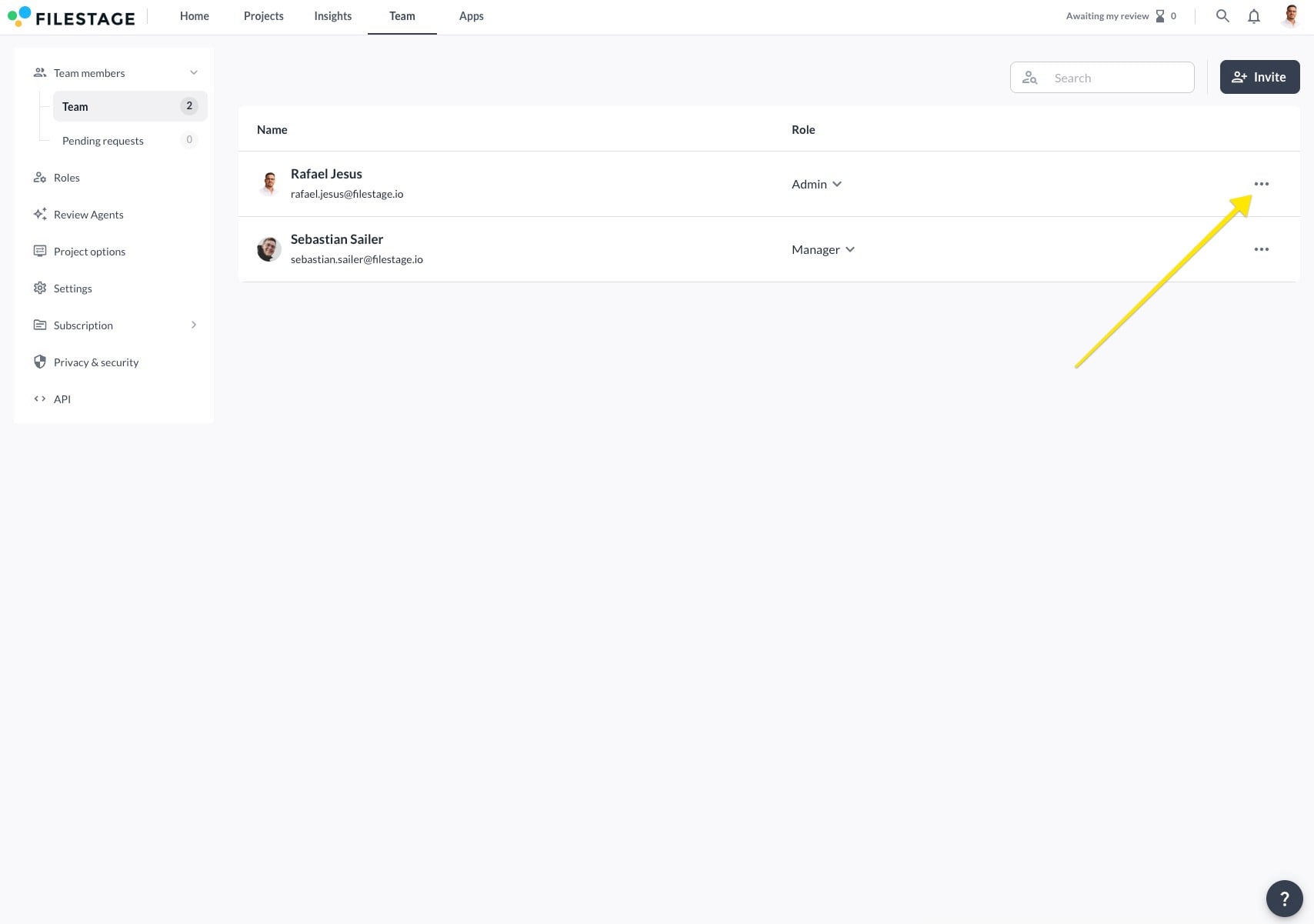
<table data-id="f3ec5303-2ba9-4428-93a1-5fda7cb628af" style="min-width: 25px;"><colgroup><col style="min-width: 25px;"></colgroup><tbody><tr><td colspan="1" rowspan="1"><ol><li><p data-id="cf351a58-b314-48d5-8001-49eedfa8563a">Open your <strong>Team</strong> tab.</p></li><li><p data-id="d927af4d-0403-4a7e-b647-4356c0d0efe0">Find the team member you want to remove and click on the three dots.</p><div style="text-align: left; width: 100%;"><img src="https://staticfiles.gleap.io/gattachments/61PmsGtQwmV0UNmN7FeKbnE5eaeMwSqxbtZRRK7dIGXP1c87EcbYhXevnjnydhTyz8vFZEqfNGQ.jpg" data-width="100%" data-align="left" style="width: 100%; border-radius: 10px; margin-top: 10px; margin-bottom: 10px;"></div><p data-id="42cee613-aa76-4a39-b6f5-7eb3e4707581"></p></li><li><p data-id="93e3748f-b715-4ce1-b550-c4e3632cac3a">Select <strong>Remove team member</strong>.</p></li><li><p data-id="411bc63b-c52b-4f74-9ba0-719e4ed328c3">Confirm your decision in the following dialogue window.<br></p><div style="text-align: left; width: 100%;"><img src="https://staticfiles.gleap.io/gattachments/LKXw7Hlu5KS421WisuvrNUEwaM0Xwfu1izwsPa4oeDWxQQuJC05OeD5yQqD9PvDjGuKPe3XzpJY.gif" data-width="100%" data-align="left" style="width: 100%; border-radius: 10px; margin-top: 10px; margin-bottom: 10px;"></div><p data-id="3cf28d1b-a257-4c53-9c48-ba400294a256"></p></li></ol></td></tr></tbody></table>

⚠️ **Please note:** Once you remove a team member, they will lose access to all projects within the team. If the removed team member was the sole owner of a project, this project will be transferred to the admin who removed the team member.

* * *

## Switch the role of a team member

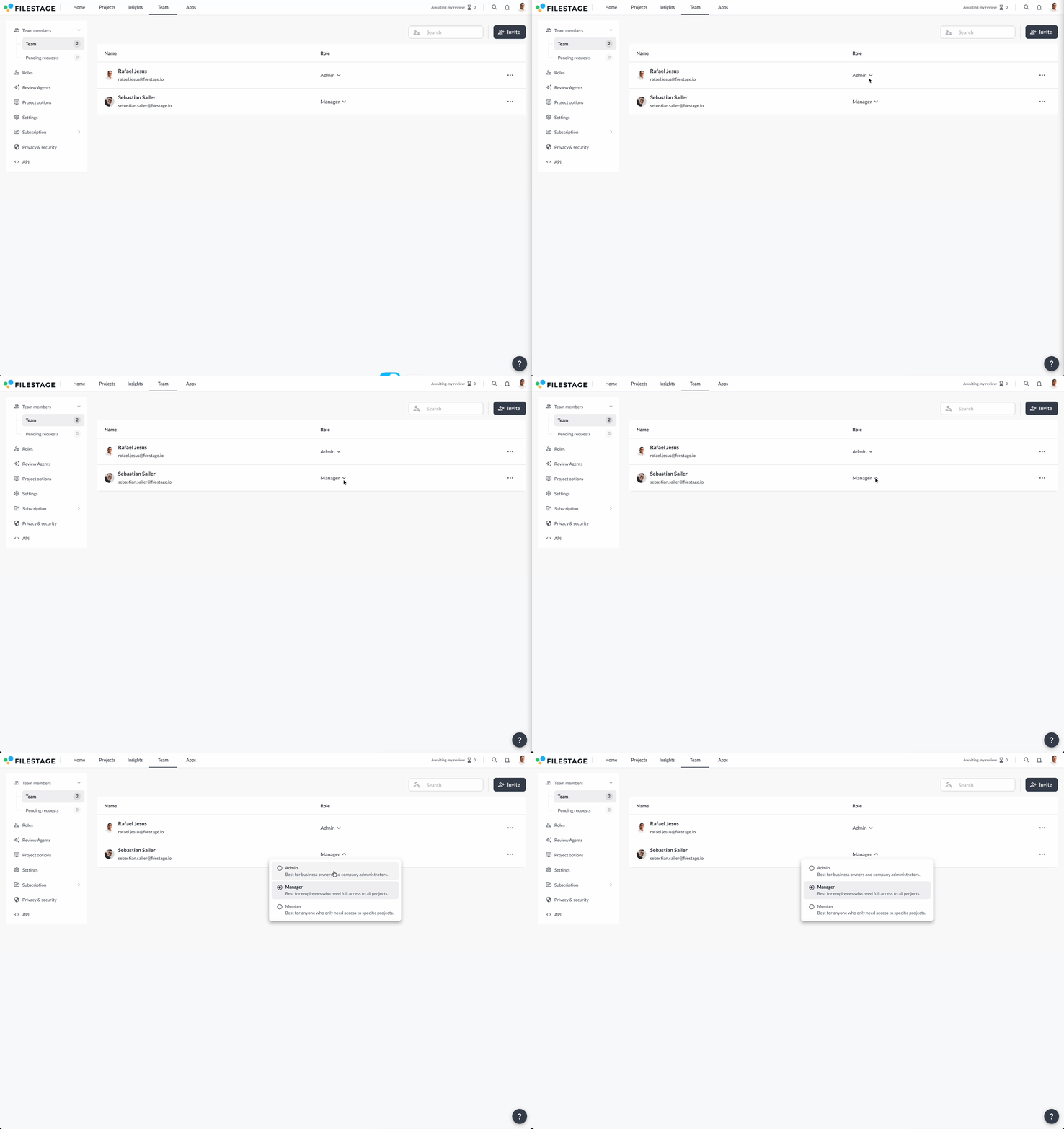
If you need to switch a team member’s role, **follow these steps:**

<table data-id="d7f49da5-7846-4c15-8379-77eadd73bbb7" style="min-width: 25px;"><colgroup><col style="min-width: 25px;"></colgroup><tbody><tr><td colspan="1" rowspan="1"><ol><li><p data-id="eeb64323-7f15-4f59-8b6f-6d8444fa663c">Open your <strong>Team</strong> tab.</p></li><li><p data-id="2760a0fa-683d-44fc-8523-ca8513a241b8">Find the team member you want to switch role and click on the <strong>arrow icon </strong>next to their email address.</p></li><li><p data-id="77af2c49-1809-436f-a5b5-9a1f77bf5a62">Select a new role to confirm.</p><div style="text-align: left; width: 100%;"><img src="https://staticfiles.gleap.io/gattachments/ZmpFlswjIkMwPqISnc8e1UGZJ3kKVCews9flVK5QL4EHiUYdec090A4CaL1pvqvgyOtISIw1vjA.gif" data-width="100%" data-align="left" style="width: 100%; border-radius: 10px; margin-top: 10px; margin-bottom: 10px;"></div><p data-id="2d22b1f6-b22c-4023-bdda-64eb905aa1d6"></p></li></ol></td></tr></tbody></table>

By switching a team member’s role, you can change their access to your projects and give them more or less responsibility.

* * *

> **Info:** Every Filestage plan includes 10 team member seats. On our Starter, Business, and Enterprise plans, you can add more seats in bundles of 5. For full details, check our [pricing page](https://filestage.io/pricing).

💡 What's next? Once you're done, see how to [create custom roles for your team members](https://help.filestage.io/en/articles/3224075-create-custom-roles-for-your-team-members.md)!

Let us know if you have any questions by reaching out to us on chat or emailing us at support@filestage.io. We’re always happy to help!